


Last updated on January 15th, 2015 at 10:23 pm
CloneZilla, free hard disk cloning live CD that clones your hard disk data similar like the commercial disk cloning software (Symantec Ghost and Acronis True Image). It is very useful because the disk image that created can be used can be used for future restoration. Plus more, the best time performing disk cloning will be after you’d installed your operating system of choice, your favorite applications, and tweaked the system settings to your liking.
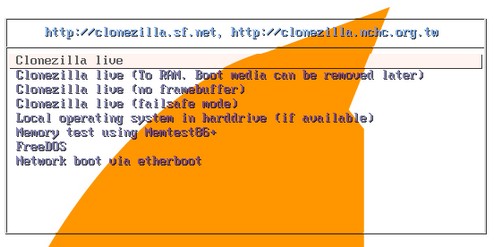
Cloning hard disk with CloneZilla can save you a lot of time without going the hectic installation, software configuration or additional nuisance the Windows operating system poses with its Activation policy. Meanwhile, Clonezilla also support multitude of file systems such as ext2, ext3, xfs, FAT, NTFS, and HFS+, ensuring you’ll be able to back up any Windows, Linux, or Mac systems you have.
While doing disk cloning task with CloneZilla, you will asked several option required to configure before perform disk cloning task on your hard disk.
Options type of cloning:
- Copying device to image both as a backup to restore backup.
- Copy device to device: we can clone an entire drive or just a partition of this.
Options directory, or where or where basically restore / store our backup:
- Local machine: either an internal hard drive as external.
- SSH server.
- Samba server.
- NFS server.
Compression options, or as we want to be compress the image of our record:
- Gzip compression: rapid image but somewhat smaller than the real.
- Bzip2 compression: the slowest yet the most compressed.
- LZO compression: faster than gzip and with a similar size.
- Without compression: clearly the fastest but also the more that we occupy.
How to make Clonezilla Live CD ?
1. Download an CloneZilla ISO file for CD/DVD.
2. Then burn CloneZilla iso file to a CD/DVD with burning program with ISO image burning feature.
3. Once finish burn, The CloneZilla bootable CD can be used to boot the machine you want to clone.
Meanwhile, CloneZilla official website also provides product documentation explaining the above-mentioned types of cloning.
Despite Clonezilla interfaces is not user friendly as Symantec Ghost, the fact is CloneZilla still remain as good disk cloning program that worth to try out since Clonezilla is released under GPL license, which you not need to pay a single cent to download it.
Visit : CloneZilla Disk Cloning Website
Updates:
CloneZilla also support burn to USB flash drive or USB hard drive. More info: http://clonezilla.org/liveusb.php


It works.
thanks. hope this software works
Fantastic solution for cloning HD’s!!!
Fantastic solution for cloning HD’s!!!