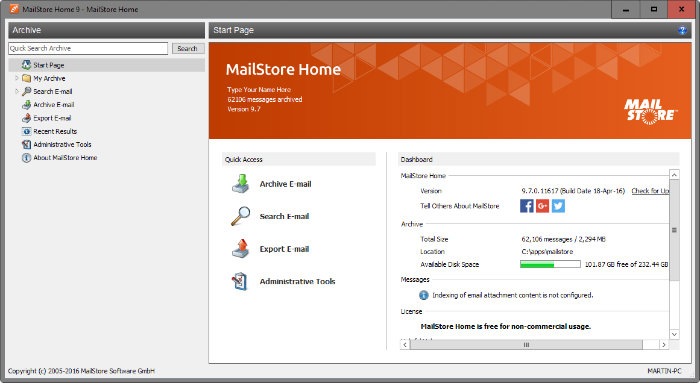
 Meanwhile, Mailstore is an free email backup and archive windows program allows any Windows user to backup almost any email source and search through them extremely quickly. You will never lose emails again.The email backup can archiving of IMAP and POP 3 email clients like Mozilla Thunderbird and Seamonkey, Windows Mail, Outlook 2016, and it supports archiving email files like PST, MBOX, EML. Besides that, it cab backup email from email system such as Microsoft Exchange, webmail such as office 365 and Gmail.Best part of this email backup program is their searchable index of all backed up emails and attachments. You can find back old emails and attachments easily. You can easily searching by subject, message body, folder, attachments and so on. Searches are performed much more quickly than in your native e-mail client.Besides that, Mailstore has improved especially on Gmail, which you may delete emails from the Gmail inbox now for instance and it support OAuth Google Profile support. Finally, You may configure the profile to remove messages from the mailbox automatically after backup from Google.The performance when archiving Microsoft Exchange 2007, IMAP mailboxed or higher EWS-based mailboxes with a high number of already archived messages has been significantly improved thanks to a new Firebird-based MAPI property cache with an also new folder contents sync module.Most of important of this release, MailStore support for importing Outlook PST files directly into the Home version of MailStore and you can run data integrity checks from the Administrative tools page of the application. This function was only available as a command line parameter previously.To use this email backup and archiving program, you need to download mailstore home and need to install Microsoft .Net Framework 4.5.1 first on your computer. Then you can configure email backup setting such as backup interval time, storage location and others. Conclusion:MailStore Home is not difficult to handle and definitely help you archives email client and webmail messages, which protects against data loss and also makes searching your backlogged email much easier.Let us know and share with us, if you know other email backup software like Mailstore home – Free Email backup software
Related Techmixer Guides
2026 update: what to check now
This older Techmixer guide has been refreshed to help readers understand current compatibility, safer download habits, official-source checks, and related newer guide paths. Use the original article as historical context, then follow current software safety practices before installing, scanning, repairing, or backing up anything important.
- Prefer official vendor or Microsoft sources over download mirrors.
- Check whether the software still supports your Windows version.
- Back up important files before system-level fixes, malware cleanup, partition work, or driver/runtime changes.
- Use the related Techmixer hubs below to move from legacy notes to current guidance.
Related updated Techmixer guides
FAQ
Should I still use older software from this page?
Only if it still comes from an official source, supports your system, and solves a real problem. Avoid old installers from unknown mirrors.
What should I do before applying a fix or installing a tool?
Check your Windows version, save important files, and read current vendor notes. For security or system changes, create a backup or restore point first.