

Last updated on July 29th, 2013 at 10:28 am
Online Mind mapping is a web based mind mapping software that allows you organize thoughts, brainstorming ideas or list making into a desirable mind map diagram. As Mind map diagram is very useful because it can represent words, ideas, tasks, or other items linked to and arranged around a central key word or idea. Plus more, mind maps can use to generate, visualize, structure, and classify ideas, and as an aid in study, organization, problem solving, decision making, and writing.
So, there are bunches of free online mind mapping software that allows you draw mind map diagram without installing any mind mapping software in computer. To use mind mapping software online, all user needs is sign up to create an account on the online mind mapping website which provides this services.
Best Online Mind Mapping to Draw Mind Map Diagram:
Bubbl – Simple Online Mind Mapping

Bubbl is an online flash based mind mapping tools that allows you create desirable mind map diagram instanlyt through the use of linked text bubbles. Each information bubble is connected to its preceding parent bubble and color coordinated accordingly for hierarchy sake.
Bubbl mind mapping is easy to use, whereby you can start first from the parent bubble. By hitting tab, it will create another bubble with same color on same level of hierarchy. If you hitting enter, it will create a new level of hierarchy with different colored bubbles (child). Beside that, you can send mind map diagram that you have created to other or embed your mind map diagram in your blog or website.
MindMeister – Web Based Mind Mapping
MindMeister is a great online mind mapping tool to brainstorm and get all of your thoughts down on mind map diagram. This online mind mapping tool is easy to add items, color code them, organize them, and just keep track of your ideas. Plus more, you can even add mind map object easily with the computer keyboard on MindMeister, Which the tab key adds a child, the enter key adds a sibling, and arrows navigate around the diagram smoothly.
MindMeister will save your mind map project automatically on regular interval without any action required of the user. Nodes can be repositioned using drag and drop.
Mindomo
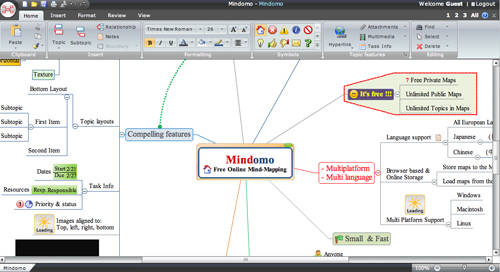
Mindomo is a Web based mind mapping tool that delivers the capabilities of desktop mind mapping software in a Web browser without any complex software to install or maintain. The mind mapping features that provides are hyperlinks, rich text notes, customizable colors, and import mind map diagram from MindManager. Plus more, you can even share the mind map diagram with others.
The only limitation is the free Mindomo version is ad-supported. I believe most of us doesn’t mind the ad-support on mind mapping services.
Mind42
Mind42 is a collaborative mind mapping services that developed by an Austrian company. This online mind mapping is behaves like a classical desktop mind mapping application that integrated with WYSIWYG (What You See Is What You Get) mind map editor with supporting keyboard shortcuts, drag and drop, zooming and much more. No forms and lists that are generally used in web application.
Mind42 mind map diagram can be export to different mind map file format like RTF or FreeMind.
Wise Mapping
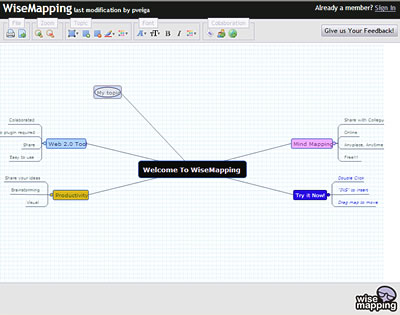
Wise Mapping is the web mind mapping tool that leverages the power of Mind Maps mixing with new technologies like vectorial languages (SVG and VML). This online mind mapping doesn’t have any advanced features but it does provide basic diagram-creation is what you need. The drag and drop capabilities on Wise Mapping make it easy to build up your mind map diagram.
There are also a few editing options, such as the shape of your bubbles, the color and font of your type, etc. Plus more, you can embed wise mapping mind map diagram to any website or import and export mind map files from / to FreeMind program.
If you don’t like web version mind mapping, here is desktop version mind mapping software that you can consider install on your computer: XMind and EDraw Mind Mapping.
So, if you know other free online mind mapping creator should include on the above list. Let us know via comment.


Thank you for the resources.
I have been using Buzan’s mind mapping software, but some of these are good as well. I especially thought the “bubl” one was pretty cool.
Whatever the case, keep it coming.
-Ron
I’ve foud that no service till now provides a service to embed the map in a Blog or site and let users collaborate WITHOUT registering. This would be some sort of mindmapping wiki and i would love souch a tool. I dont whant to register or send emails to all possible users. they should just add their thoughts in the map right away.
Great tool, i used it to create the sitemap for our new business website, i will make the map viewable from our website when it is up and running in a couple of months. 1 thing i would suggest tho, would it be possible to be able to export the map as an image file?
I have never thought too much about mind mapping because I’m a lists sort of person. I prefer the writing to the pictures when I’m looking for a file. But looking at your article I think I might have a look at some of these packages just because they are nice visually. For collaboration we have been using software called Dooster for some months now and even though we were sceptical about any results, they have been manifest. It was hard to choose because there are a lot of good softwares. We were initially interested in Basecamp but looked at about ten other favourites before we decided for no particular reason that we would take Dooster. These solutions are even more effective than they are nice looking.