Related Techmixer hubs
Use these Techmixer hub pages to find updated guides, safer software notes, and related workflows.
- DirectX and Windows Fixes Hub
- Backup and Sync Software Hub
- Free Antivirus and Online Virus Scanner Hub
2026 update: check Windows version and safety first
Before changing system settings, confirm your Windows version, create a restore point, and back up important files. Many older utilities still solve narrow problems, but built-in Windows security, recovery, and update features should be checked first.
Related Techmixer guides: Fix Guides, Software Guides, backup tools.
- Use official or trusted download sources.
- Back up important data before system-level changes.
- Check whether the tool is still maintained.
- Prefer current alternatives when they are safer.
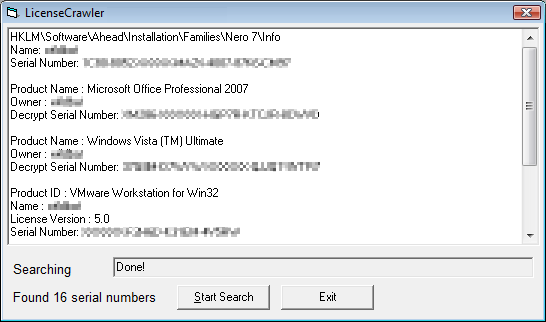 Plus more, License Crawler can run as portable application to application product keys and other serial numbers or licenses anytime and anywhere due to no installation requires.However, The License Crawler home page is written on German language ( English translation) but the software itself using English wording. But you can download License Crawler directly as below. Just download and unpack it. Then you can start using License Crawler to scan your windows system to retrieve back application product keys and other serial numbers or licenses.