

Windows Task Manager, is a task manager application that provides basic information about computer performance and running applications, processes and CPU usage, commit charge and memory information, network activity and statistics, logged-in users, and system services. However, the process information that provided is doesn’t comprehensive.
So, i have gather a set of windows task manager replacement software to replace default Windows task manager software to provide better windows process / performance monitoring and information details of each process, DLL, memory, thread, services, daemons and etc.
As default Windows task manager has limited functionality as it allows us to monitor running programs, processes, or threads and kill them if the need arise. But the default Windows task manager is provides more informative details when you are troubleshooting any application. So, below is the windows task manager replacement that that help Windows user to get more information about the processes?
Windows Task Manager Replacement to monitor / view more windows process details:
Process Explorer – Advanced Windows Process Management Utility
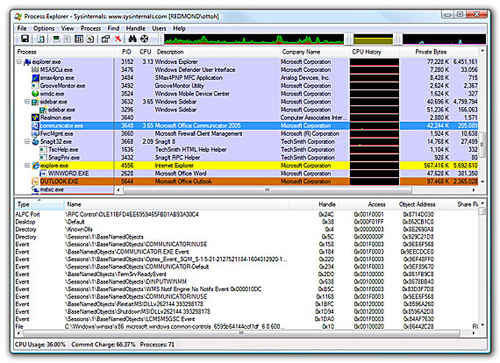
A Windows advance process management utility or advance task manager able to replace current Windows task manager application to provide more informative about a process including its icon, command-line, full image path, memory statistics, user account, security attributes, and more.
More details: Process Explorer
AnVir Task Manager Free Edition

A Windows task manager replacement software that enhance task manager functionality. This AnVir Task Manager free edition can provides Windows user full information about process, services, TCP/UDP connections, drivers and DLLs running on their Windows process. Plus more, Anvir Task manager has huge descriptions information about 70 000+ startup programs and services and oh-so-much more.
More Details: Anvir Task Manager Free Edition
Free Extended Task Manager – Free Windows task manager replacement

Free Extended Task Manager can provides additional Windows process management features and information about disk activity and network port usage. This extended task manager will summarize running programs as well as a graph with your CPU usage, Page file usage, disk I/O use and network performance under first tab. Then the rest seven separate tabs that provides detailed information about exactly what your computer is doing while you aren’t paying attention.
More details: Free Extended Task Manager
Chameleon Task Manager – Windows Task Manager Replacement

Chameleon Task Manager able to view memory usage, source path, pagefile usage, I/O activity, priority and description. Further if you click on process details, you can know about process ID, start time , threads and various other parameters.
The best of Chameleon Task manager is you can control the individual program settings and even control the RAM usage, hard drive usage, synchronize your file with another program and schedule the programs to work on certain selected days.
More details: Chameleon Task Manager
Auslogic Task Manager – Replacement Windows Task Manager Software

Auslogic Task Manager divides the Windows process information in the four different sections: applications, processes, services and open files. However, the application and process window uses a similar interface listing down the name of the application or process, a security rating, cpu usage, memory and disk utilization, Internet traffic and priority. A left click on any application or process will display the utilization of that specific program or process which can be a great way of finding the resource heavy applications and processes on a system.
While, Services view will display the running Windows services again with a security rating, category and path. Open Files will display all files that are currently open in the operating system. It will display name of the file and the application that has locked it.
More details: Auslogic Task Manager
So, hope this Windows task manager replacement software able to provide more details about Windows process on your computer system. If you know others windows task manager replacement should added on above list, let us know via comment 🙂


I’d rather use an open source utility, like Daphne. I want to know what an application does to my Windows 🙂
Is it possible to have an alert pop up when a certain process reaches a critical memory usage limit ? We use graphic programs that once they go over a PEAK limit it does not allow you to save the file. If we get a safetly alert we can stop before reaching the limit ..?? anyone know if this can be done using this or other software or even in windows XP itself ? Thanks Marco