

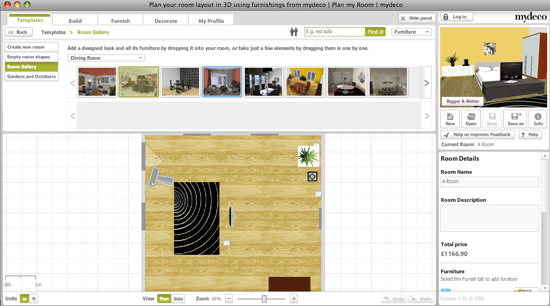
Here is Online interior home design tool that provides you a way planning home interior arrangement that will aid you in the pursuit of your dream interior home design. With this Online interior home design services, you can give your dream home the look and feel you want – choose from hundreds of styles, colours, wall coverings, flooring and materials. Experiment with your interior design ideas using 3D models, virtual tours and advanced design tools.
Online Interior Home Design Tool:
See My Design – Online interior design free

SeeMyDesign provides a simple and basic online interior designer and decorating tools. The free interior decorators tools are included See My Design Preview, See My Design Layout, and Planner. The idea behind See My Design is providing a simple solution for the interior designer to test and preview the interior arrangement design and later it with others to get feedback.
On SeeMyDesign Online interior home design services, you can decorate and preview living rooms with some different furniture and wall colors. The tool allows you to change these elements with build in presents as well as changing the colour of wall and accent. After completing your changing, you can preview your design by clicking on the preview button. You can save designs to your computer.
Meanwhile, overall costing calculation for your interior design draft also provides. This feature helps you calculate the cost for each material (i.e. paint), furniture, windows and doors and get the total cost. It will determine a total cost for your house decor and email it to the provided address.
MyDeco – Online Interior Room Planner Tool
Online interior room planner that let you create your room interior arrangement and furnish it in a 3D environment. It allows you change change colours, add wallpapers, try furniture etc and visualize changes from any angle you want. The best part of this online interior room planner allows you recreate your room directly from the pictures.
Meanwhile, another advanced features on MyDeco are the drag-able camera that allows you view the first person view in different angle. Beside that, you can also change the “height” of the camera (example: ground-level, adjacent to the ceiling, or any of the other heights in between), and it’s also possible to change whether the camera is looking down, eye-level or up.
Share with us if you know other online interior home design tools that should includes on the list.


mydeco just launched an iPhone app – everybody can be a designer now.
Choose from hundreds of 3D models of furniture to add to a photo and visualize how a new sofa, table or even chandelier might look in their own room.
http://mydeco.com/the-magazine/articles/mydeco-launches-iphone-app/
@Chrissi
Thanks for the MyDeco iphone app information. Hope the rest of home DIY user will benefit with this app
wonderfull desain.