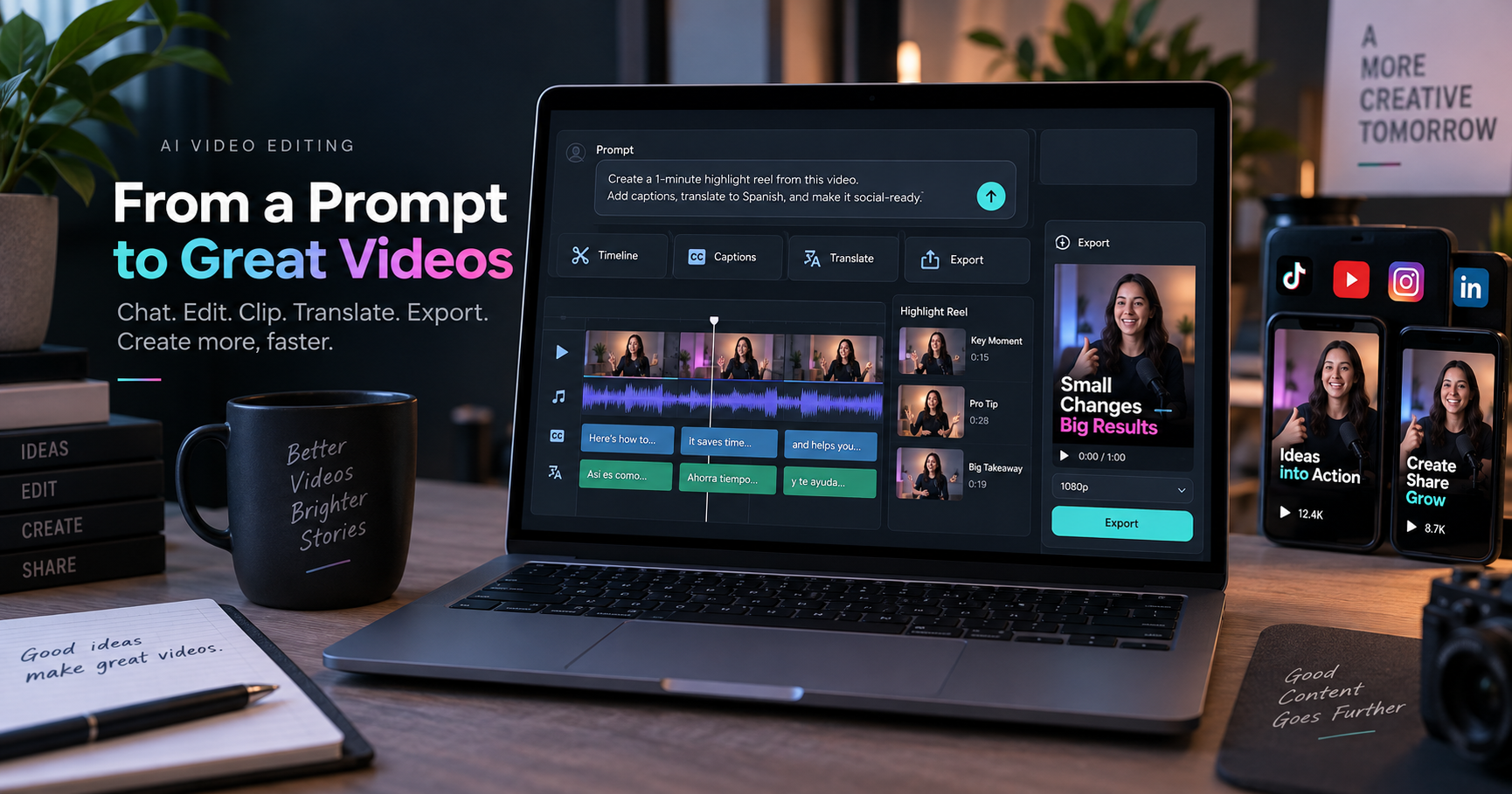
Vizard Agent AI video editing is worth watching because it moves video editing closer to a chat-based production workflow: describe the video you want, start from a template or raw material, and let the agent help assemble clips, captions, pacing, and export-ready formats. It should be treated as a production assistant, not a replacement for editorial judgment.
Quick answer
Vizard Agent is an AI video editing agent from Vizard that appears designed for creators, marketers, podcasters, and small teams who want to turn ideas, scripts, or raw footage into social-ready videos faster. The useful angle is speed and workflow automation; the risk is over-trusting AI decisions without reviewing captions, claims, music, timing, and usage rights.
Best choice by use case
- Best for creators: turning rough footage into short clips, highlight reels, and talking-head videos.
- Best for marketers: testing ad, explainer, trailer, and social templates quickly.
- Best for teams: reducing first-draft editing work before a human editor reviews the final cut.
- Not ideal for: high-stakes brand films, legal/medical/financial claims, or client videos that need tight creative direction without review.
What to know first
The phrase “Video AGI” is marketing language from the product conversation around Vizard Agent. Techmixer would not treat that as proof that the tool can fully replace a producer, writer, motion designer, or video editor. A better way to evaluate it is practical: can it reduce repetitive editing work while still giving the creator enough control to review the final video?
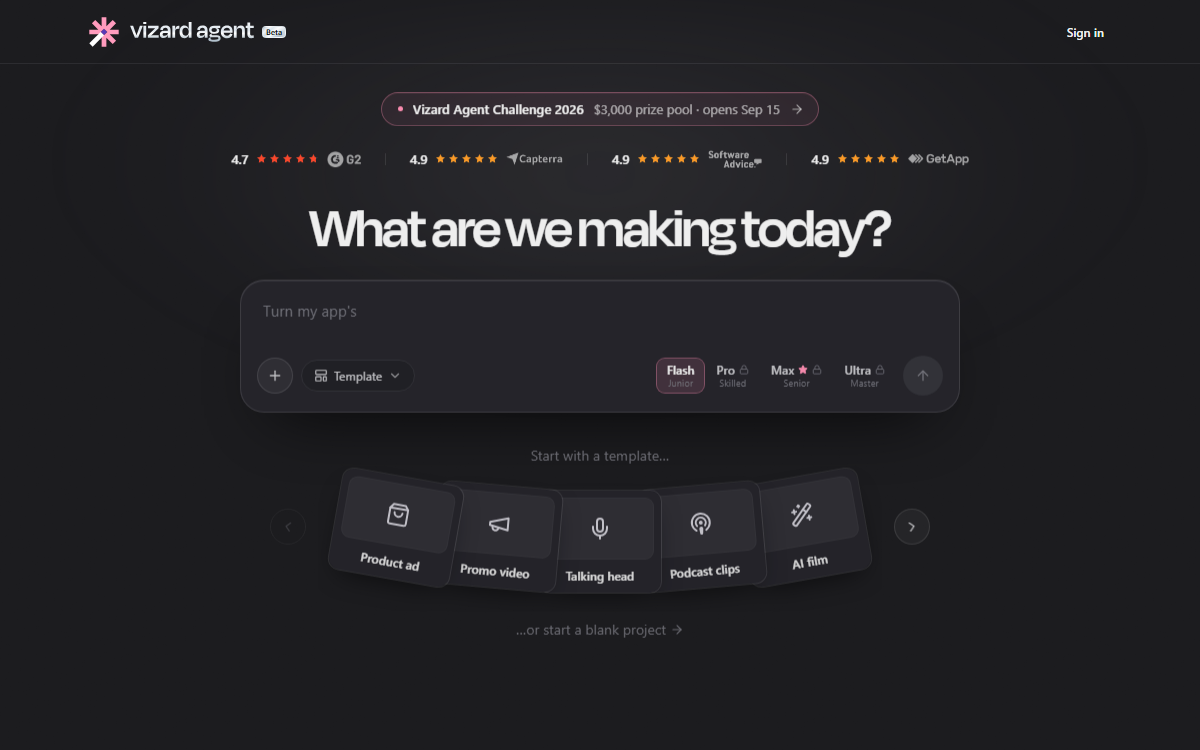
The official Vizard Agent interface shows a prompt-first workflow with templates such as product ads, promo videos, talking-head content, podcast clips, and AI film. That makes it more relevant for short-form and repeatable content than for highly custom cinematic editing.
Vizard Agent at a glance
| Tool | Best for | AI/workflow strength | Learning curve | Pricing note | Human review risk |
|---|---|---|---|---|---|
| Vizard Agent | Creators who want chat-based video editing from raw footage or scripts | Strong for prompt-to-video workflow, templates, captions, clipping, and multilingual repurposing | Easy to medium | Check the official pricing page before using it for regular production | Human review is needed for accuracy, pacing, rights, brand tone, and final approval |
7 things creators should know about Vizard Agent
1. It is built around chat-based video creation
The main appeal is simple: instead of opening a traditional editing timeline first, the user starts with a prompt. That can help non-editors explain what they want: a highlight reel, a product ad, a talking-head clip, or a translated version of an existing video.
2. It may reduce first-draft editing time
For repeatable video work, first drafts are often the slowest part: choosing cuts, adding captions, setting pacing, trimming silence, and matching a format. Vizard Agent is interesting because it tries to handle those early production steps from a single instruction.
3. Raw footage still needs context
If you drop in raw footage, the agent can only work from what it understands. Creators should give clear instructions: target audience, video length, platform, tone, must-keep moments, words to avoid, caption style, and whether music should feel calm, energetic, or corporate.
4. Script-to-video sounds useful, but review is still required
Turning a script into a video can save time for explainers and educational clips. The creator still needs to check whether the visuals match the point, whether the hook is strong, and whether the output uses the right brand voice.
5. Translation and lip-sync features need extra care
Multilingual video is useful, especially for creators who repurpose content across regions. But translations, voice tone, names, industry terms, and lip-sync quality should be reviewed by someone who understands the target language before publishing.
6. Templates make it easier to start
Templates are valuable because many users do not know how to structure an ad, mini documentary, trailer, or talking-head short. The risk is that template-heavy videos can feel similar unless the creator adds a clear angle, original footage, and specific examples.
7. The best use is creator workflow, not blind automation
The strongest workflow is not “AI makes everything and publishes it.” A safer workflow is: give the agent a clear brief, generate a first cut, review captions and claims, replace weak scenes, check music and rights, then export after a human pass.
Practical workflow for using Vizard Agent
- Start with a tight brief: audience, platform, length, tone, hook, and call to action.
- Upload clean source material: remove unusable clips, name files clearly, and mark must-use moments when possible.
- Pick the right template: ad, talking head, explainer, trailer, podcast clip, or short documentary.
- Review captions: fix names, product terms, acronyms, and timing before export.
- Check rights: music, footage, images, voice, and translated audio should be safe for the publishing platform.
- Export and test: watch the final video on mobile before posting.
Prompt example to start with
A useful first prompt should be specific enough for the agent to make editing choices. For example: “Create a 45-second LinkedIn video from this webinar clip for small-business owners. Keep the tone practical, add clear captions, use only the strongest three points, avoid hype, and end with a soft call to action.”
That kind of instruction gives the agent a target audience, platform, length, tone, content priority, and review boundary. It also gives the human editor a clearer standard when checking whether the output is actually usable.
Where it helps
Vizard Agent looks most useful for creators and teams producing a steady flow of short videos: social clips, promo edits, repurposed webinars, podcast highlights, product explainers, and multilingual variants. It can help when the bottleneck is not creative strategy, but the repetitive assembly work that happens after the idea is clear.
Limitations and risks
- Creative sameness: templates can make videos feel generic if the creator does not add a specific angle.
- Caption errors: AI captions often need cleanup for names, product terms, numbers, and acronyms.
- Translation risk: translated videos should be reviewed by a fluent speaker.
- Rights risk: source footage, music, logos, faces, and voices still need proper permission.
- Brand risk: the output may be fast, but not automatically aligned with your brand voice.
Official sources
Related Techmixer guides
- AI Tools
- Software Guides
- Best Tools
- Top AI Productivity Tools for Business and Entrepreneurs
- Best AI Tools for Office Productivity
- Best No-Code AI Workflow Automation Tools for Small Teams
FAQ
What is Vizard Agent?
Vizard Agent is an AI video creation and editing agent from Vizard that lets users describe a video task in chat and start from templates or a blank project.
Can Vizard Agent replace a full video editor?
It may reduce editing time for clips, captions, templates, and social videos, but creators should still review pacing, facts, brand tone, rights, and final exports.
Is Vizard Agent useful for short-form content?
Yes, it appears most useful for turning raw footage, scripts, podcasts, webinars, or talking-head content into short social-ready videos.
What should creators check before using it for client work?
Check pricing, export quality, caption accuracy, translation quality, usage rights, brand guidelines, and whether the final video needs human approval.
Our take
Vizard Agent is interesting because it frames video editing as a prompt-based production workflow instead of a manual timeline-first task. Techmixer would use it for first drafts, short-form repurposing, captions, templates, and multilingual experiments, but not as an unchecked final editor. Human review still matters for accuracy, rights, pacing, and brand quality.
Last reviewed: 15 September 2026.