The Freebuff coding agent brings project-aware AI assistance to your terminal, desktop, browser and GitHub repositories. The official Freebuff GitHub project describes a system of specialised agents that gather context, work on changes and review results, rather than treating every request as one isolated chat message.
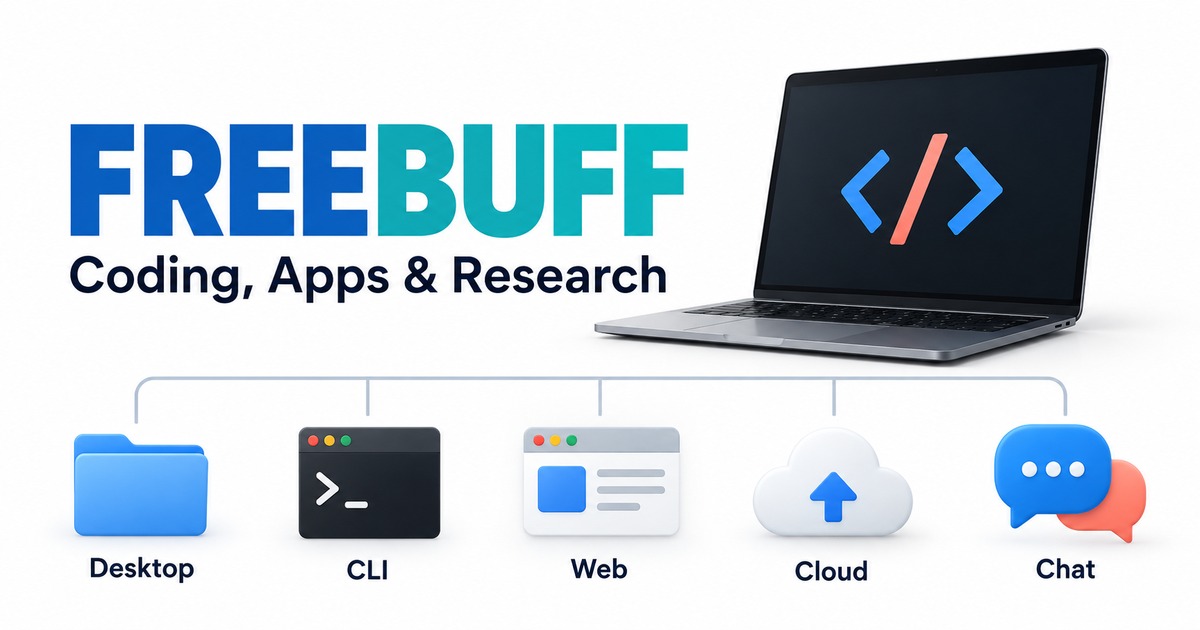
The useful distinction is where you want the work to happen: beside your local project, inside a browser-based app workflow, or around a repository. The Freebuff coding agent is available through five products.
Freebuff’s five products
- Freebuff Desktop: a desktop workspace for running parallel agents locally. For example, a developer investigating two independent changes could use separate workspaces instead of mixing both tasks into one working copy. Parallel activity still needs a final review before changes are combined.
- Freebuff CLI: the terminal-based coding agent for working with an existing project. This fits work centred on an existing codebase: understanding an unfamiliar module, proposing a small refactor or checking a bug fix. The value is keeping the conversation connected to the project rather than repeatedly pasting files into a chat.
- Freebuff Web: a browser-based experience for building and shipping full-stack applications. Think of a small prototype such as a booking form or an internal request tracker. The browser workspace is aimed at moving an app idea towards a working preview; that preview still needs to be checked against the intended behaviour.
- Freebuff Cloud: agents that work with connected GitHub repositories. This is the repository-oriented option. A clearly scoped task, such as investigating a failing check in one project, is easier to assess than a request to improve everything at once. Repository access does not make the resulting change automatically correct.
- Freebuff Chat: a conversational entry point for research and thinking through ideas. This is useful when the immediate output is an explanation or a research direction rather than a code change. For instance, you might clarify an unfamiliar API concept before deciding whether it belongs in your application.
These are different Freebuff products, not five competing tools. For a developer already maintaining a project, the terminal and desktop experiences are the natural starting points to investigate. For someone shaping a new application idea, the browser experience is a different kind of workspace.
How the Freebuff coding agent divides work
According to the repository, Freebuff can delegate context gathering, planning, editing, research and review to specialised agents. File-finding agents identify relevant parts of a codebase; other agents can make changes, run tools and inspect the result. The README also describes browser research and separate workspaces for concurrent desktop tasks.
Consider a request to improve a settings screen. Understanding the existing component, finding its related styles and checking the change are separate jobs. A multi-agent workflow can divide those jobs, but the meaningful outcome is still the finished change: does it do what the developer asked, and does the project continue to work? That is a useful way to evaluate the idea without mistaking the number of agents for a quality measure.
A useful request gives the agents something observable to finish. For example: “Explain why this settings form loses its selected value after saving. Identify the cause, propose a small change and show which checks support it.” This is a hypothetical task, not a Freebuff test we ran. It defines a symptom and an expected result without assuming that a larger rewrite is necessary.
When reviewing the response, look for the files involved, the reason for each change and the checks actually performed. A confident explanation is weaker evidence than a change you can inspect and a relevant check you can reproduce. Specialised agents can divide the work; the developer still decides whether the result is ready.
What the GitHub project contains
The public repository includes the CLI, agents, SDK, documentation and development resources. It is built on the Codebuff multi-agent framework, and its source licence is Apache-2.0.
For developers interested in the architecture, the repository is more informative than a short promotional demonstration. It gives you a place to inspect the project’s organisation, read development notes and follow changes over time.
Which models does the Freebuff coding agent support?
Freebuff’s regular model picker lists 12 options in the official model catalogue, checked on 25 October 2026. The descriptions below summarise Freebuff’s documentation, not Techmixer benchmarks. Full and limited access are Freebuff access tiers; they do not mean every model is free for every account.
| Model | Access | Freebuff’s description, summarised |
|---|---|---|
| MiMo v2.6 Flash Fast | Full and limited access | Default option; balanced tasks and images. |
| GLM 5.3 Flash | Full and limited access | Reasoning; unmetered at full access. |
| DeepSeek V4.1 Flash 10/17 | Full and limited access | Coding and tool use; unmetered at full access. |
| DeepSeek V4.1 Flash Fast 10/17 | Full access; paid plans at limited access | DeepSeek-hosted fast mode with parallel subagents and verification; peak/off-peak pricing. |
| GPT-6 Luna | Full access | General tasks and native images; OpenAI flex capacity. |
| MiMo 2.6 Pro | Full access | Stronger reasoning and images. |
| Solar Mini 4 | Full and limited access | Compact option; 524K context, text only. |
| Solar Pro 4 | Full and limited access | Larger option; 524K context, text only. |
| Gemini 3.8 Flash | Paid plans | 1M context; audio, video and PDF input. |
| Muse Spark 1.3 | Paid plans | Agentic coding; 1M context. Falls back to DeepSeek V4.1 Flash when unavailable. |
| Gemini 4 Argon | US, or paid plans elsewhere | Temporary promotion; one session daily per account; 1M context and images. |
| GPT-6.1 Sol | US, or paid plans elsewhere | One session daily per account; 1M context and images. |
Read the model descriptions against your actual task
For a text-only code change, start by comparing the coding and reasoning options available to your account. Freebuff positions MiMo v2.6 Flash Fast as its default, DeepSeek V4.1 Flash for coding and tool use, and GLM 5.3 Flash for deeper reasoning. Those are the project’s descriptions, not a measured ranking from Techmixer. A narrow task in your own project is a better test than assuming one model wins every kind of work.
Input support can narrow the choice before model reputation does. A screenshot-based UI question needs an image-capable option. The Solar models are listed as text-only, while Gemini 3.8 Flash is the catalogue’s documented option for audio, video and PDFs. Check access eligibility before building a workflow around a particular input type.
The context figures describe how much information a model can accept, not how reliably it understands every part of that information. A 524K or 1M context label is not a reason to send a whole repository when a few relevant files explain the issue. Give the agent the symptom, constraints and expected outcome; ask it to identify any missing context before making a broad change.
Freebuff also lists MiMo v2.6 Flash Fast, Solar Mini 4 and Solar Pro 4 as unmetered at full access. Limited-access accounts still have an allowance. Availability depends on region, product and current capacity; check the current picker before choosing a model. The repository identifies Gemini 3.8 Flash as the regular picker’s option for audio, video and PDF input.
How ads help fund free model access
Freebuff says text ads fund access to its included models. That makes it possible to try supported models without buying a separate provider subscription or supplying your own API key for that included access. It is access through Freebuff, rather than a free standalone API account with each model provider.
The distinction matters when choosing a model: Gemini 3.8 Flash and Muse Spark 1.3 are listed for paid plans, while Gemini 4 Argon and GPT-6.1 Sol have regional and daily-session conditions. Ad-supported access is useful, but the catalogue is not a promise that all 12 models are free and unlimited worldwide. Freebuff displays applicable limits and model-specific notices before use; see its current access explanation.
Our take
Freebuff is most interesting as a collection of project-focused AI workspaces, not just another chat box. The five-product split makes it easier to identify which experience matches your task. Start by deciding whether you need help inside an existing codebase, a browser-based app workspace or a research conversation.
The appeal is being able to explore several model families within the same project-focused environment. To judge whether that helps you, compare the outcomes: did the agent find the relevant files, stay within the request and explain the evidence for its answer? More model names and more parallel agents are useful options, but neither replaces a result that you can understand and verify.
For more project introductions, browse Techmixer’s AI tool guides.
Review note: this overview is based on the official repository; it is not a hands-on performance review.
Last reviewed: 25 October 2026.