


2026 update: choose safer file transfer tools
FTP tools still matter for hosting, WordPress maintenance, and server file transfer, but plain FTP is not ideal for passwords or private files. Where possible, choose SFTP, FTPS, or a managed hosting file manager instead.
Compare this guide with Techmixer’s related free FTP software guide, Mac FTP client guide, and broader software guides.
- Prefer SFTP when your host supports it.
- Save passwords only in a trusted password manager or encrypted client profile.
- For WordPress sites, avoid editing live theme/plugin files without a backup.
After posting free windows FTP client software, here is free Mac FTP client software that provides FTP account management and FTP functionality to upload and download files to your FTP server on Mac OS.
What to know first
A Mac FTP client helps you upload, download, and manage files on a remote server. For modern use, prefer SFTP or FTPS over plain FTP whenever the server supports it.
Questions readers usually ask
What is the best free FTP client for Mac?
The best free Mac FTP client depends on whether you need SFTP, FTPS, drag-and-drop file management, bookmarks, sync, or developer-focused workflows. Security support should matter more than an old feature list.
Should I still use FTP?
Plain FTP is not recommended for sensitive logins or files because it does not encrypt traffic. Use SFTP or FTPS when possible, especially for website, backup, and business file transfers.
Can FTP clients help with automation?
Some FTP clients support saved sessions, queues, synchronization, or scripts. For more advanced workflows, combine secure transfer tools with automation platforms or AI-assisted setup guides.
How Techmixer keeps this useful
Techmixer refreshed this older Mac FTP guide to help readers check current protocol safety and connect it with newer automation and AI workflow articles. Always verify app compatibility with your macOS version before installing.
This page was last reviewed on 8 September 2026 so older software references can stay connected to current tools, safer download habits, and practical reader intent.
2026 Update: Related AI and Software Workflow Guides
This older Techmixer article still receives Google Search impressions for free Mac FTP clients and file transfer tools. We refreshed it with current navigation links so readers can move from legacy Windows and freeware topics into newer AI, automation, and software workflow guides.
- how to install PaperClip on Windows
- how to install OpenClaw on Windows
- portable USB Hermes AI agent platform
Most of free MAC FTP client able to support various FTP technology such as FTP , SFTP and even webDAV. Plus more, these free Mac FTP client can support various Mac OS like Mac Lion, Mac Leopard, Mac Forest Leopard and others Mac OS version.
Best Free MAC FTP Client List To Transfer files on Mac platform:
CyberDuck – Free Open Source FTP Client Software
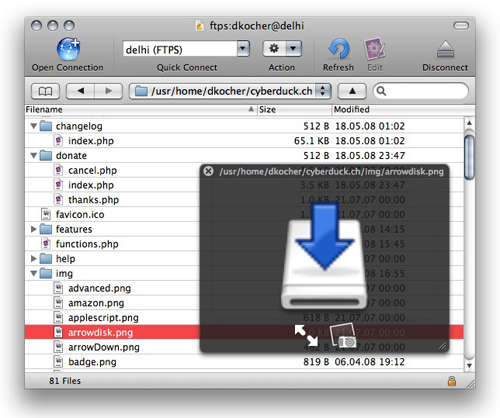
CyberDuck is the most famous MAC OS FTP client that supports FTP / TLS (FTP secured over SSL / TLS), AUTH TLS connection. Transferring files from local storage to FTP server is simple, all you need is uploading and downloading files by drag and drop only. Plus more, Cyberduck also support file storing on WebDAV servers and online file backup storage services like Amazon S3, Google Cloud Storage, Windows Azure, Rackspace Cloud Files and even Google Drive as well.
CyberDuck Mac FTP functionality is quite comprehensive ,which mac user can open some files in external text editors, FTP bookmark manager and supports the Mac OS X Keychain and Bonjour networking. Besides that, the latest CyberDuck FTP client Version 3 adds a feature to quickly open a file via its http URL in a web browser.
Cyber Duck – Free Mac FTP Client
Classic FTP – Free Simple MAC FTP Client Software

Classic FTP is a free Mac ftp client that allows you to view, edit, upload, download and delete files from a remote server (website) or network for free.
Classic FTP is simple to use as it specifically designed to look and feel like a typical ftp software client, which you can also upload or download files with a single click of a button.
Meanwhile, this free FTP client for Mac allowing you to synchronize navigation of a local folder with a remote folder, saving you time and reducing the risk of uploading to the wrong folder. Classic FTP is perfect for both advanced and novice website administrators.
FileZilla – Open Source Mac FTP Client

FileZilla is an open source FTP client that support cross-platform such as Mac, Linux and Windows. This FTP Client can manage all entire FTP connection details and logins on Windows Explorer style interface that shows all local and remote folders and can be customized independently. Plus more, the FTP transfer queue logs to shows the real-time status of each queued or active file transfer.
On FTP connection, Filezilla FTP Client can work wells under firewalls and proxy connections as well as Kerberos GSS security. Plus more, it has the ability to pause or resume the FTP file downloading or uploading on anytime and file transfer size can exceed 4GB.



CrossFTP is another good free FTP client. It features multi-tabs, transfer queue, drag & drop, and more. It is available on both Mac and PC.