


OneButton FTP – Free simple FTP Client Software

OneButton FTP is a graphical FTP client for Mac OS X that strongly emphasis on simplicity, drag and drop usability, and file queuing. It allows you easily transfer files to and from remote servers, such as the ones hosting your website, simply by dragging files to and from your computer.
Updates: OneButton is no longer supported. But the Mac FTP code is available for downloading.
Download OneButton – FTP Client for Mac
Secure FTP – Free Secure MAC FTP Client

Secure FTP is a Free MAC FTP client application that allows Mac user connect on 128-bit encrypted secure FTP over SSL (or FTPS) connection to a FTP server. This Mac FTP application can run two interface mode either graphical user interface (GUI) or from the command-line interface (CLI), which allowing for headless (scriptable) operation. This makes Secure FTP a great option for both novice and advanced users.
Meanwhile, Secure FTP client also support fully RFC 2228 compliant and offers both types of SSL connection options: explicit and implicit, which means more server compatibility. However, Secure FTP is freeware application meant for non-commercial use purposes. For those mac user wishing to use this mac FTP client for commercial purposes are granted a license free of charge for 30 days.
Download Secure FTP – Secure Mac FTP Client
OneWay – Free Mac FTP Client
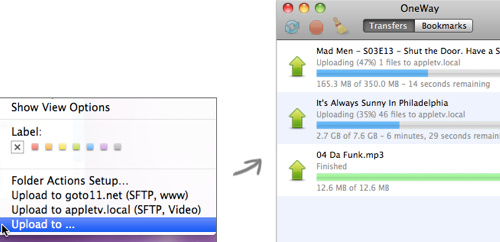
Free Mac FTP client software that simplifies the FTP process by offering context menu on Mac platform for quick, easily uploads files to FTP server or SFTP server.
OneWay – Free Mac FTP Software
MacFusion – Mac FTP Client

MacFusion is an open source Mac application that allows Mac user mount FTP folder / directories on your Mac computer. Macfusion will presents as a Mac File Volume in Finder and works with SSH / SFTP and FTP servers. This Mac FTP app requires Leopard and Google’s MacFUSE.
There are others, of course, which did not make it to the list simply because of my lack of knowledge. So, if you know any other alternatives, please share using the comment below.
Hope you like the free Mac FTP software list. If you know other free Mac FTP client software is good, drop us a comment and let us know.
Related Techmixer hubs
Use these Techmixer hub pages to find updated guides, safer software notes, and related workflows.
2026 update: what to check now
This older Techmixer guide has been refreshed to help readers understand current compatibility, safer download habits, official-source checks, and related newer guide paths. Use the original article as historical context, then follow current software safety practices before installing, scanning, repairing, or backing up anything important.
- Prefer official vendor or Microsoft sources over download mirrors.
- Check whether the software still supports your Windows version.
- Back up important files before system-level fixes, malware cleanup, partition work, or driver/runtime changes.
- Use the related Techmixer hubs below to move from legacy notes to current guidance.
Related updated Techmixer guides
FAQ
Should I still use older software from this page?
Only if it still comes from an official source, supports your system, and solves a real problem. Avoid old installers from unknown mirrors.
What should I do before applying a fix or installing a tool?
Check your Windows version, save important files, and read current vendor notes. For security or system changes, create a backup or restore point first.


CrossFTP is another good free FTP client. It features multi-tabs, transfer queue, drag & drop, and more. It is available on both Mac and PC.