AI Agent Orchestration: How Multiple AI Agents Work Together to Get More Done
AI Agent Orchestration is changing how businesses use artificial intelligence. Instead of relying on one AI tool to handle everything, companies can coordinate multiple AI agents so they work together in a structured workflow. That means one agent can gather data, another can analyze it, and a third can draft a response or trigger the next action. For business owners and operations teams, this opens the door to faster execution, better automation, and more consistent results.
The big opportunity here is simple: many business tasks are too complex for a single AI model to handle well on its own. They involve multiple steps, different decisions, and handoffs between people or systems. AI Agent Orchestration solves that problem by making AI teamwork possible.
What Is AI Agent Orchestration?

AI Agent Orchestration is the process of coordinating multiple AI agents so they can complete a task or business process together. Think of it like running a team rather than hiring one all-purpose assistant.
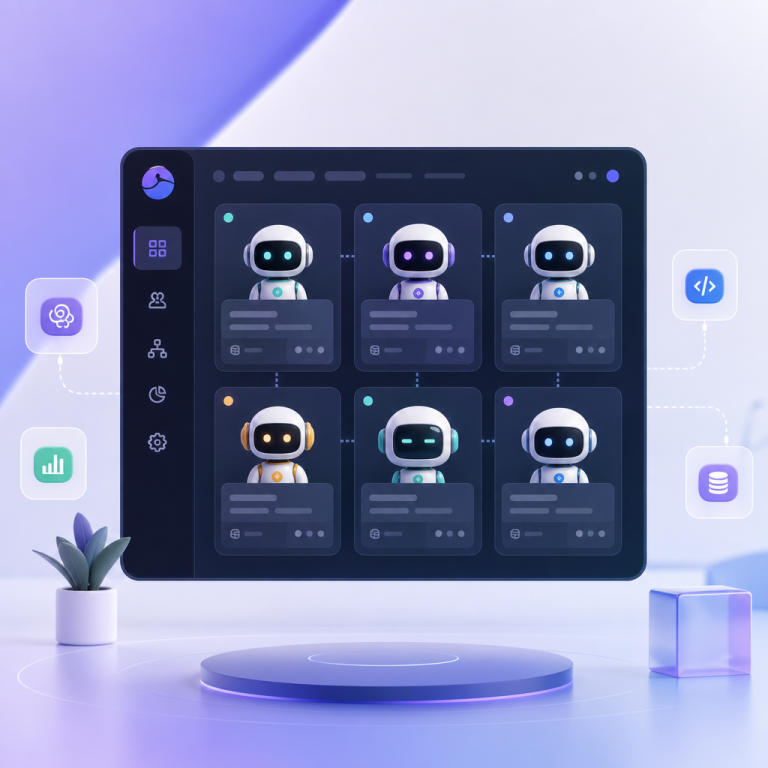
Each agent typically has a specific role. One might search a database, another might summarize information, and another might make a recommendation based on the output. An orchestrator controls the workflow, decides what happens next, and makes sure the right agent handles the right step.
This is different from basic automation. Traditional automation follows fixed rules. AI orchestration is more flexible because agents can adapt, reason, and respond to changing input.
In simple terms:
- Single AI tool = one assistant doing one broad job
- AI Agent Orchestration = several specialized agents collaborating in a managed system
How AI Agents Collaborate in a Workflow
A well-designed multi-agent system usually includes three parts: a coordinator, specialized agents, and decision logic.
1. The orchestrator assigns tasks
The orchestrator acts like a AI manager. It receives the request, breaks it into smaller steps, and assigns each step to the right agent.
For example, if a customer submits a refund request, the orchestrator may send the account details to one agent, the policy rules to another, and the final approval step to a decision agent.
2. Specialized agents perform their roles
Each agent is built for a particular function. Common roles include:
- Research agent: collects data from internal systems or the web
- Analysis agent: finds patterns, compares options, or scores outcomes
- Writing agent: drafts emails, reports, or summaries
- Validation agent: checks accuracy, compliance, or consistency
- Action agent: updates systems, creates tickets, or sends notifications
This specialization improves quality because each agent focuses on a narrower task instead of trying to do everything at once.
3. Decision-making happens between steps
AI Agent Orchestration often includes decision points. If one agent finds missing data, the orchestrator can route the task to another agent or ask for human review. If a result looks correct, the workflow continues automatically.
This creates a smarter process than simple if/then automation. It gives businesses more control while still reducing manual work.
Why Multi-Agent Systems Are Valuable
Multi-agent systems are useful because real business work is rarely linear. Tasks involve back-and-forth communication, exceptions, and context. That is where orchestration adds value.
Better productivity
When agents handle repetitive steps, employees can focus on higher-value work. Instead of manually collecting reports, copying data, or drafting routine messages, teams can spend more time on strategy, customer relationships, and problem-solving.
Faster execution
Coordinated agents can work around the clock and pass tasks instantly from one step to the next. This shortens cycle times in operations, sales, support, and finance.
More accurate workflows
A single general-purpose AI may miss details. Specialized agents can improve accuracy by separating research, validation, and output generation into different stages.
Greater scalability
As business demand grows, orchestration makes it easier to scale processes without adding the same amount of headcount. That is especially useful for startups and lean teams.
Improved consistency
When workflows are designed well, agents follow the same process each time. That reduces variation and helps standardize business execution.
Real-World Business Use Cases
AI Agent Orchestration can be applied across many departments. Here are some practical examples.
Customer support
A support workflow might start with an intake agent that classifies the customer issue. A second agent checks account history. A third agent drafts the response, while a validation agent ensures the answer follows company policy.
This can help support teams respond faster while keeping service quality high.
Sales operations
In sales, one agent can enrich lead data, another can score the lead, and another can write a personalized outreach email. If the lead meets qualification criteria, the orchestrator can create a task for a sales rep or trigger a CRM update.
Finance and reporting
Finance teams can use orchestration to gather invoice data, check for anomalies, generate summaries, and flag exceptions. This is useful for close processes, expense review, and audit preparation.
Marketing content workflows
A marketing team might use one agent to research competitors, another to create an outline, a third to draft copy, and a final agent to review SEO structure or brand tone. That makes content production faster and more organized.
Operations and supply chain
Operations managers can use multi-agent systems to monitor inventory, detect delays, send alerts, and recommend actions. If a supply issue is detected, the system can escalate the case automatically.
HR and recruiting
One agent can screen resumes, another can match candidates against role criteria, and a third can schedule interviews. This reduces administrative effort and speeds up hiring.
Common Challenges and Limitations
AI Agent Orchestration is powerful, but it is not magic. Businesses should understand the limitations before rolling it out widely.
Poor workflow design
If the process is not clearly mapped out, agents may duplicate work, miss steps, or create confusion. Good orchestration starts with a clear process design.
Weak data quality
Agents are only as good as the data they use. Incomplete, outdated, or inconsistent data can lead to poor decisions and unreliable outputs.
Too much automation
Not every task should be fully automated. In some cases, human review is still necessary, especially for legal, financial, or customer-sensitive decisions.
Integration issues
AI agents often need access to CRMs, help desks, databases, and internal tools. If systems do not integrate well, orchestration becomes harder to maintain.
Security and governance concerns
Multi-agent systems may access sensitive business information. That means permission controls, audit logs, and oversight matter a great deal.
For broader guidance on secure AI adoption, many businesses refer to resources from organizations such as NIST and major cloud providers that publish AI governance best practices.
Best Practices for Successful AI Agent Orchestration
If you want orchestration to improve execution instead of adding complexity, keep these best practices in mind.
Start with one process
Choose a repetitive, high-volume workflow with clear steps. Customer ticket routing or invoice processing are often good starting points.
Define each agent’s role clearly
Every agent should have a narrow purpose. Clear boundaries reduce errors and make the system easier to manage.
Build in human checkpoints
Use human approval for sensitive steps or exception handling. This creates a safer balance between automation and oversight.
Use measurable outcomes
Track time saved, error reduction, response speed, and completion rates. If the workflow is not producing measurable value, it may need redesign.
Keep workflows simple at first
It is tempting to build a very advanced system right away. A simpler orchestration model is usually easier to test, explain, and improve.
Monitor and refine continuously
Agent performance can change as data, tools, and business needs evolve. Ongoing monitoring helps keep workflows reliable.
The Future of AI-Powered Operations
The future of AI-powered operations will likely involve more connected, specialized, and autonomous systems. Instead of isolated AI tools, businesses will use orchestrated networks of agents that can collaborate across departments.
We will probably see more workflows where agents not only execute tasks but also recommend process improvements. For example, an operations agent may notice bottlenecks, suggest changes, and coordinate the next action automatically.
Over time, AI Agent Orchestration may become a standard part of digital operations, much like workflow software and CRM systems are today. Businesses that learn how to design and manage these systems early will have a practical advantage in speed, consistency, and adaptability.
Frequently Asked Questions
What is AI Agent Orchestration in simple terms?
It is the coordination of multiple AI agents so they can work together on different parts of a task or workflow.
How is it different from using one AI chatbot?
A chatbot usually handles one conversation or request. Orchestration manages multiple specialized agents working in sequence or parallel.
Do businesses need technical teams to use it?
Not always. Some tools are becoming easier to use, but setting up reliable workflows still helps from technical or operational oversight.
What kinds of tasks work best with orchestration?
Repetitive, multi-step tasks with clear decisions are a strong fit. Examples include support routing, lead qualification, reporting, and document processing.
Can AI agents replace employees?
No, and that is not the goal. Orchestration is best used to reduce repetitive work and support better decision-making, not replace human judgment where it matters.
Is AI Agent Orchestration safe for sensitive business data?
It can be, but only with strong access controls, logging, governance, and careful system design. Security should be part of the setup from the beginning.
Conclusion
AI Agent Orchestration helps businesses move beyond isolated AI tools and toward coordinated, task-driven automation. By assigning clear roles to specialized agents, companies can improve productivity, streamline workflows, and execute more efficiently across departments.
The real value is not just speed. It is better business execution through structured AI teamwork.
A smart next step is to identify one workflow in your business that is repetitive, rule-based, and time-consuming. Then map the steps, define the agent roles, and test a small orchestration pilot. Starting small makes it easier to learn what works and scale with confidence.