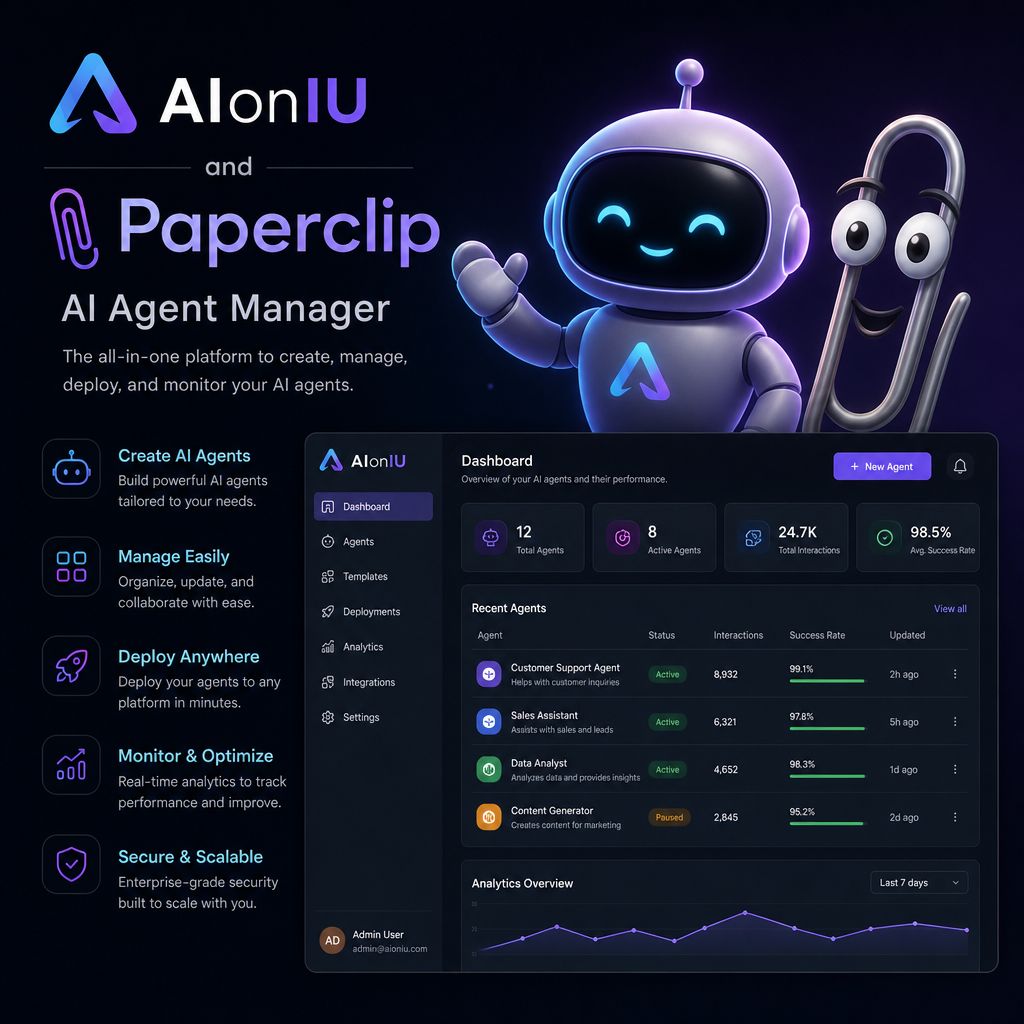
Paperclip and AionUI approach the AI agent ecosystem differently. Paperclip is an organizational and management framework designed to orchestrate multiple AI agents like a traditional corporate org chart. AionUI is a local, desktop co-work app that visually consolidates and unifies command-line AI tools into a single workspace.
Imagine this incredibly common modern scenario: You have Claude Code running in one terminal window, trying to rewrite a complex piece of software. In another window, Hermes Agent is right in the middle of an intensive, long-form research task. Somewhere in a hidden tab you completely forgot about 20 minutes ago, CodeX is waiting for your input. Meanwhile, you have absolutely no idea which AI agent has finished its job, which one is burning through your expensive API tokens, or what will happen to all their progress if your computer suddenly decides to reboot.
If this chaotic digital workspace sounds intimately familiar to you, take a deep breath. You are not doing anything wrong, and you are certainly not alone. You are simply missing a foundational organizational layer that most people in the rapidly moving AI space are just starting to figure out.
In early 2026, two massive open-source tools went totally viral for what appeared to be the exact same reason. Both tools support popular AI agents like Claude Code, CodeX, Open Code, and OpenClaw Agent. Both are completely free to use. Both are self-hosted—meaning you run them on your own hardware rather than relying on a big tech company’s cloud—and both blew up on GitHub in record time.
Paperclip hit an astounding 46,000 stars in less than a month, while AionUI (often stylized as IonUI) crossed 23,000 stars shortly after.
Naturally, the internet did what it always does: it pitted them against each other. People started creating side-by-side comparisons, debating which one was the ultimate “winner” in the AI orchestration space. But asking which tool is better is entirely the wrong question. Paperclip and AionUI are not actually competitors. They solve two completely different problems that just happen to involve the exact same set of AI agents.
If you want to master AI automation and scale your workflows this year, you need to deeply understand the difference between the two. In this comprehensive, beginner-friendly guide, we are going to break down exactly what each tool is, how it thinks about AI agents, and where it fits into your daily life.
The Two Sides of the Multi-Agent Problem
To understand why these tools exist, we first need to understand the structural problem they are trying to fix. As AI has evolved, the “multi-agent problem” has split into two distinct categories.
1. The Interface Problem (Personal Productivity)
You are probably already using three or four different command-line interface (CLI) AI agents. The core issue is that every single one of them lives in its own isolated environment. They all have their own terminal window—that intimidating black box with white text—their own configuration files, and their own separated memory. There is no shared screen where you can view them all at once. Every time you switch from Claude Code to CodeX, you have to re-explain the entire context of what you are working on from scratch. This creates massive friction and is a significant personal productivity bottleneck.
2. The Coordination Problem (Infrastructure)
On the other hand, maybe you have moved past manual prompting and are running AI agents autonomously around the clock. The problem here is that the agents themselves have no overarching “manager” or organizational structure holding them together. They lack strict financial budgets. They don’t have an audit trail so you can see what they did while you were away from your desk. You have absolutely no way to prevent an agent from getting stuck in a recursive loop at 3:00 AM and burning through your entire monthly API budget by making thousands of unnecessary requests. This is not a UI issue; it is a fundamental infrastructure problem.
The Golden Rule: Paperclip was built from the ground up to solve the Coordination Problem. AionUI was built from the ground up to solve the Interface Problem.
Once you grasp this simple framing, choosing between them becomes incredibly obvious. Let’s dive deeper into how each platform operates.
What is Paperclip? The “Company OS” for AI Agents
Paperclip was created by a developer who goes by the name Datada. The origin story of Paperclip perfectly illustrates why a tool of this magnitude is so necessary for power users.
Datada was trying to run a fully automated hedge fund using a growing team of autonomous AI agents to handle different parts of the operation. At one point, he had more than 20 different Claude Code sessions open at the exact same time. None of them shared any context. He had no way to track how much money they were spending collectively, and if he had to restart his machine, all of their state and progress was instantly wiped out. The moment he stepped away from his keyboard, the entire operation fell apart. Paperclip was his engineered solution to this chaos.
When you hear the name “Paperclip,” you might picture a cute little digital assistant or a simple visual workflow builder. It is neither of those things. Paperclip is a full-blown organizational layer.
It acts essentially like the Operating System for a virtual corporation. It features an organizational chart, reporting hierarchies, goal structures, and rigid budget controls. When you use Paperclip, your job is no longer to write clever prompts for an AI chatbot. Your job is to act as the Board of Directors for the company they work for.
How Paperclip Works: You Are The Boss
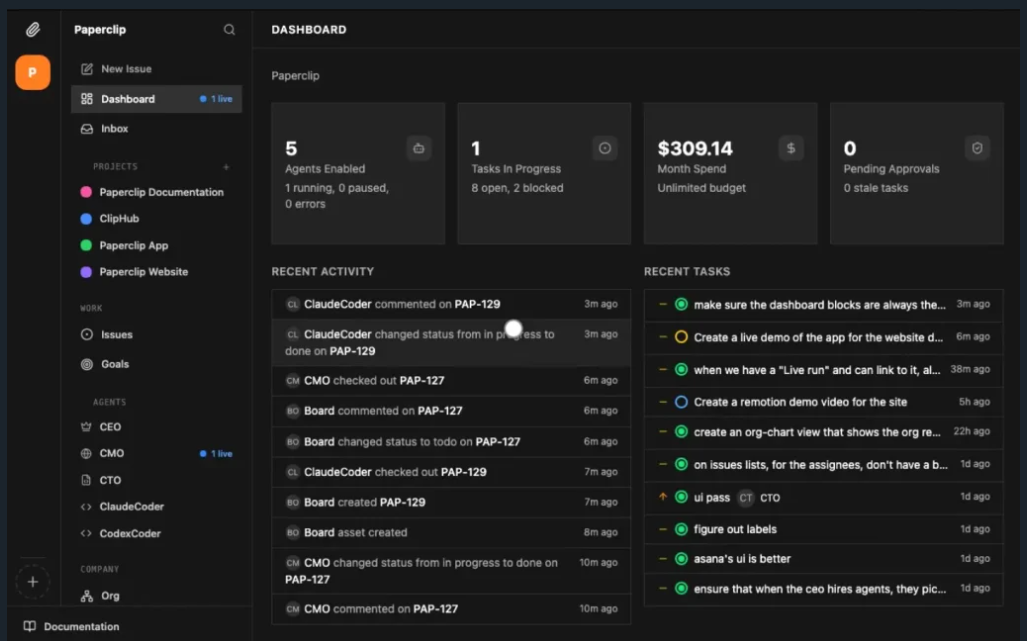
When you open Paperclip, you are not just launching an app; you are creating a company. You set a grand corporate mission. Next, you “hire” a CEO Agent. That CEO drafts a strategy based on your mission and proposes a hiring plan for sub-agents. You review the plan, approve the new AI hires, set their financial budgets, and then the agents get to work. You are governing a digital organization, not babysitting software.
Beating the “Memento Man” Problem
One of the most genius concepts Paperclip introduces is its solution to what is known as the Memento Man Problem. In the famous movie Memento, the main character is highly capable, but he wakes up every day with zero memory of who he is, what he was doing, or what decisions he already made.
This is exactly what happens to standard AI agents. When a new session starts, the AI wakes up with complete amnesia. Paperclip solves this using a brilliantly simple “Heartbeat” system. Agents in Paperclip do not just run continuously into infinity. They wake up on a strict schedule (a heartbeat), read their job description, check their identity, look at their to-do list, execute their work, save their output, and report back up the chain of command to their AI boss. Then, they go dormant again. When the next heartbeat happens, they pick up exactly where they left off. They never lose context because the system holds the memory for them.
Strict Budgets and Bulletproof Accountability
If you let an AI run wild, it can quite literally cost you a fortune in API fees overnight. Paperclip prevents this by giving every single agent a strict, hard-coded monthly budget. If an agent hits 100% of its budget, it is automatically and physically stopped. You get a soft warning at 80%. Every single token spent is tracked per agent, per task, and per project.
Furthermore, everything the agents do is recorded in an “immutable audit trail.” This means the log is append-only; it cannot be edited or secretly deleted by anyone. If a mistake happens, you can look back and see the exact decision the AI made, what tools it used, and how much it cost. For a business running mission-critical workflows, this kind of accountability is absolutely mandatory.
What is AionUI? The Ultimate AI Desktop Workstation
If Paperclip was born from the chaos of running an autonomous business, AionUI was born from the immediate, personal frustration of a messy computer screen.
You have all these incredibly smart CLI AI tools installed on your computer, but they all live in separate terminal windows with their own separate configurations. The moment you close the window, the session history vanishes. There is no unified view, no shared management layer, and no way to use all of your powerful tools together from a single place.
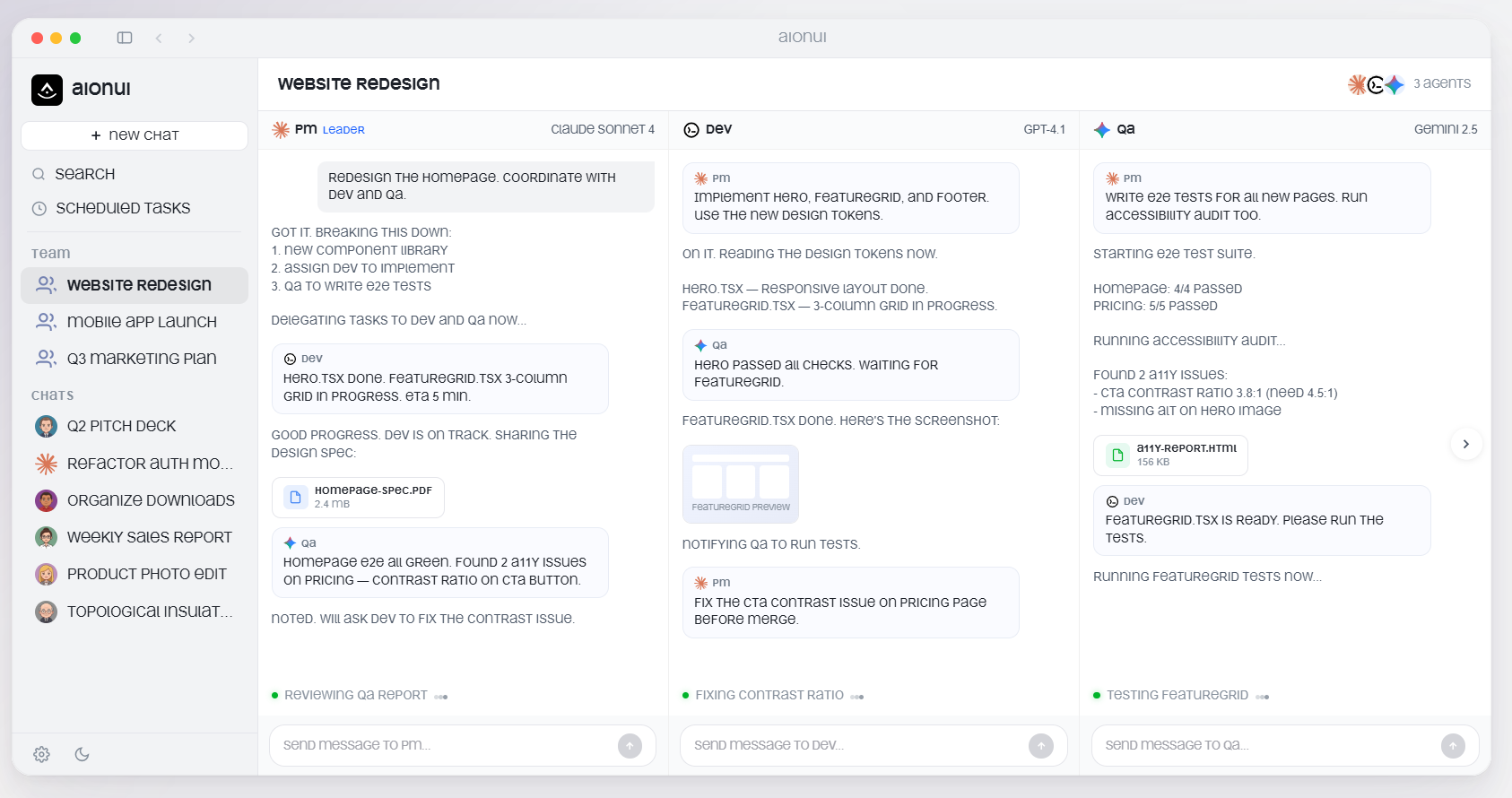
AionUI is the ultimate, free, open-source desktop application that solves this exact pain point. Available on Mac OS, Windows, and Linux, AionUI acts as a single, beautiful dashboard where all of your AI agents can live and work together.
Seamless Integration (Zero Setup Headaches)
The core pitch of AionUI is simplicity. The moment you install AionUI, it scans your computer. It automatically detects whichever AI tools you already have installed—whether that’s Claude Code, CodeX, Open Code, Hermes Agent, or a dozen others. You do not have to write a single line of extra configuration. If the CLI is on your machine, it instantly shows up in the AionUI app.
Instead of juggling ugly terminal windows, you get a clean, modern workspace. You can have Claude Code analyzing a massive codebase in one panel on the left, while CodeX is writing a totally different script in another panel on the right. Everything is visible, completely separate, and incredibly easy to manage in parallel without contexts leaking into one another.
The Magic of Unified MCP Management
AionUI also handles “MCP” (Model Context Protocol) masterfully. Without getting too deep into the technical weeds, MCP is the framework that allows AI agents to securely interact with your computer’s local files, databases, and tools. Usually, maintaining a separate MCP configuration file for every single agent you use is an absolute nightmare.
AionUI lets you configure your MCP settings just once, and it automatically syncs those rules to every single agent you have connected. Change a permission in one place, and it propagates everywhere instantly. This alone saves developers hours of setup friction.
Real Office Files & Ultimate Local Privacy
Unlike web-based tools that beam your sensitive data to massive cloud servers, AionUI is explicitly “local-first” by design. Everything is stored in a private SQLite database directly on your machine. Your chat history, your proprietary code, your files, and your agent data never leave your computer. For professionals working with sensitive client data or proprietary source code, this architecture is not just a nice bonus—it is the entire point.
AionUI also features a robust built-in file preview system. It doesn’t just spit out plain text or useless PDF exports. The AI can generate actual, editable Microsoft Word files (.docx), Excel spreadsheets (.xlsx), and PowerPoint presentations (.pptx). It even supports advanced PowerPoint morph transition animations, which is a level of detail almost entirely unseen in other AI tools.
Head-to-Head Comparison: The Workstation vs. The Org Chart
The absolute easiest way to understand the difference between these two powerhouse tools is to look at their core philosophy and architecture.
Feature Breakdown
| Feature / Concept | Paperclip | AionUI |
| Core Architecture | Server-based application (runs 24/7 in the background). | Desktop application (runs locally when you open it). |
| Agent Relationship | Agents are Employees. They have job titles, budgets, and reporting lines. | Agents are Colleagues. They sit alongside you in a shared workspace. |
| Coordination Style | Hierarchical. A CEO delegates tasks down an org chart autonomously. | Horizontal. You act as the team leader and delegate tasks to sub-panels. |
| Budget Controls | Strict, hard-coded monthly budgets per agent with automatic cutoff. | None built-in. You must monitor API costs through your model provider. |
| Data Privacy | Self-hosted on your own infrastructure/servers. | Local-first. Stored entirely on your device’s hard drive. |
| Setup Complexity | High. Requires server provisioning, database setup, and org design. | Extremely Low. Downloads and detects your existing tools in minutes. |
How Popular Agents Behave in Both Tools
To make this practically crystal clear, let’s look at how a popular AI agent like Claude Code operates inside both environments.
In Paperclip: Claude Code is an employee with a strict task queue. It works through a heartbeat schedule. You assign it to a project, give it a job description, and it wakes up on a timer, does its job, and logs its progress to the unchangeable audit trail. You do not watch it type; you just review the highly structured finished work later.
In AionUI: Claude Code is an interactive, real-time chat window on your screen. You talk to it directly, watch it generate text or code right in front of you, and seamlessly click over to another tab to talk to a different agent. It is entirely hands-on.
A community member perfectly summarized this dynamic when talking about the autonomous agent Open Claw: “Open Claw is an employee. Paperclip is the company.”
Do You Need Both? The Power-User Hybrid Approach
Here is a secret that advanced AI developers are already discovering: You do not actually have to choose just one. Because they operate at completely different altitudes of abstraction, they complement each other perfectly.
Imagine this highly efficient, futuristic setup:
You install Paperclip on a cloud VPS (Virtual Private Server). It runs continuously in the background 24/7, managing a massive team of AI agents that are constantly researching market trends, scraping competitor data, drafting content, and organizing your databases. It is governed by strict budgets, logs every action, and reports to you at the end of the week.
Meanwhile, on your physical laptop, you have AionUI open. You use AionUI for your immediate, hands-on daily tasks—like asking an AI to quickly write a complex Excel formula, debug a piece of code you are currently staring at, or draft a quick PowerPoint presentation for a meeting you have in 20 minutes.
Paperclip handles the long-term, autonomous, large-scale background operations. AionUI handles the immediate, interactive desktop productivity. They are a match made in heaven.
The Future of AI Agents in 2026 and Beyond
The fact that both of these tools exploded in popularity at the exact same time is not a mere coincidence. It is a massive, blinking signal about where the technology industry is heading.
The debate is no longer about whether AI agents can do useful work. We know they can write brilliant code, plan complex marketing campaigns, and execute deep research. That debate is over. The new question is about how we—as humans—organize, manage, and comfortably live alongside thousands of digital workers at scale.
The infrastructure being built around AI today is starting to look exactly like the infrastructure built around human workers over the last century. Humans need a personal desk and a computer to do their actual work (AionUI), and they need a company structure—complete with managers, budgets, and HR—to keep them pointed in the right direction without everything falling into chaos (Paperclip).
As massive tech giants like Google, Anthropic, and Microsoft try to build closed, expensive, tightly controlled ecosystems for AI orchestration, open-source community tools like Paperclip and AionUI represent a beautiful, rebellious alternative. They offer absolute transparency, zero vendor lock-in, and total sovereign control over your own data and infrastructure.
The Final Verdict: Which One Should You Choose?
Stop looking at arbitrary feature checklists and ask yourself one simple question: What is actually slowing you down right now?
Choose AionUI if:
You are drowning in a sea of terminal windows, struggling to switch between different AI tools, constantly losing track of your session contexts, and just want a clean, simple, unified desktop application. If you want your AI agents to act as highly capable colleagues sitting right next to you on your screen, download AionUI today. It is the absolute fastest path from where you are right now to a significantly better daily workflow.
Choose Paperclip if:
You are trying to build an automated business workflow, run 20 agents at once, carefully track every single penny spent, and need a bulletproof system that runs reliably while you sleep. If you need accountability, an immutable audit trail, and strict organizational structure, you need to install Paperclip. The setup takes some genuine effort and strategic thought, but the level of operational control it gives you is unmatched by anything else in the open-source world right now.
Stop thinking of them as competitors. AionUI is your workstation. Paperclip is your organizational chart. Figure out which layer of your tech stack you are missing right now, and get to work building the future.
Frequently Asked Questions (FAQs)
What is the main difference between Paperclip and AionUI?
AionUI is a desktop application designed to give you a clean, unified, visual workspace to chat with and manually control your AI agents. Paperclip is a server-based organizational system designed to let multiple AI agents work autonomously in the background with strict financial budgets, job titles, and a highly structured chain of command.
Are Paperclip and AionUI completely free to use?
Yes! Both are completely open-source and free to download. Paperclip operates under an MIT license, and AionUI operates under an Apache license. The only thing you ever pay for is the API tokens of the specific AI models (like OpenAI, DeepSeek, or Anthropic) that you choose to plug into them.
Do I need advanced coding experience to use AionUI?
Not at all. AionUI is built to be extremely user-friendly. It installs just like any normal desktop application (like Spotify or Slack) and automatically finds the AI tools you already have installed on your computer. It is highly recommended for beginners looking to clean up their messy workflows.
Is Paperclip hard to set up?
Paperclip requires more technical comfort than AionUI. You will need to provision a server, configure a PostgreSQL database, and spend time designing your “Company” structure (defining roles, budgets, and goals). However, platforms like Hostinger now offer it as a one-click install, which removes a lot of the initial friction.
Does AionUI collect or steal my private data?
Absolutely not. AionUI is explicitly designed to be “local-first.” All of your conversation history, uploaded files, proprietary code, and agent outputs are stored locally in an SQLite database right on your own computer. Nothing is uploaded to external corporate servers without your explicit setup and permission.
How does Paperclip stop AI agents from spending too much money?
aion uses a strict, system-level budgeting architecture. Every “AI employee” is assigned a hard monthly budget limit by you (the Board). When the agent spends 80% of its budget, it sends you a soft warning. The exact moment it hits 100%, Paperclip automatically and forcibly pauses the agent so it cannot spend another cent until you authorize more funds.