

Quick Answer
Free FTP software helps transfer files to servers, hosting accounts, and remote storage. For security, use SFTP or FTPS where available instead of unencrypted FTP.
Frequently Asked Questions
What is FTP software used for?
FTP software is used to transfer files between a computer and a remote server, often for websites, backups, hosting accounts, or shared file locations.
Is FTP secure?
Plain FTP is not secure because credentials and files can travel without encryption. Use SFTP or FTPS when transferring private, business, or website files.
What is the difference between FTP, SFTP, and FTPS?
FTP is the older unencrypted protocol. SFTP transfers files over SSH. FTPS adds TLS encryption to FTP. Most users should prefer SFTP when the server supports it.
Editorial Trust Note
Techmixer refreshed this FTP software guide to connect legacy transfer tools with newer hosting, automation, and AI setup workflows. Check protocol support and vendor download pages before installing.
Last reviewed: 8 September 2026.
2026 Update: Related AI and Software Workflow Guides
This older Techmixer article still receives Google Search impressions for free FTP software and file transfer utilities. We refreshed it with current navigation links so readers can move from legacy Windows and freeware topics into newer AI, automation, and software workflow guides.
- free VPS options for hosting AI agents
- how to install OpenClaw on Windows
- portable USB Hermes AI agent platform
File Transfer Protocol (FTP) is a standard network file protocol used to copy a file from one host to another over a TCP-based network, such as the Internet. FTP is built on client server architecture and utilizes separate control and data connections between the client and server. Actually, FTP Server Software comes into scene when you are involved into web site development and hosting part. It adds a great flexibility, when it comes to transferring data from one host to another. Let’s say for instance, that you run a web development company, and you have to host the customers site. So, when it comes to developing a web site, it can be easily done by using different flexible languages such as C# or PHP. However, once you are done with the development part, you actually have to make it live (deployment of the site to the actual server). So, to make it live you have to use some FTP client software. Today we will provide you a list of some of the efficient free FTP software.
Free FTP Software:
FileZilla
 To connect to an FTP server, enter the address of the server into the host field of the Quickconnect bar. If it is a special server type like an SFTP server, add the protocol in front of the address. In case of an SFTP server, start the address with ‘sftp://’ (i.e. sftp://example.com). Enter the port of the server into the port field if it is not the default port (21 for FTP, 22 for SFTP). If a username / password is required, enter it in the corresponding fields, otherwise the default anonymouslogon will be used. Click on Quickconnect or press Enter to connect to the serve You can use the FileZilla Site Manager to specify specific site parameters and connect to the targeted FTP site. The Site Manager allows you to store entries and configure more parameters than the Quick Connect allows. If the server you are connecting to is in your home LAN, then there is not an address (domain name) as you may know from the Internet. In LAN, you simply use the internal IP address of the server PC. In most cases the network name (computer name) will do, too. If the server is on the same PC as Filezilla, you can even use localhost or 127.0.0.1 as hostname. NOTE: If you connect from the outside of your LAN this does not apply, you have to use the external (WAN) IP instead.
SmartFTP download
 The SmartFTP FTP Library component (COM) provides file transfer functionality for the FTP protocol. It offers a wide range of features which allows reliable and secure file transfers (SSL/TLS). The component takes advantage of the COM technology which makes it possible to use it in numerous environments as Visual Basic, Visual C++, JavaScript/VBScript, VB.NET, C#.NET, Delphi, etc. FTP Features
- Secure Transfers (SSL/TLS)
- FXP (Server to Server Transfers)
- Compression (MODE Z)
- Enhanced NAT/UPnP/ICS/ICF Support
- Transfer Integrity (XCRC, XMD5, XSHA1)
- Machine Readable Listing (MLSD)
- FTP Proxy Support (Wingate, Checkpoint FW-1, Transparent, etc)
- Set/Get Modified File Time (MDTM, UTIME, MFMT)
- Local Port Limitation
- Set Unix Attributes (SITE CHMOD Wrapper)
- FTP Parser (Unix, MLST, VMS, MVS, DOS, NT, HP-UX, zOS, VxWorks, …
Core FTP
 Now you can download Core FTP LE – free Windows ftp software that includes the client FTP features you need. Features like SFTP (SSH), SSL, TLS, IDN, browser integration, site to site transfers, FTP transfer resume, drag and drop support, file viewing & editing, firewall support, custom commands, FTP URL parsing, command line transfers, filters, and much, much more! This free, secure FTP client gives you a fast, easy, reliable way to update and maintain your website via FTP. It also provides a secure method (via SSL, TLS, or SFTP) to upload / download files to and from FTP servers. Check out the list of features and you’ll find almost every feature you need, all in a free ftp program. There are no popup ads, advertising or spyware and you’re never asked or reminded to register.
Coffee Cup Free FTP
 What do you want in an FTP client? If your answer is “simple and reliable file transfers,” you’ve come to the right place. CoffeeCup Free FTP gives you all the great FTP features you’d expect from CoffeeCup Software without all that extra stuff. Set up multiple server profiles, transfer files in binary, ASCII, or auto mode, and upload files by dragging and dropping them from your computer to your server.
Leech FTP
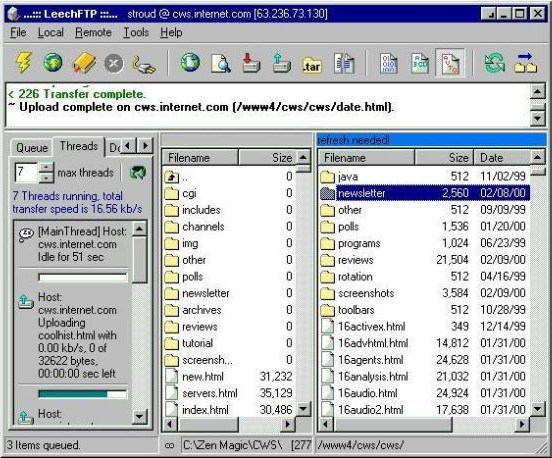 LeechFTP has a feature to check for updates from within the program, you can access this in the Tools menu. A small dialog will show up and tells you wether there is a newer version or not. This is done by connecting to this server, so you have to be connected to the internet.” However, if you don’t find this softwares handy, you can always use the most traditional method of file transfer by using your Browser such as, IE, Fire Fox, and Google Chrome. Or you can also opt the Windows Explorer for normal file operation over FTP. (i.e copy/paste, rename, delete etc.)


nice list, Filezilla in nice FTP sofware in my opinion .
I wish Filezilla had these functions :
FXP (Server to Server Transfers)Compression (MODE Z)
Smart FTP also look promising
Good list. I have used smart ftp, filezilla, Leech FTP and Core FTP lite. I like core ftp the most and currently using it.
I believe Filezilla FTP client still the best FTP client software