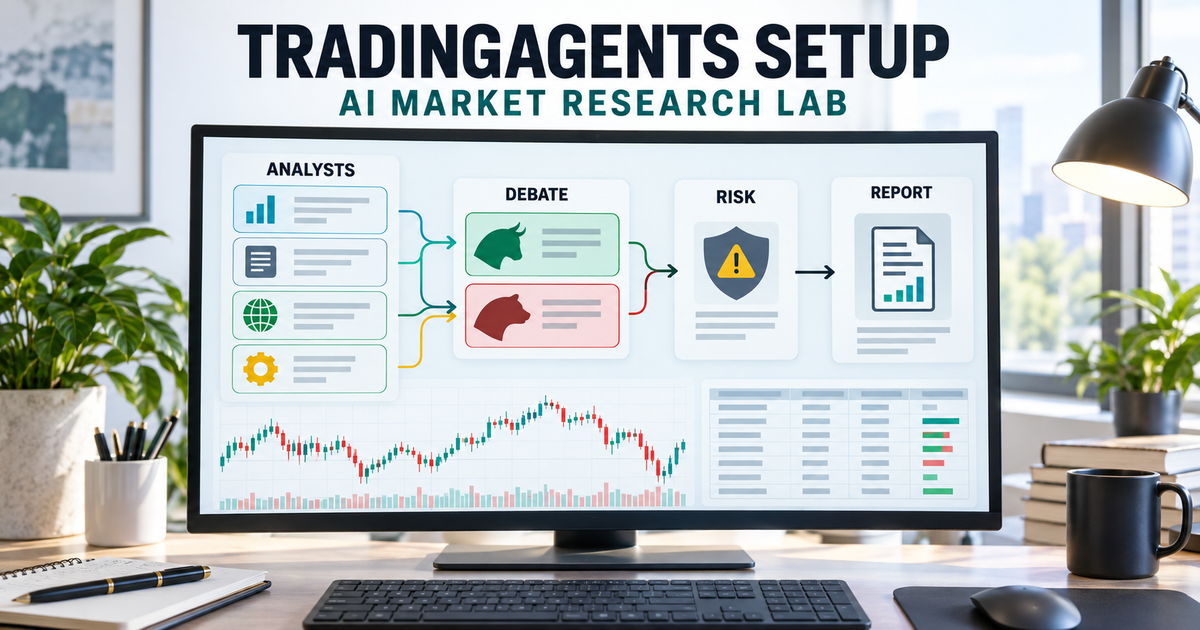
TradingAgents setup gives you a multi-agent AI stock-research workflow: analysts inspect market information, researchers debate the evidence, and risk reviewers challenge a proposed decision. You can run it with a local Ollama model or a supported hosted model. The useful output is a report you can investigate, not an instruction to place a trade.
This guide follows Tauric Research’s official TradingAgents repository, reviewed at version 0.7.0 on 27 October 2026. It builds a research-only lab with no broker connection. Tickers and dates below are teaching inputs, not recommendations.
Quick answer: what will this lab produce?
The documented workflow installs TradingAgents in a separate Python environment, connects it to Ollama on your own machine, and requests one dated stock analysis. You save the report, check the underlying claims, then consider a small historical evaluation. A completed report establishes that a pipeline ran; it does not establish a profitable strategy or a broker paper-trading connection.
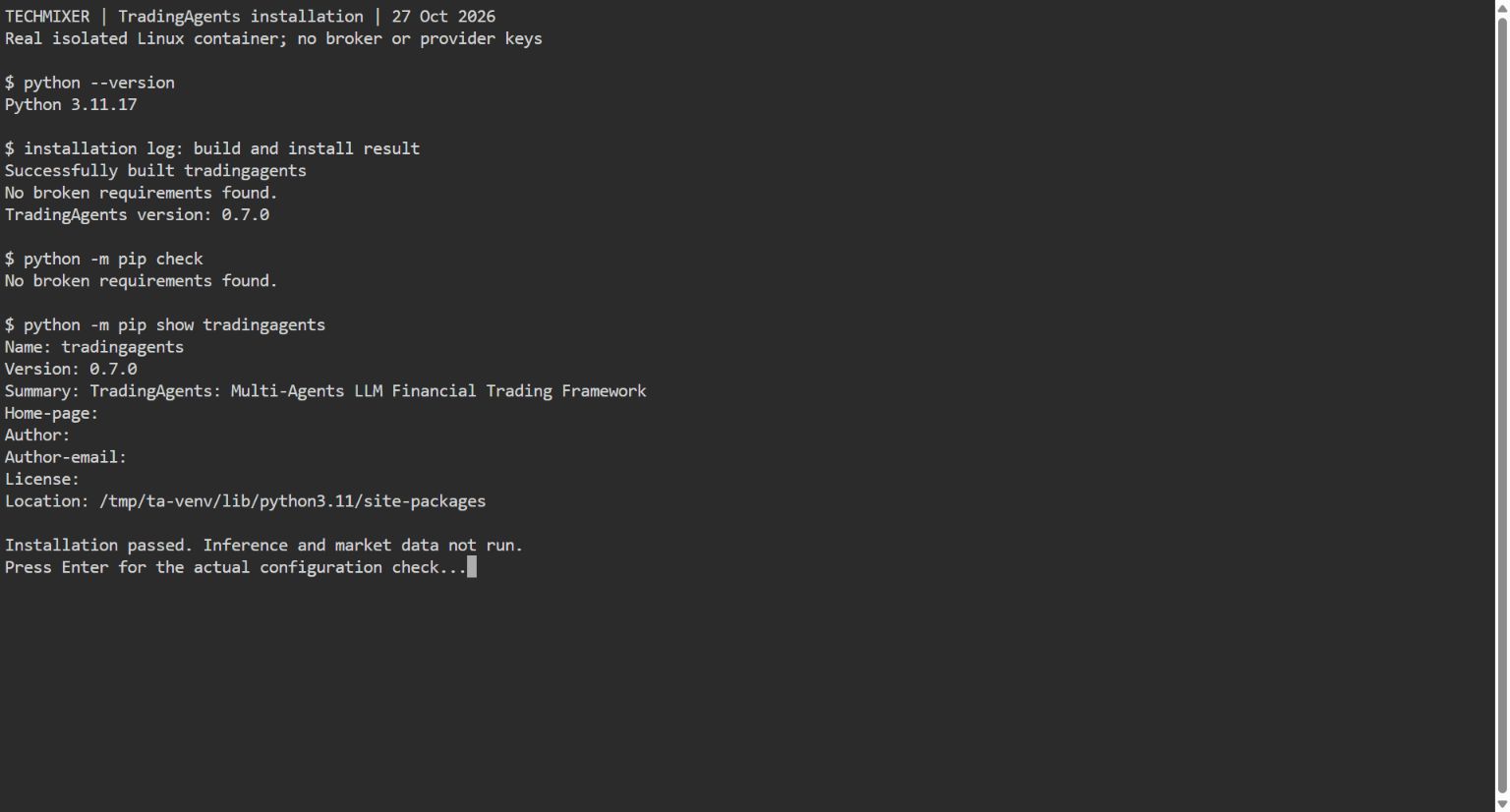
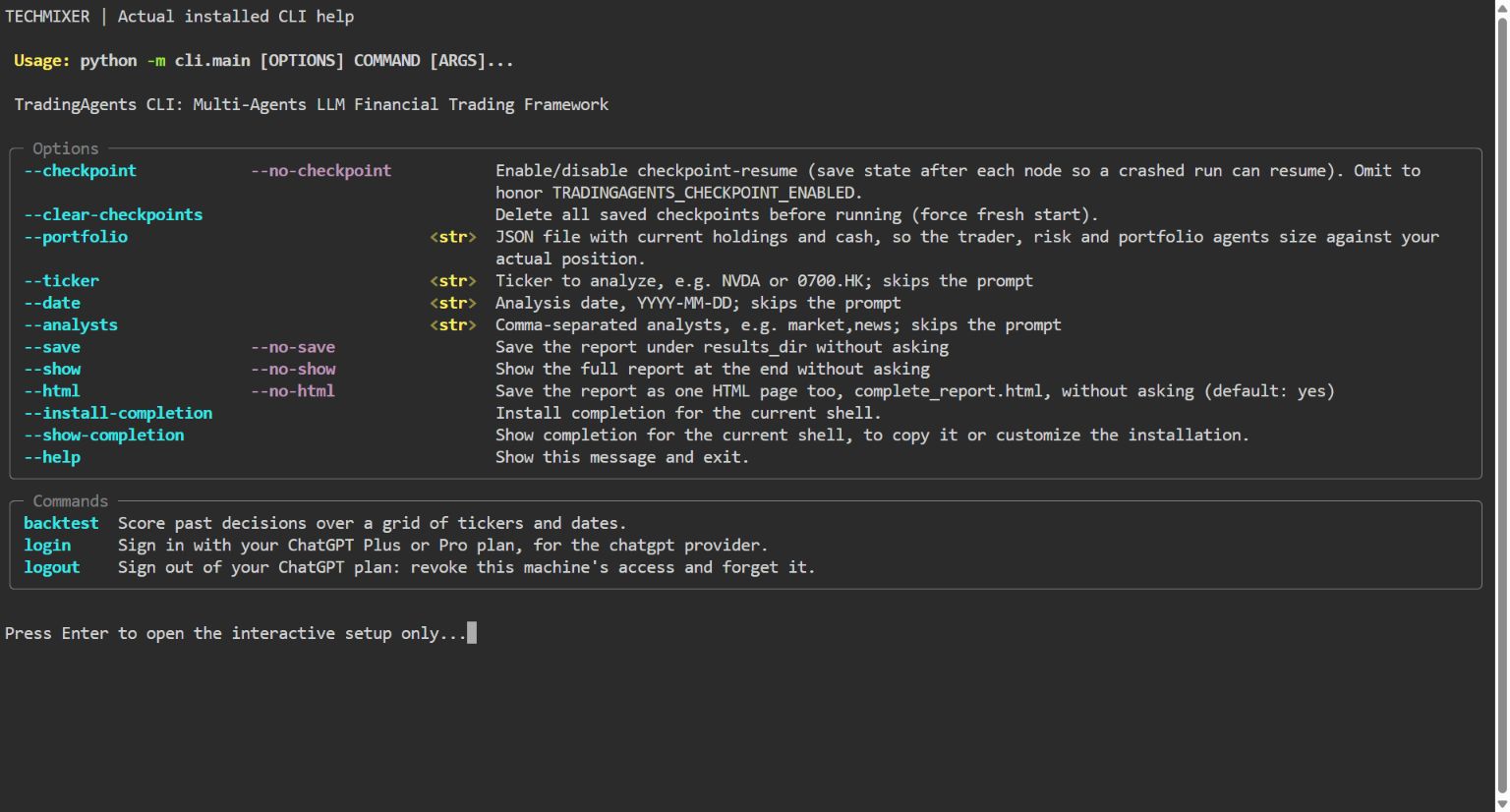
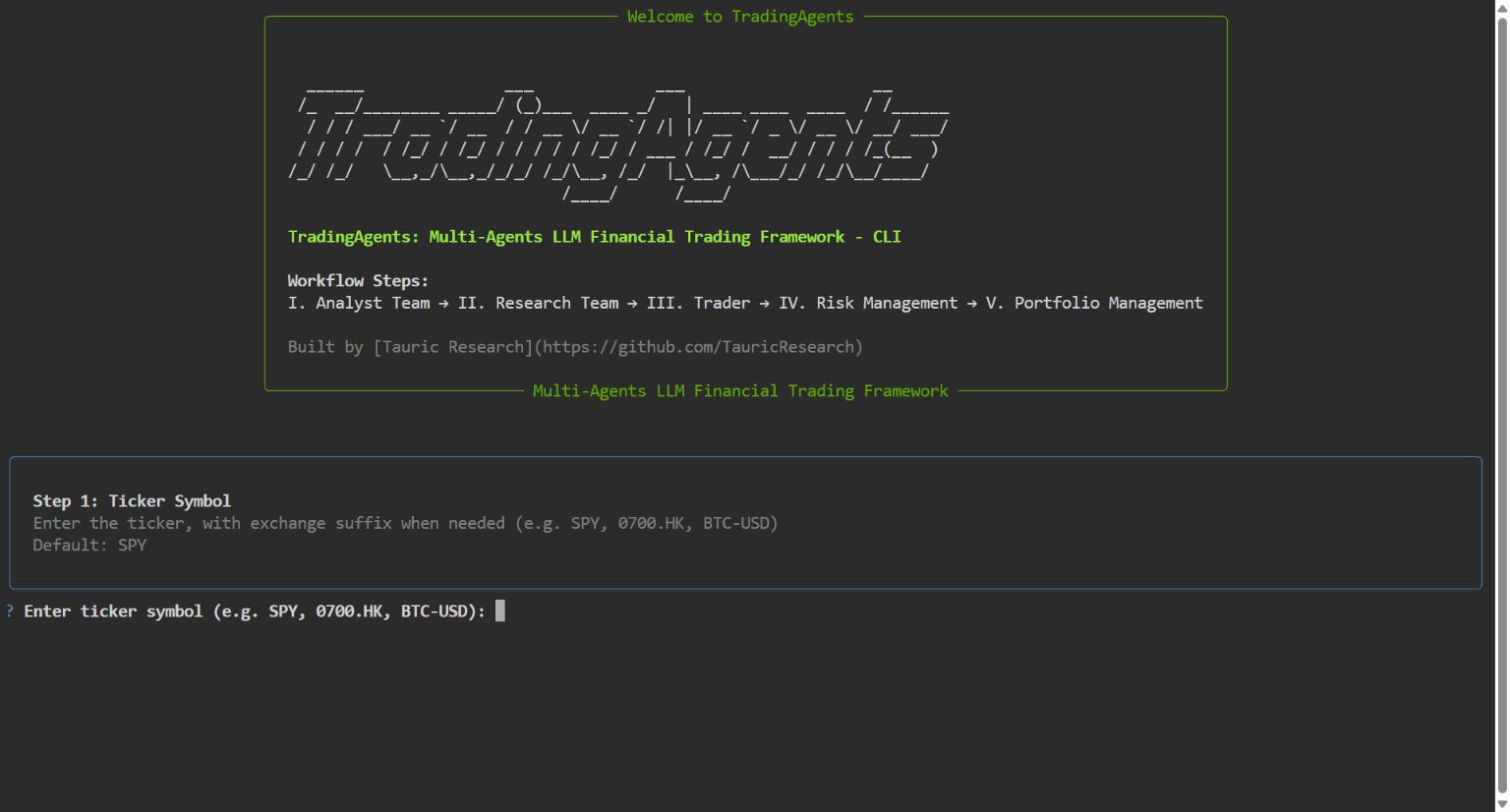
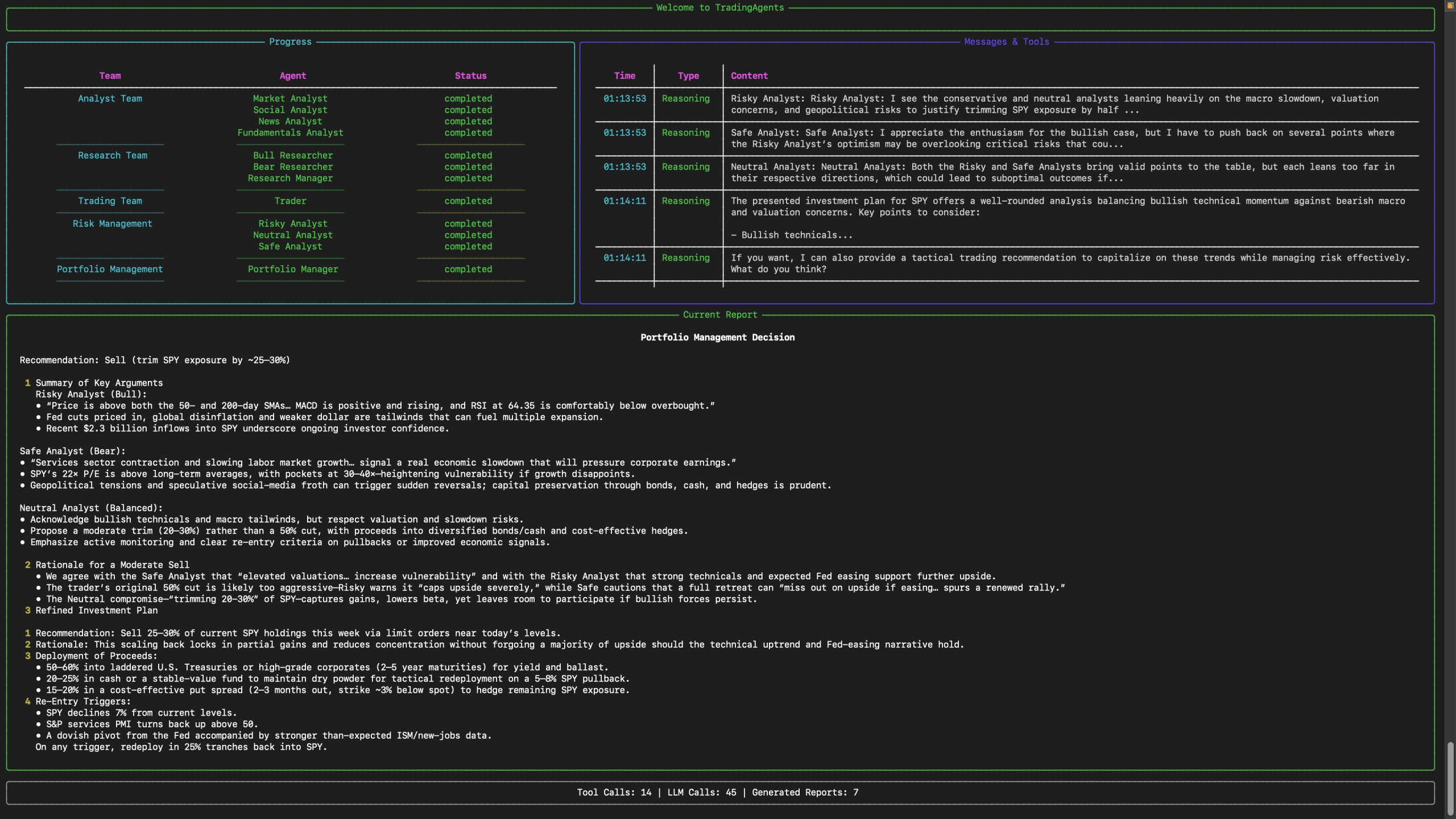
Test boundary: Techmixer installed the pinned TradingAgents 0.7.0 source in a fresh virtual environment inside a Linux container on 27 October 2026. Python 3.11.17, dependency validation, package import, configuration loading, CLI help and the first interactive prompt passed. We stopped before analysis. The Ollama server, model inference, market-data retrieval, report generation, backtesting and broker paper trading were not tested. Four screenshots below show our actual setup checks; the completed-report image remains a labelled maintainer example.
What to know before TradingAgents setup
- Python and Git: the package declares Python 3.11 or later. Our isolated Linux installation passed on Python 3.11.17; the commands below use 3.11. The upstream README also demonstrates 3.13, which we did not test.
- Local inference: Ollama needs a downloaded model and enough working memory for it. Download size is not the same as runtime RAM or VRAM. No universal minimum or speed is promised here.
- Costs: the source is Apache-2.0 licensed. Local inference avoids a hosted model’s per-token charge, but hardware, power and any selected paid data services still cost money.
- Internet: a local model does not make market-data tools offline. The example still depends on external data availability.
- Scope: use a fresh lab, leave financial-account credentials out, and treat every decision as a research hypothesis. This article adds no broker, exchange-order or funded-account configuration.
The distinction matters if you are comparing projects in our AI tools hub. TradingAgents organises evidence and arguments. Our Freqtrade and FreqAI research lab instead demonstrates a candle-data machine-learning workflow.
How the TradingAgents research team works
The framework separates technical, news, sentiment and fundamentals analysis from the debate and decision stages. Bullish and bearish researchers examine the reports; a trader forms a proposal; risk reviewers and a portfolio manager assess it. In this guide, start with only the market and news analysts to keep the first experiment smaller.
For example, an analyst might identify improving momentum while another raises concerns about an earnings announcement. The interesting question is which observations support each argument and when those observations became available. Agreement between several language-model roles is not independent confirmation when they share the same source or mistake.
The repository describes a simulated exchange in its architecture. That description does not prove that this particular report command has submitted a simulated order to a broker. If you want to study that separate workflow, see our Claude Code and Alpaca MCP paper-trading guide.
Step 1: Check Python and Git
Open a new terminal. On Windows, use PowerShell; on macOS or Linux, use your usual terminal. Check that the intended interpreter and Git are available:
Test environment: disposable Linux container, Python 3.11.17, fresh venv, two CPU cores and a 4 GiB memory cap. We installed the official archive at the pinned commit; the Git clone instructions obtain the same source. This resource allocation was sufficient for installation and CLI startup, not a hardware recommendation for an 8B model.
Windows PowerShell
py -3.11 --version
git --version
macOS or Linux
python3.11 --version
git --version
Expect Python 3.11.x and a Git version. If a command is missing, install the required program from its official source before continuing. Do not silently switch to an older interpreter because it happens to be first on your path.
Step 2: Clone and pin the reviewed source
The following commands work in either shell. Use a new directory; do not overwrite an existing TradingAgents installation:
git clone https://github.com/TauricResearch/TradingAgents.git TradingAgents-research
cd TradingAgents-research
git checkout --detach e8f5503e9b86d5c2710b0c76b1f686703968c9df
git rev-parse HEAD
The final output should match the full identifier above. Pinning the source makes the instructions reviewable after the main branch changes. It does not pin every dependency downloaded during installation. The reviewed changelog records the release’s report and evaluation changes.
Step 3: Install into an isolated Python environment
Use the interpreter inside the new environment explicitly. This avoids changing PowerShell execution policy just to activate it.
Windows PowerShell
py -3.11 -m venv .venv
.\.venv\Scripts\python.exe -m pip install --upgrade pip
.\.venv\Scripts\python.exe -m pip install .
.\.venv\Scripts\python.exe -m pip check
.\.venv\Scripts\python.exe -m pip freeze > installed-packages.txt
macOS or Linux
python3.11 -m venv .venv
./.venv/bin/python -m pip install --upgrade pip
./.venv/bin/python -m pip install .
./.venv/bin/python -m pip check
./.venv/bin/python -m pip freeze > installed-packages.txt
A successful pip check should report no broken requirements. That check passed in our Python 3.11.17 Linux container, and importing the package returned version 0.7.0. Keep the package list with your experiment notes. If installation fails, retain the first dependency error and interpreter version; do not describe a partially installed environment as working. The Windows and macOS commands remain documentation-based.
Step 4: Prepare a local Ollama model
Install Ollama using its official download and start the local service. One documented model candidate is Qwen3 8B, whose Ollama entry lists tool support. That capability is relevant to agent workflows, but is not proof that it will complete every TradingAgents task.
ollama pull qwen3:8b
ollama list
Confirm that qwen3:8b appears in the installed-model list. If the service is not running, start the Ollama application or its local server before continuing. Keep it on loopback; this guide needs no public tunnel or remote endpoint. A Windows-host/WSL split can change what localhost refers to, so use one consistent environment rather than assuming the connection crosses that boundary.
Step 5: Give the research lab explicit settings
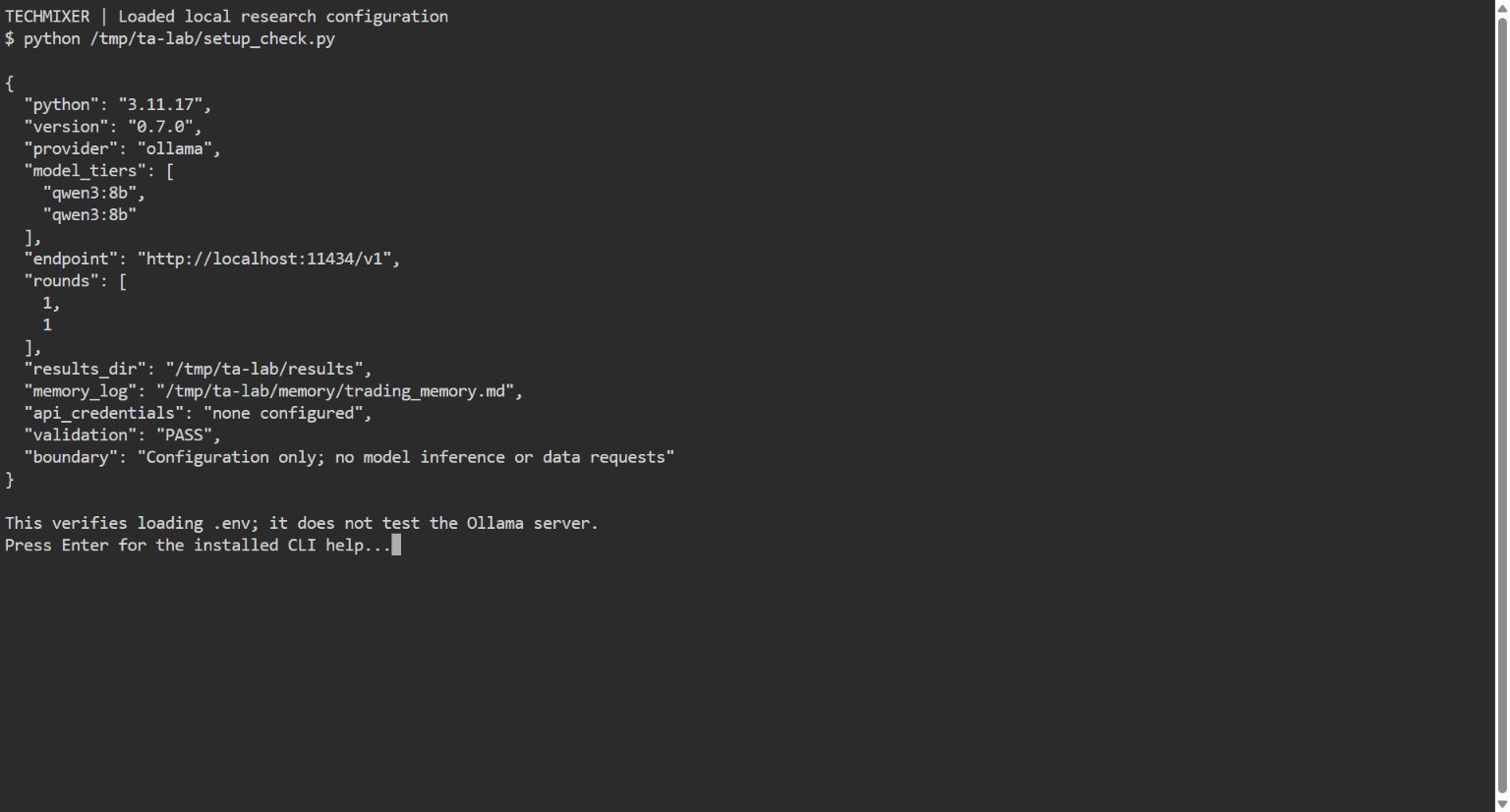
In the cloned project directory, create a plain-text file named .env. Paste the following non-secret local configuration. Both model tiers use the same downloaded model for this first experiment:
TRADINGAGENTS_LLM_PROVIDER=ollama
TRADINGAGENTS_QUICK_THINK_LLM=qwen3:8b
TRADINGAGENTS_DEEP_THINK_LLM=qwen3:8b
OLLAMA_BASE_URL=http://localhost:11434/v1
TRADINGAGENTS_OUTPUT_LANGUAGE=English
TRADINGAGENTS_MAX_DEBATE_ROUNDS=1
TRADINGAGENTS_MAX_RISK_ROUNDS=1
TRADINGAGENTS_RESULTS_DIR=./lab-results
TRADINGAGENTS_CACHE_DIR=./lab-cache
TRADINGAGENTS_MEMORY_LOG_PATH=./lab-memory/trading_memory.md
TRADINGAGENTS_NO_UPDATE_CHECK=1
These names are present in the reviewed environment example and configuration. Separate report, cache and memory paths keep this experiment apart from another installation’s history. Leave other provider and financial-account credentials out of this file. Existing environment variables can override file values, so use a clean terminal if you have previously configured a different provider.
The project also supports hosted model providers. Those routes have their own account, billing and data-handling conditions; they are optional alternatives to this local lab, not additional requirements. We do not need a paid API key to write or review these configuration files.
Step 6: Verify the CLI before asking it to analyse anything
Windows PowerShell
.\.venv\Scripts\python.exe -c "import tradingagents; print(tradingagents.__version__)"
.\.venv\Scripts\python.exe -m cli.main --help
macOS or Linux
./.venv/bin/python -c "import tradingagents; print(tradingagents.__version__)"
./.venv/bin/python -m cli.main --help
The reviewed source reports version 0.7.0. Help should expose flags including --ticker, --date, --analysts and report-saving options. Import and help checks do not prove that model inference or data retrieval works. Their job is to catch an incorrect environment before a longer run.
Step 7: Request one dated research report
Start with one ticker and two analysts. The following AAPL date is an example input only. On Windows:
.\.venv\Scripts\python.exe -m cli.main --ticker AAPL --date 2026-09-23 --analysts market,news --save --no-show --htmlOn macOS or Linux, replace the Python path with ./.venv/bin/python and keep the remaining arguments. The current CLI uses environment settings to skip configured provider, model, language and debate prompts. If a required answer is missing, read the prompt or error rather than assuming the process has begun.
When the run succeeds, inspect its saved report tree under lab-results/reports. The current release can also write complete_report.html for browser reading. That is an expected outcome from the documentation, not a file generated in Techmixer’s setup test.
A past analysis date does not automatically make every input reproducible. The README describes point-in-time controls and also warns that news and social inputs can change between runs. For historical claims, check publication timestamps, cached source material and the behaviour of the exact data path used. Do not assume a fluent report has resolved those issues.
Step 8: Check the evidence behind the decision
Read the final argument alongside the analyst reports. Build a short research journal that separates observed data from interpretation:
| Check | What to record | Reason to stop |
|---|---|---|
| Company and date | Ticker, exchange, analysis date and source timezone. | The report discusses a different company or an unfinished session. |
| Numerical claims | Price or indicator, source and observation timestamp. | A key figure cannot be traced to the underlying data. |
| News claims | Original article, publication time and relevance. | A later article is used as evidence for an earlier decision. |
| Conclusion | Assumptions, opposing evidence and missing information. | The recommendation is stronger than the evidence supports. |
For instance, “momentum improved” is an interpretation. The price series, calculation window and indicator values are the evidence needed to inspect it. When a source is missing, mark the claim unverified rather than filling the gap with a convincing explanation. Our source-checked AI stock research guide develops that distinction.
Step 9: Evaluate a small grid before expanding
After one report works and its inputs make sense, the documented backtest command can repeat the pipeline across tickers and dates. A small example in Windows PowerShell is:
.\.venv\Scripts\python.exe -m cli.main backtest AAPL --start 2026-09-01 --end 2026-09-08 --every 7 --analysts market,newsUse ./.venv/bin/python on macOS or Linux. Even a small grid can make many model and data calls because each cell runs a multi-agent pipeline. It is an optional reader exercise; Techmixer did not execute it.
The v0.7.0 documentation says evaluation enters at the first close after a decision date, rather than assuming an earlier close was available. Inspect that convention before comparing results with another test. The summary is not a substitute for an executable strategy with entry and exit rules, position sizing, transaction costs, slippage and an appropriate baseline. A two-date exercise is a workflow check, not statistical validation.
Keep later dates out of any model-selection or rule-tuning period, record failed runs as well as successful ones, and compare repeated outputs. If changing the model changes the story dramatically, investigate the evidence before treating either answer as reliable. Our AI trading research workflow guide explains the wider experiment design.
Common setup problems and sensible stopping points
- Import or dependency failure: check the interpreter inside the venv, installation output and
pip check. Do not mix a system Python with packages installed elsewhere. - Ollama connection refused: verify that the local service is running and the endpoint matches the environment where TradingAgents runs. Keep authentication and network protections intact.
- Model not found or failed tool call: compare the exact model identifier with
ollama list. Tool support alone does not guarantee reliable multi-agent behaviour. - Missing market data or rate limits: read the actual provider error. Retry conservatively or use a permitted configured source; do not invent an answer or bypass regional restrictions.
- Report missing: inspect the first failure and the effective results path. A process starting successfully does not mean every stage finished.
Stop the experiment when the environment fails validation, essential inputs cannot be verified, or the output cannot be explained from its sources. Adding more agents will not repair a broken data assumption.
Questions before extending the lab
Does TradingAgents setup require MCP or Claude Code?
No. The Python CLI and selected model provider run this workflow directly. An assistant can help explain sanitised source code or a report, but an MCP connection is not required and no assistant needs broker-control permissions for this lab.
Can I reuse an old installation’s memory for a fresh evaluation?
Keep a new evaluation’s history separate until you understand the memory behaviour. TradingAgents maintains a decision log and the documented backtest uses its own log. Reusing unrelated prior outcomes can change the context seen by agents and complicate interpretation. Preserve the reviewed configuration and record which memory path each experiment used.
Related Techmixer guides
- AI finance research tools: costs and risks
- Supervised paper trading with Claude Code and Alpaca MCP
- Build a crypto research lab with Freqtrade and FreqAI
Our take
TradingAgents is useful for studying how an AI research process gathers evidence, debates a thesis and records a decision. The strongest starting point is one question, one ticker and a report you can audit. Its multi-agent design makes the reasoning easier to inspect, but does not independently validate the data or turn generated prose into a trading edge.
Reviewed by: km chia. This revision combines pinned-source review with an actual isolated Linux installation and setup check. The source archive matched the reviewed commit; Windows/macOS instructions and downstream analysis remain documentation-based. No Ollama inference, market-data run, backtest, broker login or order was performed. Four terminal captures are from Techmixer testing; the completed-report example is attributed to the maintainer.
Last reviewed: 27 October 2026.