Windows firewall, a software based firewall that help windows users inspects network traffic passing with built-in network exceptions to allow connections from machines on the local network. Using firewall software on your computer and laptop is a must to identify which applications on the computer are creating security risks.
If a worm infects your system and attempts to open your computer to the world, the personal firewall will prompt you to confirm the new application or to prevent its use. Your personal firewall may be your first warning that a malicious program is attempting to use the network! Plus more, Windows Firewall can protects your computer by preventing unauthorized users from gaining access to your computer through the Internet or a network.
However, the default Windows firewall ( Internet Connection Firewall ) that install on Windows operating system has limitation of security protection or less user friendly compares to third party firewall software.
Two major disadvantages to using default Windows firewall ( Internet Connection Firewall) :
1. Default Windows Firewall does not restrict outgoing traffic from your computer or restrict applications from using your Internet connection. This means that if have a virus , Internet connection firewall will allow your applications to send data to the Internet without your permission.
2. When you boot your computer, Windows will enable your Internet connection before it enables the built-in firewall. This means that if someone attempts to hack your computer or port scan you while your computer is booting, your computer will be available on the Internet before the firewall starts up. This creates a limited opportunity for your computer to be hacked. Though this risk is mitigated by the short length of time between your Internet connection being active and the firewall starting, it is still a risk to take into consideration.
Over here, i have gathers a list of free Windows based firewall software that can replace default windows firewall (Internet Connection firewall) on Windows operating system which give more firewall functionality options and firewall protection for your computer.
Free Firewall software To Replace Windows Firewall :
Comodo Internet Security
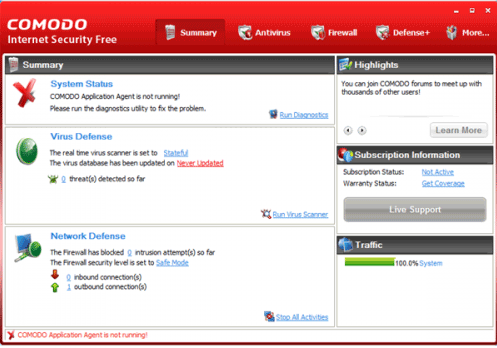
Comodo Internet Security, the latest Comodo Internet security that combines firewall and antivirus software can secure your system against internal attacks such as Trojans, viruses, malicious software and external attacks by hackers. Meanwhile, Comodo Internet Security run a multi-layered security application that protects you against identity theft hackers, Trojans, scripts and other unknown threats. Plus more, the Comodo firewall easy to understand and configure.
ZoneAlarm Free Firewall
ZoneAlarm firewall is designed to protect your cable or DSL-connected computer against unauthorized access by hackers, hijackers and malicious software. It also blocks threats already on your pc from communicating with the malefactor or a third party so that hackers can’t gain access to your computer or personal data.
NetVeda Safety.Net firewall
a windows based firewall software offers Internet security, content security and advanced Internet firewall protection for all your LAN computers, and trust controls to block unwanted or harmful applications from accessing the network. You can define granular user or computer specific access controls based on site, content, PICS ratings and time of day. You can monitor connection level network activity round-the-clock and view detailed reports to analyze traffic and usage patterns over days, weeks or months.
Sunbelt-Kerio Personal Firewall
Sunbelt Personal Firewall used to be called the Kerio Personal Firewall (KPF). The free Sunbelt Kerio Personal Firewall provides firewall features like Packet filtering, file integrity control, application communication control, application launch control and network intrusion prevention system. Plus more, there are simple firewall statistic reporting such as Statistic of block ads and attacks, automate update checker and extended logging
Online Armor Personal Firewall
Online Armor protects your computer’s internet connection (inbound connections and outbound connections), stops unknown programs from running and detects keyloggers – plus lots more!. Online Armor is a full security system for your computer, but has been designed to be very easy to use.
Online Armor includes powerful “HIPS” functions, which give you the ability to stop strong>all unrecognized programs from running on your computer unless you say so, making it possible to protect yourself against these new attacks.
PC Tool Firewall Plus

PC Tools Firewall Plus is equipped with advanced user mode while experienced users can optionally create their own advanced packet filtering rules, including IPv6 support, to customize the network defenses. Plus more, PC Tools Firewall Plus provides world-leading protection, backed by regular Smart Updates, real-time protection and comprehensive network shielding to ensure your PC remains safe and hacker free.
Agnitium Outpost Firewall

A personal firewall encompasses Agnitum’s fundamental protective mechanisms and provides key components to build a comprehensive security system. It provides advanced network firewall and HIPS/application activity monitoring protect your windows operating system data against unauthorized third parties.
This free firewall software offers the best-of-breed two-way personal firewall, host protection module which blocks suspicious activity and 0-day threats and self-protection, which prevent product deactivation by malware. Meanwhile, it also supports plug-ins for tasks such as Intrusion Detection, Advertisement Blocking, Content Filtering, E-mail Guard and Privacy Control.
Ashampoo Free Firewall

Ashampoo Firewall free definitely can prevent your computer from being controlled by spammers or destructive hackers. It monitors all your computer’s network activity and protects you against both incoming and outgoing connections.
Meanwhile, Ashampoo firewall free has a Configuration Assistant guides you through every step of the setup process. Beside firewall protection, it also comes with four additional integrated tools that can significantly increase your security.
GeSWall (GentleSecurityWall) Firewall

GeSwall firewall is using a Windows Security Framework (WSF) – a general framework to accomplish flexible access control policies. The framework works as a kernel mode driver and controls access to various Windows resources. Beside that, GesWall free firewall also enforces mandatory access control policy, which maintains high confidentiality and secure over your data.
Private Firewall
Private Firewall integrated desktop firewall and multi-layered intrusion prevention technology to protect your computer. This free private firewall delivers signature-less, real-time protection from known or new spyware, viruses, hacking techniques, and other intrusions on Windows desktops and servers.
Meanwhile, it also offers network security features like port tracking, URL and packet filtering and application/system behavior modeling and anomaly detection components to protect both inbound and outbound traffics of user PCs.
Jetico Personal Firewall ( No available anymore)
Jetico Personal Firewall is designed to give the user full control over the networking subsystem. The key principles are rule based stateful filtering, open configuration, detailed logging and live statistics.
Download Jetico Personal Firewall
Webroot Desktop Firewall ( No available anymore)
Webroot Desktop Firewall secures your computer from Internet threats and reduces the risks of being a victim of online crimes. Webroot Desktop Firewall combines intelligent firewall technology with intrusion prevention for inbound and outbound protection that is both powerful and easy to use.
Webroot Desktop Firewall act as the gatekeeper to your PC.
- Monitors Internet traffic in and out of your PC for better protection
- Makes your PC invisible to online scammers looking for easy targets
- Prevents remote access Trojans from hijacking your PC
Download Webroot Desktop Firewall
So, all the windows based firewall that I mention is totally firewall freeware. Just get rid of default firewall on Windows and install third party windows based firewall to protect your computer network traffic.