

iRinger, a Free iPhone Ringtone Maker that allow any iphone user to customize their favour music become iphone ringtone. iRinger is a good iphone ringtone maker solution because it doesn’t require any jailbreak your iphone to hack version iphone similar like the other commercial iPhone Ringtone maker. Meanwhile, iRinger also includes a lot of customization ringtone features to fancy up your ringtone as you want.
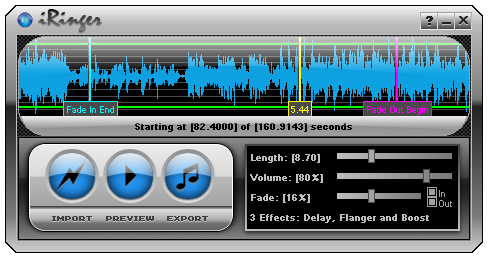
To customize your iphone ringtone is easy, all you need download iRinger iphone ringtone software and install it. Then just import the the music and song that you want to convert as iphone ringtone by clicking “open” button. Then the music will be converted to iphone ringtone depending the size of the music media.
After finishing music convertion, you can use the iRinger iphone ringtone maker software to customize your iphone ringtone by selecting which part of the music that you want. Meanwhile, other customize iphone features like fade in , fade out , length of the iphone ringtone, volume of the ringtone and loop gap also included during customization of your iphone ringtone.
Once finish customize your iphone ringtone using iRinger, you can export iphone ringtone to other file directory as copy. Meanwhile, you can change the name of the converted iphone ringtone and setting the period looping the customize iphone ringtone. Plus more, make your sure check the ” export to itunes ” option to allow exporting to your itunes ringtone section. After that, you can use your itunes to upload your customize iphone ringtone to iphone devices.
Here is the Video tutorial how to use iRinger free iPhone Ringtone Maker :
Beside that, you can use their advanced audio features like Delay, Flanger, Boost, Reverse, etc. on the iRinger iphone ringtone maker software to fancy your iphone ringtone. Below is another video tutorial how to play around the iRinger advanced audio effect on your customize iphone ringtone.
Requirement to run iRinger free iphone Ring tone Maker:
- Runs on all versions of Microsoft Windows including Windows Vista
- Requires iPhone firmware 1.1.2 or newer, iTunes software 7.5 or newer
- Works with the new iPhone 3G
There is a limitation on this free iphone ringtone maker software which the maximum the iphone ringtone time frame is 30 second only. However, iRinger still remain a good free iphone ringtone maker solution.
Download iRinger-Free iPhone Ringtone Maker SoftwareRinger.zip
Anyway, thanks for iRinger – free Iphone ringtone maker contribution to all iphone user !!! 🙂


I have a new iphone just bought 2 weeks ago.. Will this thig work on version 2?
I was just in need of this ring tone maker and I get it here,thanks .
Does this app work with a mac? i would love to use it, i have heard great things about the program. i have a pc but if i sync it with that it will erase all of my stuff off of the iphone. anyway around this?
@ThrownJuice
iRinger iphone ringtone maker is workable on windows OS only.
Just made my first one! It works great! So useful! Thanks so much guys!
Josh
Wow. Looks really easy. Thanks for the overview I will try it later.
Great work
I have the new AT&T iphone 3g. The ringtone exports to the itunes library under the subfolder ringtones but can’t drag to iphone. =( Iphone 3g doesn’t accept it. Hate buyimg ringtones from itunes, not that many selections of music.
this iringer is really great
Just tried this with my Iphone 3G, and amazingly it worked. I had made several special ringtones: for my Dad, a friend and his wife for their anniversary, and a couple of others. Up until now I couldn’t upload them to the phone, like I did on my old Motorola. But with this, IT WORKS!! I’ll never get a chance to hear my Dad’s ringtone, he has since passed before we could hear him calling, but the others will bring me joy every time they call me.
Thank you so much.
I dont trust free ones, I’ve tried the 4Media iphone ringtone maker from http://www.iphoneringtone-maker.net, and it works well
i am really love to use this kind of software by the ultimate developers..i really appreciate that work. thanks a lot.
Andy – you’re amazing! Thanks so much – it’s absolutely fantastic!
For you Mac users out there, get iToner. It’s not free–but just a nominal amount–15 bucks or so, but it works great for transferring ringtones from Mac to iPhone. Only quirk–every other sync or so, iPhone kicks out the ringtones, so you have to do an extra step and reload them through iToner–not a big deal.
I just made a ring tone for my brand new iPhone 3G. It’s so easy and worked great! It didn’t import directly to iTunes, I had to manually add the file, but it showed up in ringtones and dragged and dropped right onto my iPhone.
Thanks a MILLION!!!
are there any type of music file that it doesnt support?
For Mac users:
How to Make Customized Ringtone(M4R) for Your iPhone (3GS) on Mac
http://www.mediasoftmac.com/ringtone-maker-articles/tutorial-mac-iphone-ringtone-maker.html#129
Thanks for the tutorial, I just added part of a song as my ringtone, sweet.
fnx very much for this grt software i am so happy that finally i got whateva i was looking for fnx again grt job who eva u r keep it up
tc
Here is a guide about how to use gadageband to make free iphone ringtone.
http://www.mac-dvd.com/how-to-make-cool-iphone-ringtone-with-garageband-on-mac.html
Thanks for this info. I just added a free ringtone to my phone.
Great article, well for Mac users, you can use iphone ringtone maker for Mac, it works pretty good. Here is a tutorial of how to make custom iphone ringtone on mac:
http://www.imediacreator.com/tutorial-ringtone/how-to-make-iphone-ringtone-on-mac.html#191
I just got my 3GS yesterday. Been searching software to create my own ringtones, came to your website and yep, it works.. Great works and very good software.. I have created 2 30sec ringtones for now. Any idea for the custom sms ringtones?
This is great! I have created some great ring tones, and solved some problems with acquired ringtone tunes from the web! thanks. I’d be glad to throw you some donation of some kind, where do I send it?
Thank You for this. Didnt think it would work with the 4.0.2 update but it does.
I recently found an cool app’ on the AppStore, it’s Ringbuilder. More than an iPhone ringtone maker, you can share your creation with other iPhones ! I recommend to all ;P
How can u put the ringtone on the iphone?
Dude, I love you. This worked perfectly!