You can build a crypto research bot with Freqtrade and FreqAI that downloads public price candles, trains a machine-learning model and saves predictions for inspection. Start without exchange keys and without entry signals. Getting a model to run is the first job; deciding whether its predictions are useful is a separate research project.
This guide builds that first part. FreqAI uses predictive machine learning, not a conversational LLM. There is no Claude subscription, MCP server or funded account in the setup below.
Quick Answer
The finished lab trains LightGBM on BTC/USDT five-minute candles and lets you inspect the output locally. The supplied strategy refuses non-dry-run settings and exchange credentials, disables shorting and sets every entry signal to zero. You can learn the full data-to-prediction workflow without generating simulated trades, let alone real orders.
Tested result: Freqtrade 2026.9 installed successfully, four safety-test methods passed, three historical training windows completed and prediction files were saved. Those are setup results, not evidence of investment returns.
What to Know First
This is for readers comfortable copying terminal commands and opening JSON and Python files. Use a new project folder rather than an existing trading installation. The commands below target a Linux shell, including Ubuntu under WSL on Windows; they are not PowerShell commands.
- Software: Python 3.11 or later is required by the reviewed Freqtrade 2026.9 package. The captured lab used Python 3.11.17, CCXT 4.5.89 and LightGBM 4.7.0.
- Hardware: our isolated Linux container was capped at two CPU cores and 4 GiB RAM. That was enough for this small example, not a sizing recommendation for dozens of markets or deep-learning models.
- Costs: Freqtrade is GPL-licensed open-source software. This CPU example needs no paid LLM API. Your computer, storage, bandwidth and any hosting still have costs.
- Data access: the lab read Binance public spot-market data without credentials. Availability and permitted access depend on location and the provider’s rules. If access is blocked or unavailable, stop and choose a permitted data source; do not work around regional restrictions.
- Scope: no leverage, futures, broker connection, deposit or live-trading setup. The bot is deliberately unable to generate entry signals in this tutorial.
For the broader distinction between research software and investment decisions, see our AI finance research tools guide. The official Freqtrade package page and 2026.9 release identify the version reviewed here.
What each part of the crypto research bot does
| Component | Job in this lab | Important boundary |
|---|---|---|
| Freqtrade | Downloads candles, loads the strategy and runs historical replay or dry-run monitoring. | The wider framework can trade. We restrict this particular configuration and strategy. |
| FreqAI | Builds the feature/target dataset and manages model training and inference. | Automating retraining does not establish predictive value. |
| LightGBMRegressor | Estimates a numerical target from the candle-derived features. | A positive estimate is not a buy recommendation or probability of profit. |
| FreqUI | Shows the local bot and candle chart in a browser. | Keep its authenticated API private. A chart proves visibility, not model accuracy. |
The official FreqAI introduction explains the framework. If you want agents that discuss filings and news instead, our TradingAgents setup guide covers a different architecture. Do not treat the two as interchangeable.
Step 1: Prepare a separate Linux environment
Check the Python version before installing anything. Use a supported 64-bit Linux environment and an isolated virtual environment. On Ubuntu or Debian, the usual system prerequisites are:
python3 --version
sudo apt update
sudo apt install python3-venv python3-dev build-essential libgomp1 curl unzip
mkdir techmixer-freqai-research
cd techmixer-freqai-research
python3 -m venv .venv
source .venv/bin/activate
python -m pip install --upgrade pip
If python3 --version is below 3.11, install a supported Python version for your distribution first. Do not replace the operating system’s Python executable. Package names vary by distribution; follow the official installation guidance when a prerequisite differs.
Testing boundary: the application commands were run in an isolated Linux container, not a fresh Ubuntu desktop. The prerequisite commands above are a native Linux route. Our container needed the OpenMP library supplied separately. A prebuilt Freqtrade image download failed in this test, so the screenshots do not claim a successful Docker-image installation.
Step 2: Install the pinned Freqtrade and FreqAI package
Inside the activated virtual environment, install the reviewed release with its FreqAI dependencies:
python -m pip install "freqtrade[freqai]==2026.9" "lightgbm==4.7.0"
freqtrade --version
python -m pip check
python -c "import lightgbm; print(lightgbm.__version__)"
Expect Freqtrade 2026.9, LightGBM 4.7.0 and No broken requirements found. A successful package download alone is not enough: the imports and commands must work too. The extra dependencies can be a large download even though this example uses a CPU.
If installation fails, keep the error and check Python version, available disk space and platform support. Do not switch to a random prebuilt model or unofficial installer just to get past the error.
Step 3: Load the research-only starter files
The official example configuration is useful for learning, but it is not the configuration used here. In the reviewed release, the example includes futures and forced-entry settings, while its example strategy supports shorting. We replace those choices with a spot-only lab and a no-entry wrapper.
Download the reviewed FreqAI research starter (ZIP). Inspect the source before running it. Keep this 2026.9 example separate from any funded trading installation.
Download the ZIP, inspect its Python and JSON files, then extract its contents inside your new project folder. It supplies user_data/config-research.json, user_data/strategies/CryptoResearchStrategy.py, configuration checks, tests, prediction inspection and a helper for a private local UI configuration. It contains no credentials, exchange client keys or pretrained models.
Review these settings in the supplied JSON. This is an excerpt, not a complete replacement config:
{
  "dry_run": true,
  "trading_mode": "spot",
  "force_entry_enable": false,
  "timeframe": "5m",
  "exchange": {
    "name": "binance",
    "key": "",
    "secret": "",
    "password": "",
    "pair_whitelist": ["BTC/USDT"]
  }
}
Leave the credential fields empty. The dry_run_wallet value of 1,000 USDT is an accounting fixture inside the simulator, not a deposit or an exchange balance. The small stake setting is likewise unused while entries are disabled. See the official configuration reference for the meanings of the settings.
Step 4: Verify the strategy and effective settings
The supplied wrapper inherits feature engineering and targets from the installed FreqAI example. Its extra checks reject live-mode configuration, futures and nonempty exchange credentials. Its entry method always returns zero long and short signals:
def populate_entry_trend(self, dataframe, metadata):
    dataframe["enter_long"] = 0
    dataframe["enter_short"] = 0
    return dataframe
Run both the standalone config check and the strategy tests:
python check_config.py
python -m unittest -v test_research_strategy
freqtrade show-config --config user_data/config-research.json
Expect the check to pass and the test runner to report Ran 4 tests followed by OK. Read the effective configuration output for unexpected overrides and error messages. In our setup, an earlier incomplete optional configuration produced an error despite a zero process exit status; that is why the displayed result matters as much as the exit code.
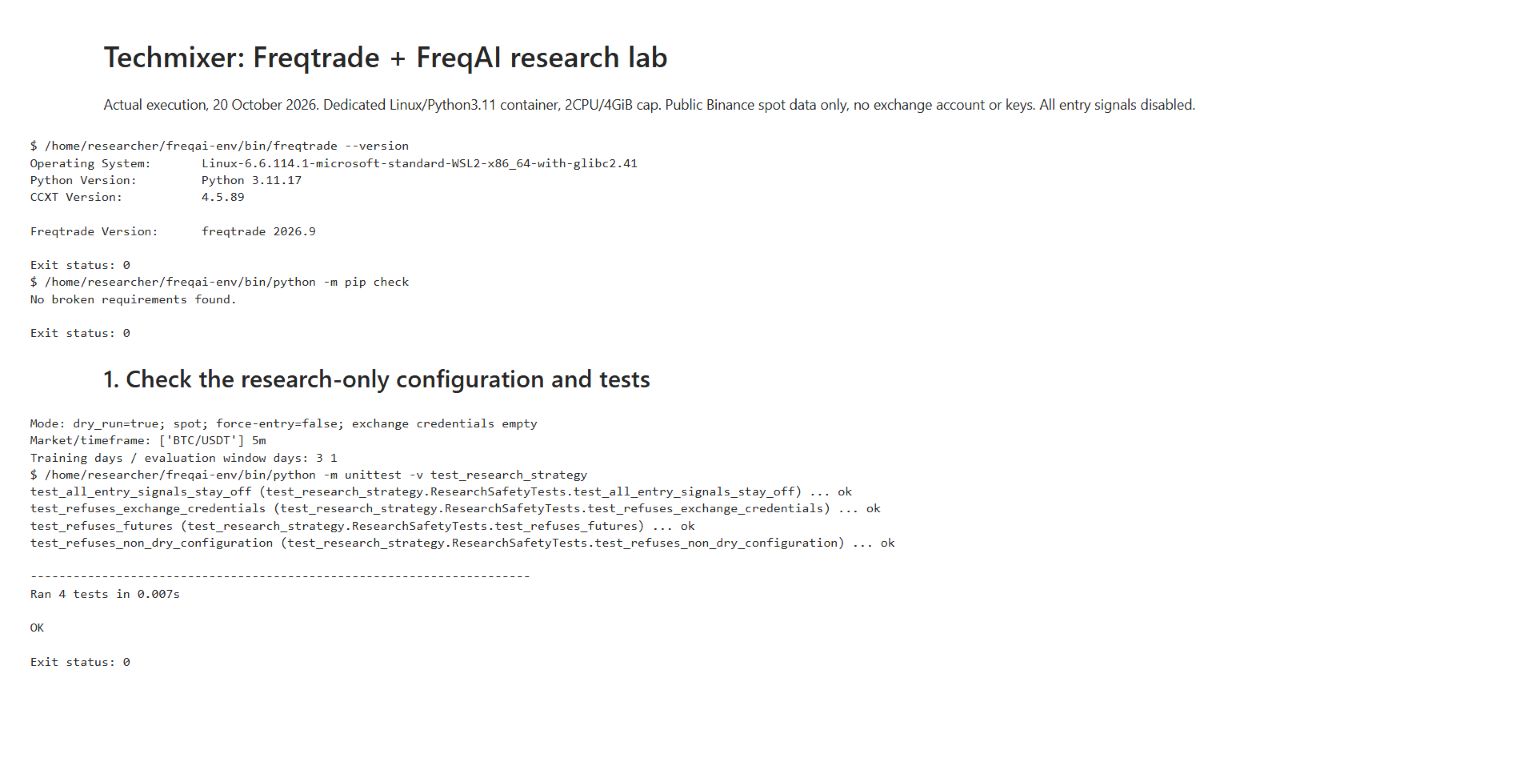
Do not continue if a test fails, credentials appear, the effective mode is not spot/dry-run, or another strategy is selected. These are safeguards for this example, not a hardened security boundary against someone editing the code or starting another process.
Step 5: Download public candles and check their coverage
Use one market and one timeframe first. The following fixed dates reproduce the historical window used for this guide and leave several days before the evaluation period for training and indicator warm-up:
freqtrade download-data \
  --config user_data/config-research.json \
  --timerange 20261010-20261019 \
  --timeframes 5m
Inspect the saved file instead of assuming its contents match the requested range:
python - <<'PY'
from pathlib import Path
import pandas as pd
p = next(Path("user_data/data/binance").glob("*5m.feather"))
d = pd.read_feather(p).sort_values("date")
print("Rows:", len(d))
print("First:", d.date.min(), "Last:", d.date.max())
print("Duplicate timestamps:", d.date.duplicated().sum())
print("Non-five-minute gaps:", d.date.diff().dropna().ne(pd.Timedelta(minutes=5)).sum())
print(d.head(3).to_string(index=False))
PY
On the reviewed lab, the cached dataset had 3,057 rows, beginning at 10 October 2026 00:00 UTC and ending at 20 October 2026 14:40 UTC. It also served the later monitoring run, so its extent was wider than the historical download request. The replay below explicitly selects its own evaluation dates.
An incremental download can legitimately fetch zero new rows when the file already covers the requested period. An empty file, missing warm-up history or unexplained gaps is different: resolve that before training. The official data-download guide covers storage and download options.
Step 6: Train the model in a historical replay
The starter uses a three-day training window and a one-day evaluation window. That keeps the installation check short. It is far too little evidence to call a strategy robust.
freqtrade backtesting \
  --config user_data/config-research.json \
  --strategy CryptoResearchStrategy \
  --strategy-path user_data/strategies \
  --freqaimodel LightGBMRegressor \
  --timerange 20261014-20261017 \
  --cache none
Look for training to complete and prediction files to appear under the configured identifier. Our run trained three windows with 44 features and 681 retained training points per window. It finished with No trades made. That is the expected outcome of the no-entry strategy, not a claim of zero-risk returns.
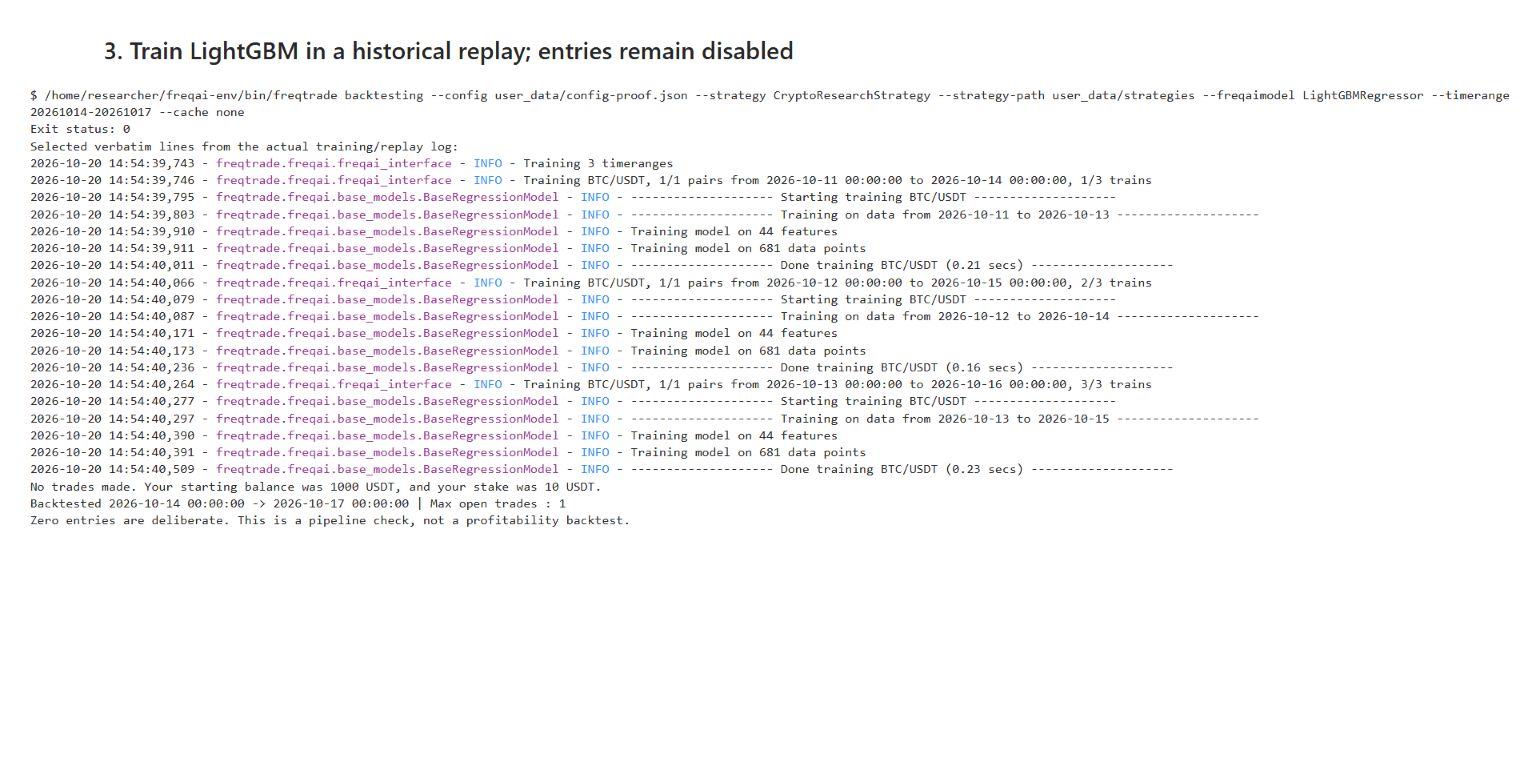
The screenshot uses a separate evidence identifier, tm-crypto-research-proof-v1, to keep its files apart from the monitoring run. Your starter uses tm-crypto-research-v1. The model, strategy and historical evaluation dates are otherwise the same.
What is it learning? The inherited example target, &-s_close, represents the relative change from the current close to the average of the next 12 closes. At five minutes per candle, that is a 60-minute forward window, not a prediction of one exact future price. The forward target is a training label; it must not accidentally become information available to a trading rule at prediction time.
The configuration uses shuffle: false for chronological splitting. That is a starting choice, not proof against leakage from overlapping labels or other look-ahead mistakes. Read the pinned example strategy source and the feature-engineering documentation before changing the target or features.
Step 7: Inspect the predictions, not just the summary
Run the supplied inspection script after the historical replay:
python inspect_predictions.pyIt opens the saved Feather prediction files and prints their timestamps, target estimate and acceptance-related columns. Our first evaluation file contained 288 five-minute rows. A row included an &-s_close estimate around 0.000440, or roughly 0.044% for that defined target. It is not a 44% chance of profit.
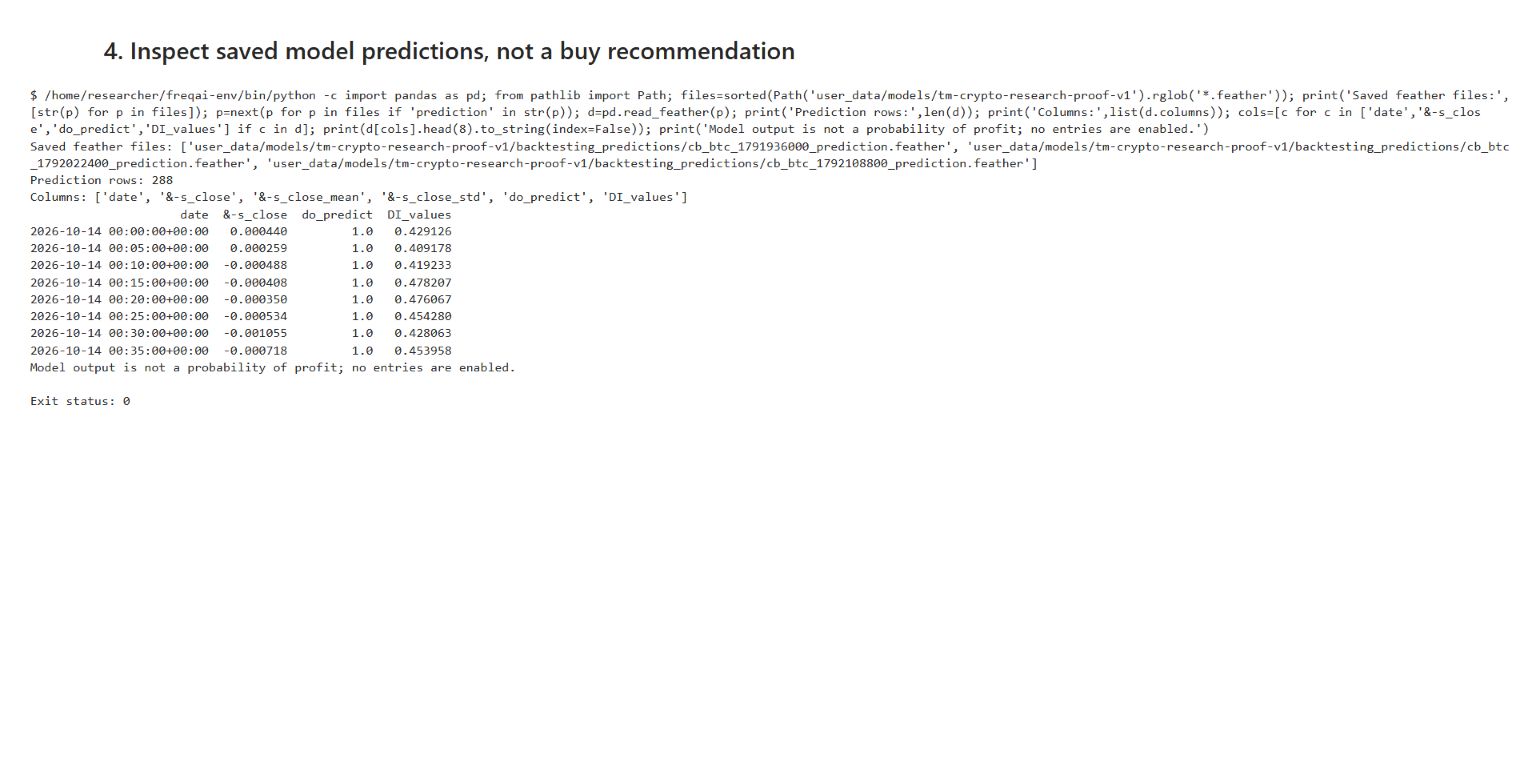
do_predict == 1 indicates that the row passed the configured FreqAI acceptance checks; it does not establish that the forecast is correct. DI_values relates to the configured dissimilarity check. Keep these fields beside the prediction instead of treating every numeric output as equally usable. The FreqAI configuration documentation explains the returned values.
That distinction mattered in the actual files: the 15 October 00:00 UTC row had a positive estimate near 0.004991, but do_predict was zero and its DI value was about 1.151, above our 0.9 threshold. Reading only the positive estimate would discard a relevant rejection flag. The inspection helper prints every evaluation file so you can spot differences like this.
For your next research experiment, keep a later time period untouched, compare prediction errors with a simple baseline, and repeat across different market conditions. Handle overlapping labels explicitly when designing evaluation splits. Only after a forecasting experiment is defensible would a separate, reviewed paper-trading experiment address fees, slippage, turnover and execution assumptions.
This walkthrough does not validate an entry rule or run a meaningful profitability test. Freqtrade’s look-ahead analysis is worth understanding, but a no-entry strategy cannot provide useful trade-based validation of a future strategy.
Step 8: Open an authenticated local dashboard
FreqUI is optional. The historical replay and saved files already work without a browser dashboard. To inspect the running research bot, install the official UI and create a private configuration:
freqtrade install-ui
mkdir -p user_data/logs
python create_local_ui.py
The helper asks for a local UI password of at least 16 characters without echoing it, generates authentication secrets and writes user_data/config-ui.private.json. Do not upload, commit or include that file in screenshots. It binds the native-host API to 127.0.0.1:8080; it does not ask for exchange credentials.
freqtrade trade --dry-run \
  --config user_data/config-research.json \
  --config user_data/config-ui.private.json \
  --strategy CryptoResearchStrategy \
  --strategy-path user_data/strategies \
  --freqaimodel LightGBMRegressor \
  --logfile user_data/logs/research-runtime.log \
  --db-url sqlite:///user_data/research-dryrun.sqlite
In another browser tab, open http://127.0.0.1:8080, choose Login, use that URL as the API URL, enter username researcher and your chosen password, then open Chart and select BTC/USDT. The command is named trade, but this invocation stays in dry-run mode and the strategy suppresses all entries. Do not substitute the vendor’s trading example strategy.
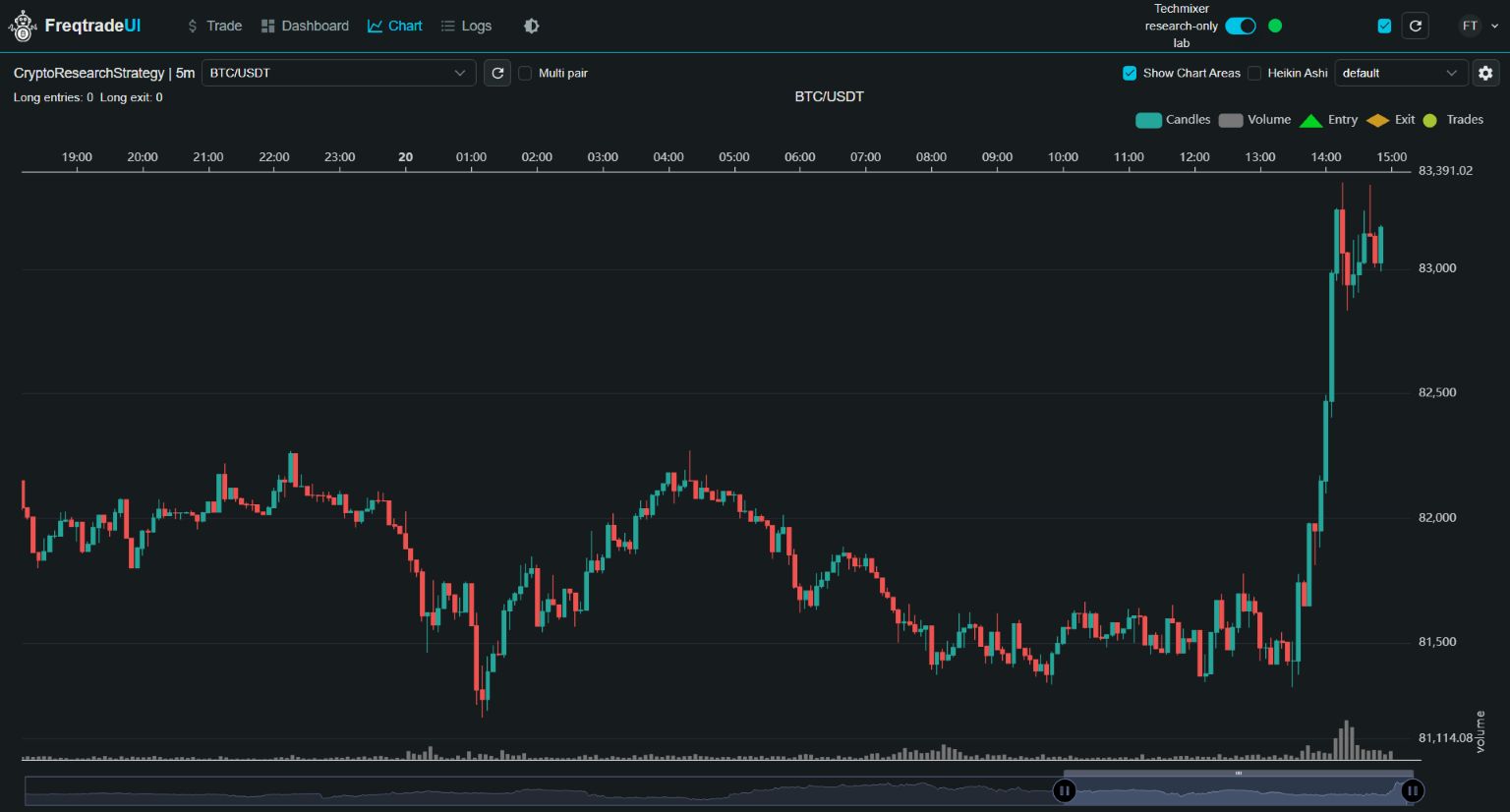
Our capture used the same application inside an isolated container, with host access mapped to 127.0.0.1:8088. That explains the different local port; it is not an internet service. The chart showed zero long-entry signals. We also observed a successful current-data training cycle in the runtime log.
Do not publish the API through a tunnel, router rule or unrestricted VPS port. FreqUI includes controls designed for trading bots even when this strategy does not enter trades. Follow the official REST API security guidance and FreqUI documentation.
Step 9: Save the experiment and stop the process
Before changing features, write down the package versions, market, candle coverage, training/evaluation dates, target, acceptance settings and identifier. Save the config without secrets, strategy source, tests, prediction files and logs. Keep private UI configuration out of shared artifacts.
python -m pip freeze > requirements-tested.txt
freqtrade --version
Use a new FreqAI identifier when changing the experiment so cached files from one feature/target setup are not confused with another. Keep the original run for comparison. The official running guide explains model reuse and identifiers.
Press Ctrl+C in the terminal running the bot and wait for shutdown. Close its local dashboard. There is no reason to leave this demonstration running continuously after collecting the evidence you need.
Common setup problems and when to stop
| Symptom | Check first | Next action |
|---|---|---|
| LightGBM cannot load libgomp.so.1 | The system OpenMP library is missing. | Install your distribution’s libgomp1 package. Re-run the import before training. |
| No model or insufficient training data | Actual candle coverage, NaNs, warm-up and the active identifier. | Resolve missing history and read the first training error. Do not add keys or enable futures as a workaround. |
| Configuration command exits without working | Error text and the displayed combined configuration. | Fix the incomplete section; do not treat exit status alone as a pass. |
| Prediction files are missing | Training completed, identifier and backtesting_predictions directory. | Check the log before rerunning. A different identifier means a different path. |
| Local UI will not connect | Bot process, local port, private API config and chosen password. | Keep access local. Do not disable authentication to fix a connection problem. |
Stop if public data is unavailable under the provider’s rules, the safety tests fail, or you cannot explain the target and time split. Adding more AI components will not fix those problems.
Questions before extending the lab
Can I import a pretrained FreqAI model shared online?
Do not load untrusted pretrained model files into FreqAI. Model serialization formats can carry executable behavior. This guide trains locally from public candles and distributes source files only, not model artifacts. Review the official FreqAI running documentation before importing or reusing any external model.
Does this research bot need MCP, Claude Code or n8n?
No. Freqtrade, FreqAI and LightGBM run this workflow directly. A separate assistant can help explain a sanitized log or a read-only prediction export, but it does not need access to the bot control API. This guide installs no MCP connector and grants no agent permission to force entries, change configuration or place orders.
Related Techmixer guides
- Build a Vibe Trading research workflow for the wider evidence-and-review process.
- AI investment tools for comparing research roles before choosing a stack.
- Techmixer AI Tools for more setup guides and practical AI workflows.
Our take
FreqAI is worth learning when you want to understand how a model moves from historical candles to stored predictions. Start with one market and make the output inspectable. The most useful milestone here is not a rising balance chart; it is being able to explain where each prediction came from and why the evaluation might be misleading.
Method and limits: Techmixer installed the pinned Python package in an isolated Linux container, checked dependencies, ran four safety-test methods, replayed the specified historical period, inspected real prediction files and opened the authenticated local chart. The screenshots are actual captures of that execution, with notebook output exported for readability. No exchange authentication, simulated orders, live orders, investment return or production reliability was tested. The UI helper’s native-host route is supplied for readers; the captured runtime used a loopback-only container port mapping.
Last reviewed: 20 October 2026. This is a software research tutorial, not financial advice or a recommendation to trade cryptocurrency.