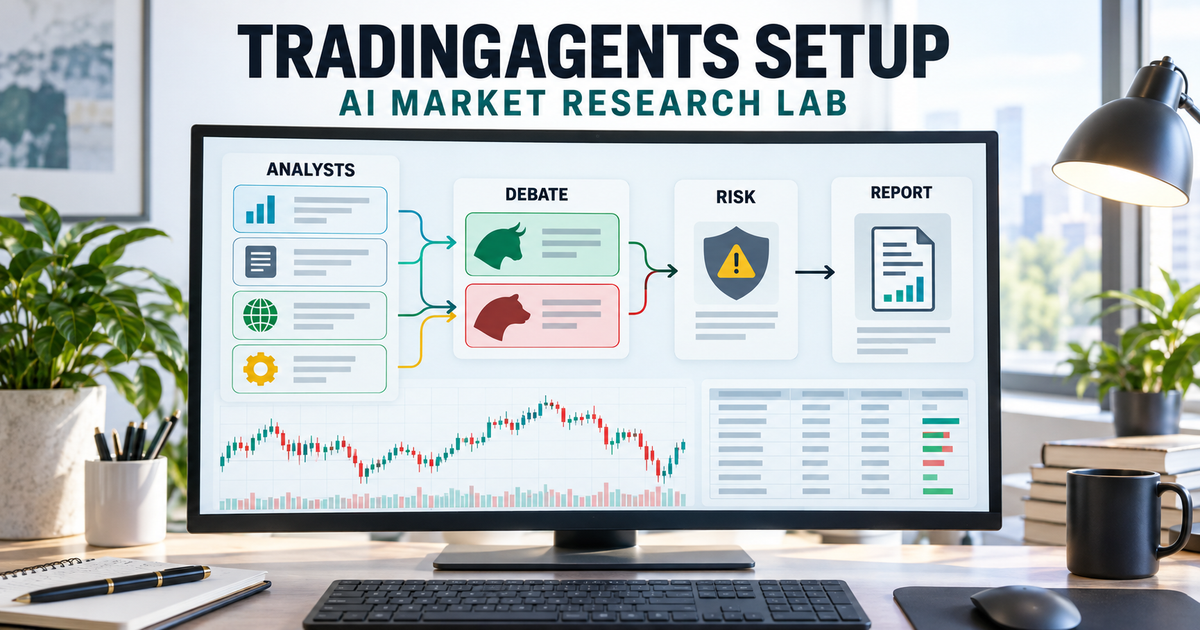
free AI trading agents can be built with the open-source TradingAgents framework and a local Ollama model, but “free” does not mean effortless, guaranteed or ready to trade real money. TradingAgents coordinates market, news, sentiment and fundamentals analysts, bull and bear researchers, a trader, risk reviewers and a portfolio manager to produce a research decision. Use it for learning, historical analysis and paper research only.
Quick answer
Install TradingAgents in an isolated Python 3.12 environment, choose Ollama for local inference or supply a supported cloud-model key, configure only the data sources you understand, and run the interactive CLI against a historical ticker/date. Treat every output as a hypothesis. Do not connect the framework to a brokerage account, and do not risk capital until you have independently validated data integrity, reproducibility, transaction costs and out-of-sample results.
What to know first
- Open source is not the same as zero cost: TradingAgents is Apache-2.0 software, while cloud LLM calls and some data services can charge separately.
- Local inference is the free-token route: Ollama can run a model locally, but performance and output quality depend on your hardware and chosen model.
- It is a research framework: the repository says it is not financial, investment or trading advice.
- The documented exchange is simulated: this guide deliberately excludes broker credentials and live-order execution.
- One result proves nothing: the project includes a backtest command because individual decisions are not enough to establish reliability.
- Outputs can change: LLM sampling, current news and social data make repeated runs non-deterministic.
What TradingAgents does
TradingAgents models a small research firm rather than asking one chatbot for a stock tip. Separate agents inspect technical indicators, fundamentals, news and sentiment. Bullish and bearish researchers debate the evidence, a trader forms a proposal, risk agents challenge it from different risk tolerances, and a portfolio manager produces the final decision.
The accompanying paper describes seven core roles and evaluates the framework on historical data. That is evidence that the architecture can be studied, not proof that a fresh installation will reproduce the paper or beat the market. The current repository explicitly says results depend on the backbone model, temperature, period, data quality and other non-deterministic factors.
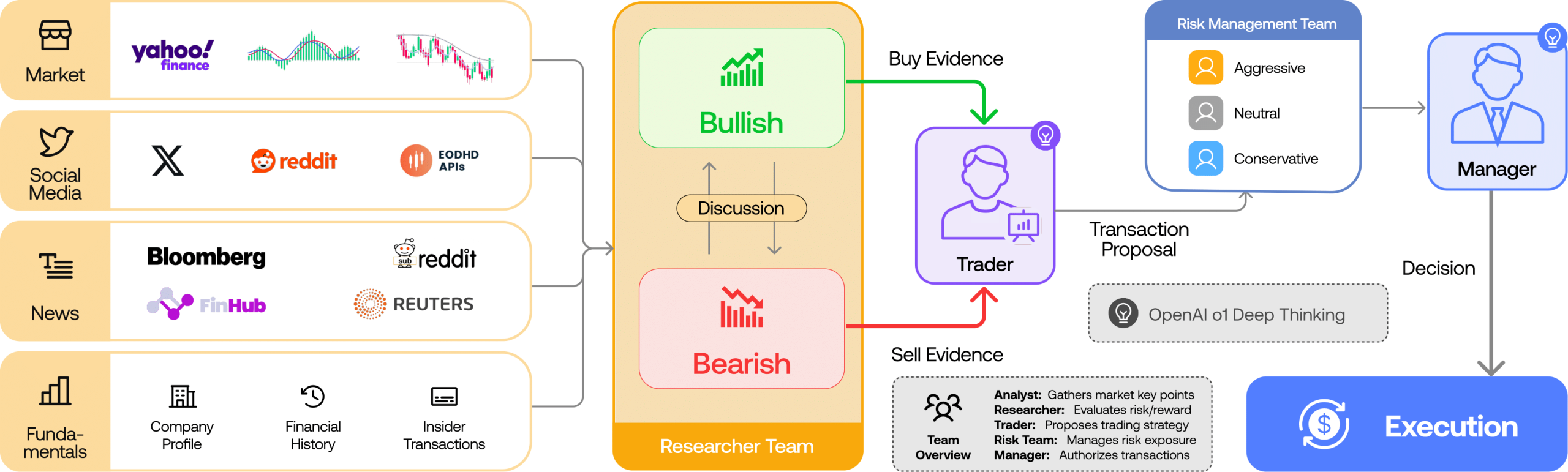
Are these free AI trading agents actually free?
| Component | Can be free? | Real limitation or cost |
|---|---|---|
| TradingAgents framework | Yes | Apache-2.0 code, but you maintain the installation and updates |
| Local LLM through Ollama | Yes | Requires suitable RAM/VRAM, storage, electricity and patience |
| Cloud LLM | Sometimes limited | Free credits expire or throttle; multi-agent runs can make many model calls |
| Market prices and indicators | Often | Public sources can be delayed, incomplete or governed by changing terms |
| SEC EDGAR fundamentals | Yes for supported filings | US-filer coverage, filing-date constraints and an identifying user agent |
| News and sentiment | Varies | Coverage, freshness, API limits and licensing differ by vendor |
| Reliable production system | No | Monitoring, validated data, model access, compliance and operations have costs |
Best choice by use case
- Good fit: learning multi-agent systems, comparing analyst roles, historical experiments and paper-trading research.
- Possible with care: internal research tooling where a human verifies every input, calculation and conclusion.
- Poor fit: unattended alerts that users may mistake for regulated advice.
- Do not use: automatic execution with borrowed money, retirement funds or capital you cannot afford to lose.
Before starting the TradingAgents setup
| Requirement | Practical starting point | Why it matters |
|---|---|---|
| Python | Python 3.12 in a dedicated virtual environment | Matches the current project instructions and isolates dependencies |
| Git | Current Git client | Clones the official repository and makes updates auditable |
| LLM | Local Ollama model or one supported provider key | The agents cannot reason without a model backend |
| Hardware | Enough RAM or VRAM for the selected local model | Local models can be slow or fail when memory is insufficient |
| Data | Start with default/public sources and a historical US ticker | Reduces the number of variables in the first run |
| Risk boundary | No brokerage key; no live-order adapter | Prevents a research mistake from becoming a financial loss |
TradingAgents setup in 9 steps
1. Choose local or cloud inference
For the lowest direct token cost, choose Ollama and a local model that fits your machine. Cloud models are easier to run and may reason better, but each analyst, debate and risk round can generate multiple calls. Set a budget and provider usage limit before using paid APIs.
2. Install the prerequisites
Install Git and Python 3.12. Install Ollama only if you are using the local route. Confirm each executable in a new terminal with git --version, python --version and, where relevant, ollama --version. Do not weaken Windows security or execution policies globally to make activation work; Command Prompt activation is an alternative if PowerShell blocks a script.
3. Clone the official repository
git clone https://github.com/TauricResearch/TradingAgents.git
cd TradingAgents
Check the repository URL before entering API keys. The review date used TradingAgents 0.5.1, released in September 2026. Later releases can move imports, defaults or provider names, so compare the current README and changelog before updating an existing installation.
4. Create an isolated Python environment
On Windows PowerShell:
py -3.12 -m venv .venv
.\.venv\Scripts\Activate.ps1
python -m pip install --upgrade pip
pip install .
On macOS or Linux:
python3.12 -m venv .venv
source .venv/bin/activate
python -m pip install --upgrade pip
pip install .
The project also documents Conda and uv. Use one environment manager consistently; mixing global pip, Conda and uv installations makes dependency problems harder to diagnose.
5. Prepare the environment file
Copy the example without publishing it to Git:
# Windows PowerShell
Copy-Item .env.example .env

# macOS or Linux
cp .env.example .env
Add only the keys needed for your selected provider and data path. Never paste a brokerage password, seed phrase or live trading credential into this file. Keep .env excluded from source control and rotate any key that appears in a screenshot, terminal recording or public repository.
6. Configure the low-cost Ollama route
Start Ollama and pull a model that fits your computer:
ollama pull <model-id>
ollama list
When the CLI asks for the provider, select Ollama. Choose the exact installed model ID, using the custom model option when it is not listed. The default Ollama endpoint is http://localhost:11434/v1. A model being able to run does not mean it is strong enough for financial reasoning, so compare its output against source data.
Docker users can use the project profile:
docker compose --profile ollama run --rm tradingagents-ollama7. Launch the interactive CLI
tradingagents

# Or from the repository
python -m cli.main
The CLI asks for the ticker, analysis date, analyst team, research depth, LLM provider and models. Start with one liquid ticker, a past date, the smallest useful analyst set and shallow debate depth. This keeps the first run understandable and limits model calls.
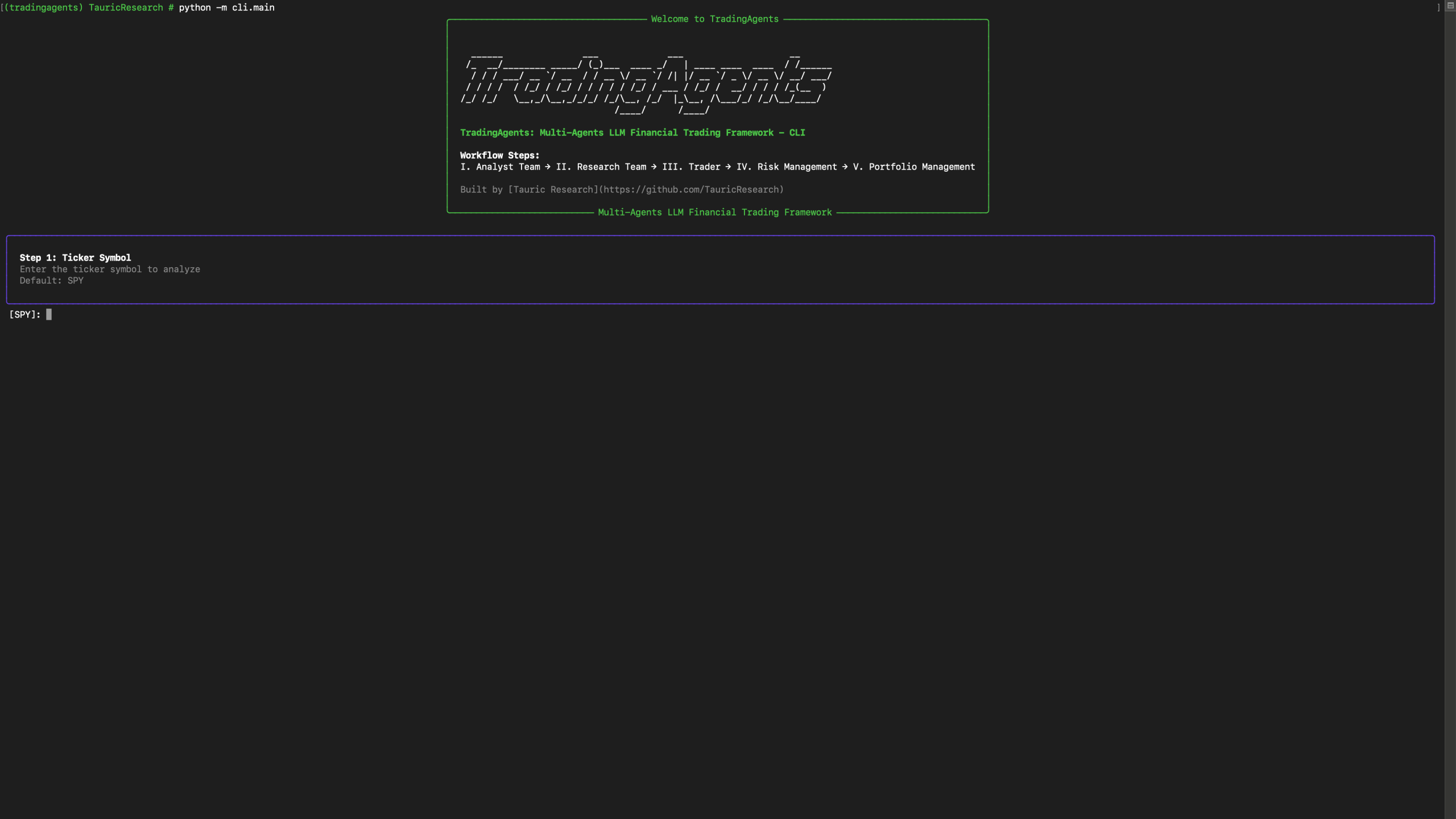
8. Review the decision as research, not an order
Read the analyst reports, bull/bear debate, risk discussion and final portfolio-manager reasoning. Verify every quoted price, filing fact, indicator and news claim against its original source. Record which model and data vendors served the run. A polished final recommendation can still be based on stale, incomplete or hallucinated evidence.
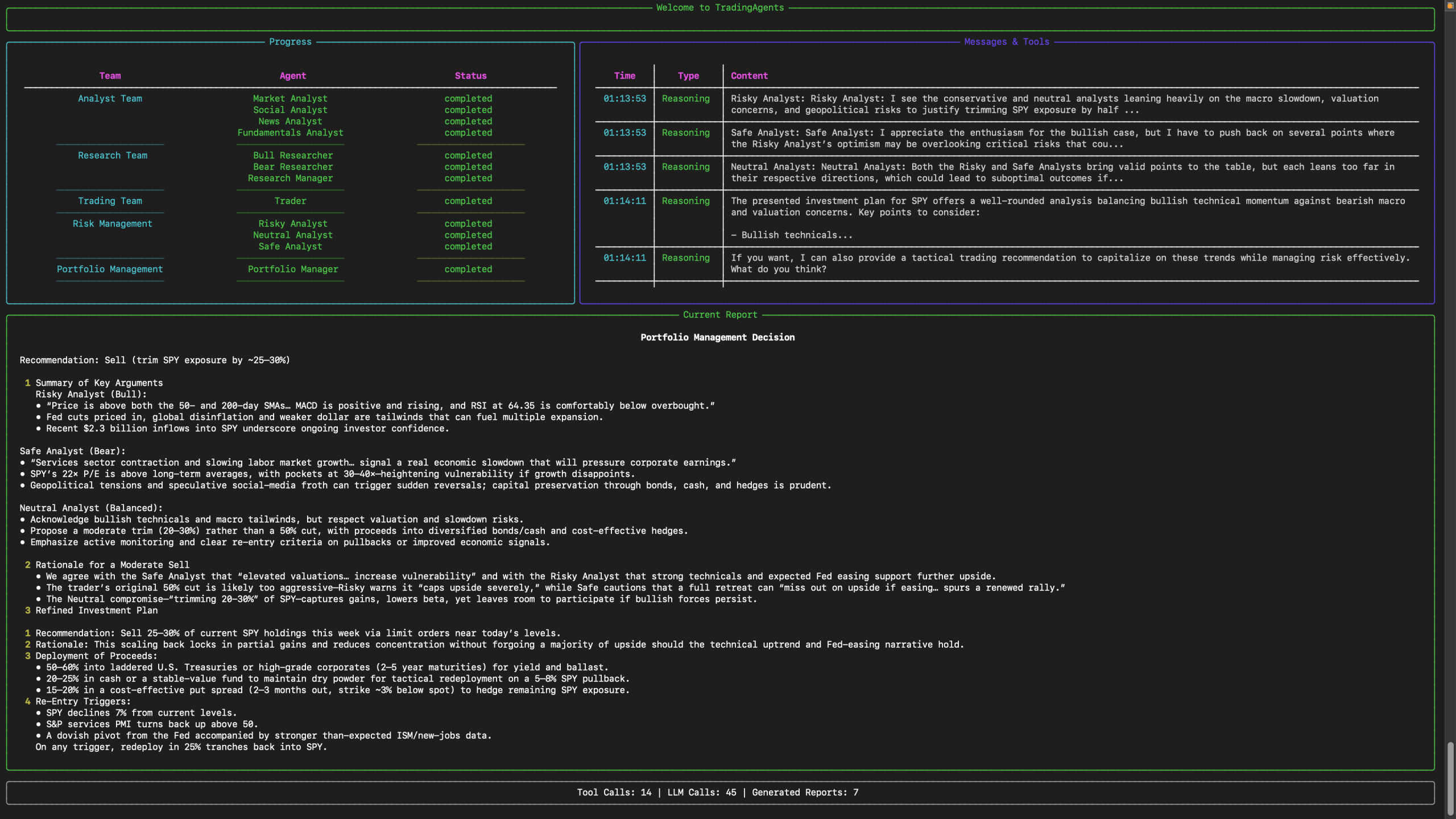
9. Backtest before trusting any pattern
The repository provides a backtest command because one good-looking decision is meaningless:
tradingagents backtest NVDA,AAPL --start 2026-06-01 --end 2026-08-01 --every 7Use more than one ticker, market regime and holding window. Separate development and evaluation periods, include fees and slippage in any independent simulation, and compare against simple baselines such as buy-and-hold. The project warns that reproduced results need not match the paper because models, data and sampling change.
A safer research workflow
- Pick a historical date whose filings and prices can be independently checked.
- Run a narrow analyst set and save the configuration, model IDs and data vendors.
- Verify source facts before reading the final recommendation.
- Repeat the same run and note disagreements caused by model or live-data variation.
- Backtest across several assets and market regimes with an untouched evaluation period.
- Paper-track future decisions without changing the rules after seeing the outcome.
- Require a qualified human to make every real-world investment decision independently.
What the paper proves and what it does not
The paper proposes a structured multi-agent architecture and reports historical comparisons against five baselines over a 2024 technology-stock simulation. It demonstrates a research method and an experimental result. It does not establish a universal trading edge, provide a warranty, account for every live-market cost or show that a different model and data stack in 2026 will reproduce the figures.
| Evidence | Useful conclusion | Wrong conclusion |
|---|---|---|
| Specialized agents and debates | Different analytical roles can be orchestrated into a traceable workflow | More agents automatically create more accurate forecasts |
| Historical backtest | The framework can be evaluated against defined baselines | Past returns guarantee future profits |
| Risk-management agents | Risk arguments become visible in the report | An LLM risk debate replaces portfolio controls or professional advice |
| Structured reports | Researchers can inspect intermediate reasoning and evidence | Readable explanations prove the underlying facts are correct |
| Open-source code | The system can be studied and modified | The full workflow is free to operate and safe for live trading |
Common setup problems
| Problem | Likely cause | What to try |
|---|---|---|
| Command not found | Virtual environment is inactive or installation failed | Activate the correct environment and rerun pip install . |
| Ollama connection error | Ollama is stopped or the endpoint is wrong | Confirm the Ollama service, model list and localhost endpoint |
| Local model runs out of memory | Model is too large for RAM/VRAM | Use a smaller quantized model or a controlled cloud provider |
| Missing data or API errors | Key, quota, ticker format or vendor coverage issue | Check the configured vendor and use the exchange suffix documented for that market |
| Run is expensive | Too many analysts, debate rounds or high-cost models | Reduce scope and set TRADINGAGENTS_MAX_TOKENS and provider budgets |
| Repeated runs disagree | Sampling and changing news/social inputs | Pin historical inputs where possible and evaluate distributions, not one answer |
When to stop
- Stop if you cannot identify the source and timestamp of the market data.
- Stop if the model invents prices, filings or news that you cannot verify.
- Stop if a key or credential appears in logs, screenshots or version control.
- Stop before adding a live broker connection; that is outside this research guide.
- Do not act on the output when the potential loss would affect essential savings, debt obligations or financial security.
Official sources
- TradingAgents GitHub repository
- Latest TradingAgents release
- TradingAgents research paper on arXiv
- Official environment-variable example
- Official Docker Compose configuration
- Current default configuration
FAQ
Are TradingAgents really free?
The TradingAgents code is open source under Apache-2.0. A local Ollama model can avoid cloud-model token fees, but suitable hardware, electricity, storage and optional market-data or cloud-model services can still cost money.
Can TradingAgents place real trades?
The public framework is presented as a research tool and its documented workflow uses a simulated exchange. This guide does not connect it to a broker or authorize live orders.
Can TradingAgents guarantee profitable decisions?
No. The paper reports historical experiments, while the repository warns that results vary with models, temperature, dates, data quality and non-deterministic outputs. Backtests do not guarantee future performance.
What is the cheapest TradingAgents setup?
Use the open-source framework with a local Ollama model and free public data sources where their terms permit. The trade-off is slower inference, hardware requirements and potentially weaker reasoning than paid cloud models.
Which Python version does TradingAgents require?
The current installation instructions use Python 3.12. Create an isolated environment so TradingAgents dependencies do not conflict with other Python projects.
Should I use the latest market date for my first run?
No. Start with a historical date and a familiar liquid ticker. Review the data snapshot and run repeated backtests before considering any current-market interpretation.
Why can two TradingAgents runs disagree?
Language-model sampling is non-deterministic, and live news or social inputs can change. The repository says even a fixed ticker and date may not produce byte-identical results.
Related Techmixer guides
- Explore the Techmixer AI Tools hub
- Build a Vibe Trading System for AI Research
- Understand Vibe Trading and AI Trading Tools
- Learn AI Engineering from Scratch
- Build an Always-Free AI Server on Oracle Cloud
- Compare No-Code AI Workflow Automation Tools
Our take
TradingAgents is interesting because it forces free AI trading agents to expose competing views and a risk review instead of returning one opaque answer. That structure improves inspectability, not truth. The correct first milestone is not a profitable trade; it is a reproducible paper-research run whose data, assumptions and failure modes you can audit. Keep execution disconnected and treat every recommendation as an unverified research artifact.
Evidence note: This draft is based on TradingAgents 0.5.1 repository documentation, the arXiv paper version dated 3 June 2025 and official project screenshots. Techmixer did not install the framework, benchmark local models, reproduce the paper or place any simulated or live trade for this draft.
Last reviewed: 29 September 2026.