To research a stock with AI, start with official company documents, ask the assistant to extract facts with citations, and check the important numbers yourself before writing a conclusion. The useful output is a report you can trace back to evidence, not a confident buy or sell answer.
This walkthrough builds a small Microsoft research note from its FY2025 annual report. You will import a source, run a constrained prompt, check the statements, calculate two ratios and turn the result into a report with clear limits. It follows our AI finance tools research guide, but you do not need a trading terminal, broker connection or autonomous agent.
Quick Answer
Use a source-aware notebook for extraction, the original filing for verification, and a spreadsheet or calculator for arithmetic. Keep a small evidence table containing the claim, reporting period, units, source location and verification status. Leave unsupported claims out of the finished report. A citation is a place to begin checking, not a guarantee that the answer is correct.
What to Know First
This is a research-method tutorial, not a recommendation to buy Microsoft or any other security. We deliberately use a fixed historical document so you can reproduce the checks. FY2025 is not the latest information as of this guide’s review date. For a current investment question, obtain the latest filings and subsequent disclosures before drawing conclusions.
- You need: a browser, an account with access to the demonstrated notebook, and a calculator or spreadsheet. No paid market feed is required for the historical arithmetic shown here; AI-service access and usage limits depend on your account.
- Keep inputs public: do not upload brokerage statements, employer research, account credentials or personal financial information for this exercise. A cloud notebook processes the sources you provide; this is not an offline workflow.
- Keep the task read-only: do not connect a broker, wallet or trading API. Research notes and simulated examples are enough.
The live interface used for our captures on 20 October 2026 calls Google’s tool Gemini Notebook, formerly NotebookLM. Older instructions and URLs may still use the earlier name. The principles also apply to other source-aware assistants, but the button-by-button example below uses this interface only.
Step 1: Ask a Question You Can Actually Check
Start narrower than “Is this a good stock?” That question combines business quality, valuation, time horizon and personal circumstances. A chatbot cannot resolve those merely by summarizing an annual report.
Our example question is: What do Microsoft’s FY2025 statements show about revenue growth, operating profitability and cash remaining after cash purchases of equipment? Record the company, period, currency and document before asking for an answer. Here, the financial year ends on 30 June 2025 and the selected financial statement amounts are in USD millions.
A practical note header is enough: company; ticker; period covered; document title; source URL; document publication date where established; retrieval date; and what the report does not attempt to answer. Do not substitute the fiscal year-end for the date the document became available. A later shareholder letter may sit beside earlier financial statements on the same website.
Step 2: Collect Official Sources Before Opening the Chat
Open the company’s investor-relations site or its regulator’s filing system yourself. For our worked example, use the Microsoft FY2025 annual report. Keep it in a separate tab so the assistant’s answer never becomes your only view of the source.
For broader U.S. company research, use a Form 10-K for the annual account, relevant later 10-Q filings and material subsequent disclosures. Investor.gov’s guide to reading a 10-K and 10-Q explains the business, risk, management discussion and financial-statement sections. A glossy annual report and the full regulatory filing are not always identical.
Our small demonstration uses one annual-report webpage, not a complete current source pack. In particular, its references to risks in the full 10-K are a reason to open that document, not permission for AI to invent a risk section. Two pages repeating the same issuer’s figures are a consistency check, not independent corroboration.
Step 3: Create a Notebook and Import the Report
- Open Gemini Notebook and complete any required sign-in yourself. Check your account’s available allowance before starting; do not assume unlimited access.
- Select New notebook and give it a specific title, such as Microsoft FY2025 source check.
- Choose Add source or Add sources, then Websites. Paste the official annual-report URL and select Insert.
- Wait for the imported report to appear as a selectable source. Select only that source for the first extraction.
- Confirm that the imported text includes the financial statements, year headings and units. An imported title alone does not prove that the important table was captured.
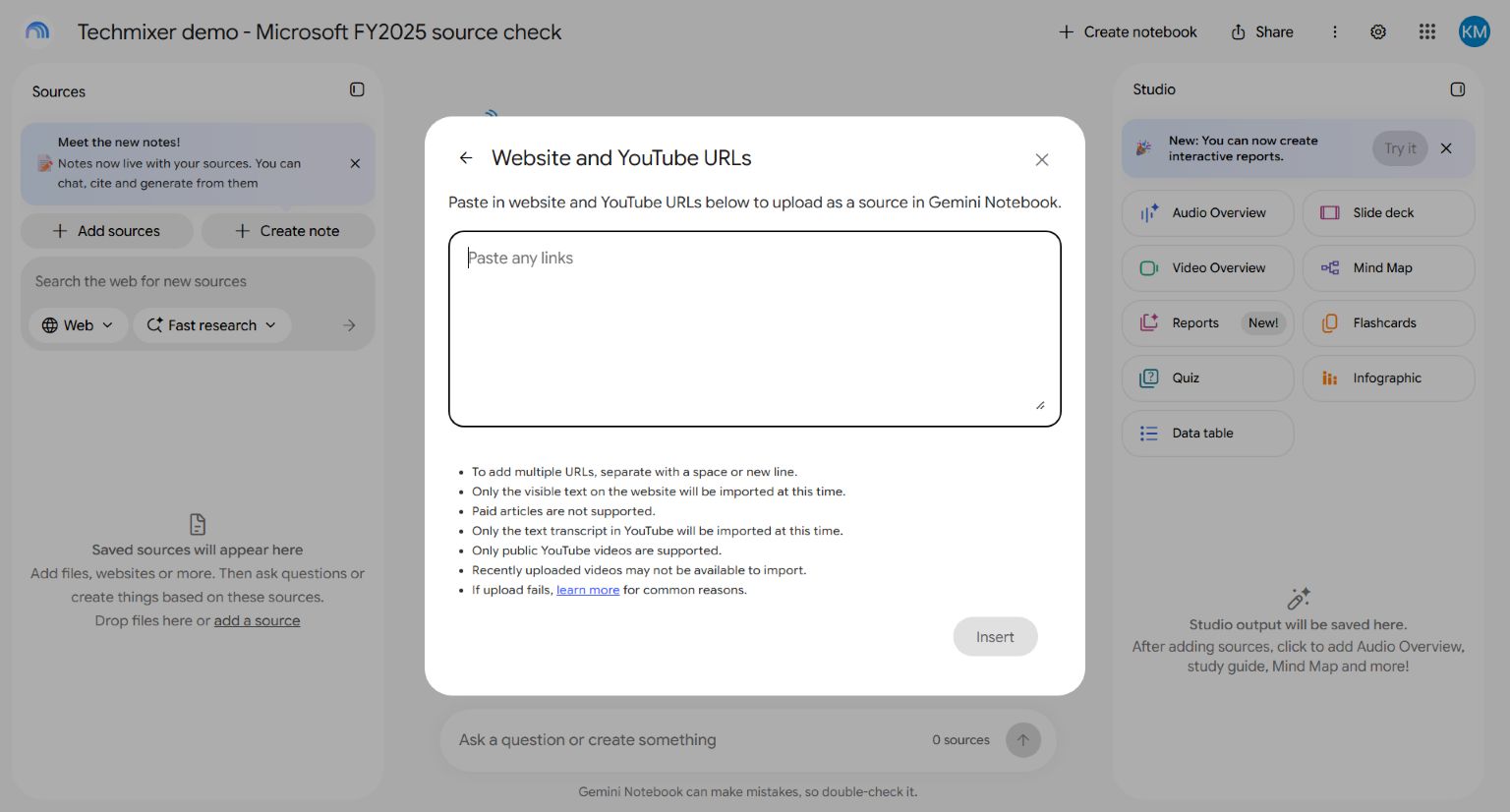
Google’s source-import documentation describes website ingestion. Do not assume that linked documents or interactive data behind a page were imported with it. If a table is missing, use a supported official document or a clearly labelled excerpt with its URL and location. Do not fill gaps from memory.
Step 4: Ask AI to Extract Facts, Not Pick a Winner
Separate extraction from interpretation. First ask for a compact table that preserves the reporting period, units and signs. Here is the prompt used in our live example:
Use only the selected Microsoft 2025 Annual Report.
This is a historical FY2025 research exercise, not current investment advice.
Do not browse, estimate or recommend a trade.

Return a compact table:
metric | FY2025 value | FY2024 value if requested | currency/unit |
exact report section | citation.

Extract total revenue for 2025 and 2024, operating income for 2025,
net cash from operations for 2025, and the cash-flow line for
additions to property and equipment for 2025.
Preserve the negative sign or parentheses for the last line.
If a value is absent, write NOT FOUND.
End with one limitation of using this source alone.
Do not calculate ratios yet.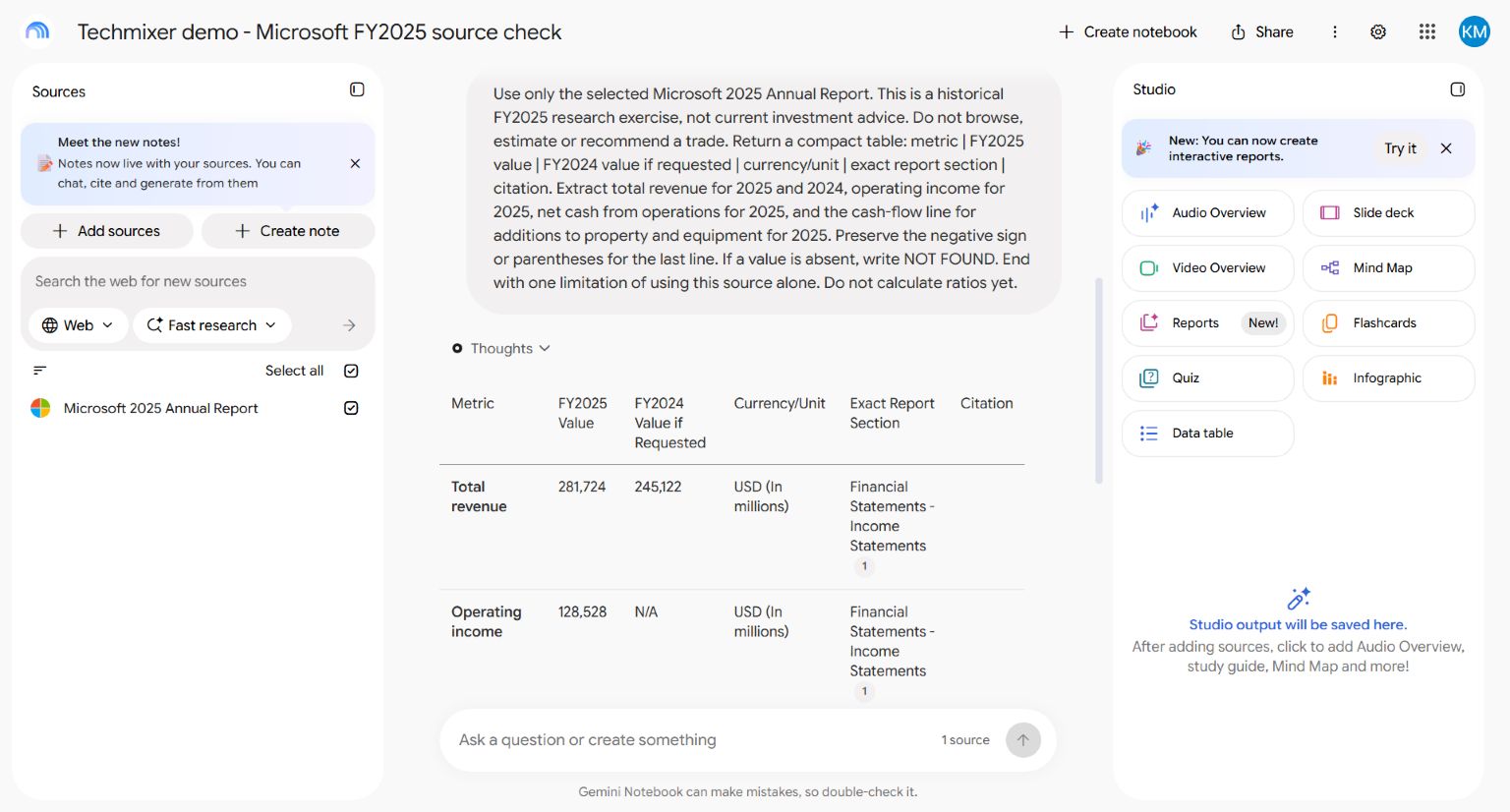
The captured run returned the requested amounts with numbered citations and retained the equipment-spending outflow sign. That is one observed extraction, not an accuracy benchmark. Your wording, imported source, account or model may produce a different answer. “Use only this source” is a useful instruction, not a technical guarantee against unsupported content.
Step 5: Check Every Important Claim in the Original
Open each citation, read the surrounding passage and then compare it with the original report. Google’s chat guidance describes citation navigation. Check whether the citation supports the exact claim, not merely whether it points to a real document.
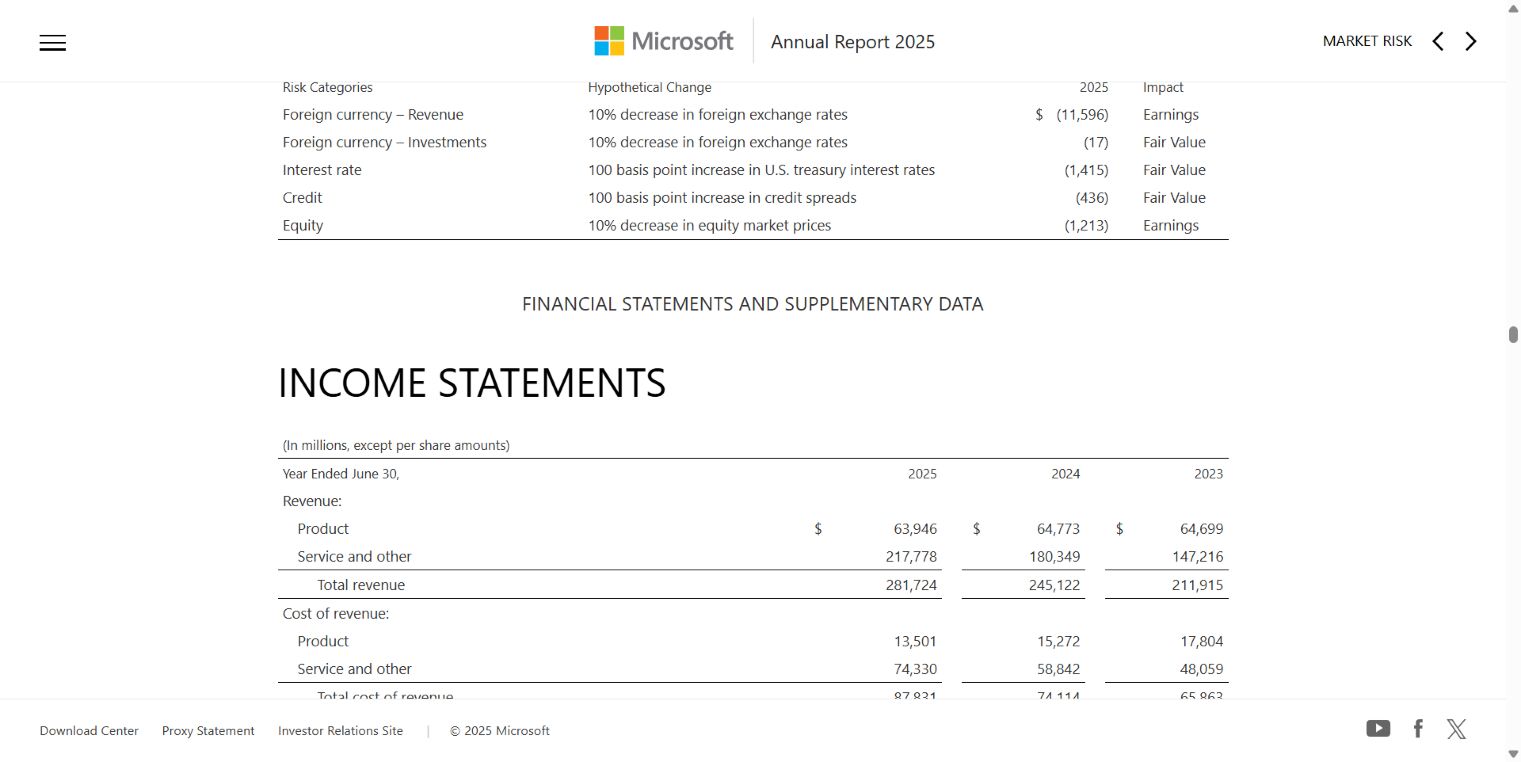
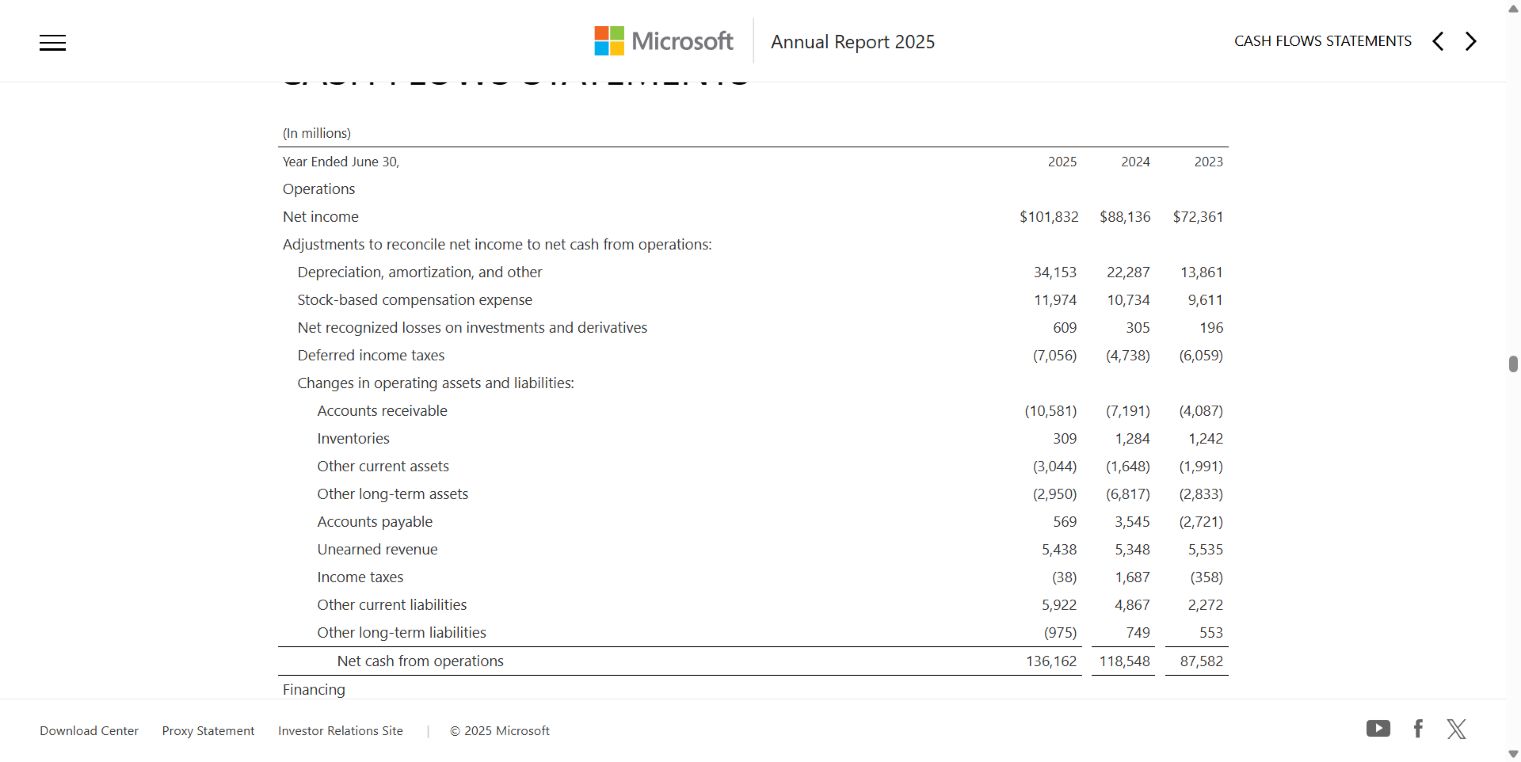
For the revenue row, open the report’s income statement. Match the year column and scale before copying a number. The source amounts below are USD millions, not dollars per share or USD billions.
| Source item | FY2025 | FY2024 if used | Location / check |
|---|---|---|---|
| Revenue | 281,724 | 245,122 | Income statement; both year columns checked |
| Operating profit | 128,528 | Not used | Income statement; not net profit |
| Operating cash generation | 136,162 | Not used | Cash-flow statement; positive inflow |
| Cash equipment additions | (64,551) | Not used | Cash-flow statement; negative outflow |
Source: Microsoft’s FY2025 income statement and cash-flow statement, checked 20 October 2026. Its FY2025 earnings release is an additional issuer source for checking the annual totals. Keep the raw reported figures in your evidence table; do not make an AI-rounded value your only record.
Use a status for each row: checked, needs clarification or not found. If the assistant supplies a plausible value but you cannot locate it, exclude it from the report. Asking a second chatbot to agree is not a substitute for opening the source.
Step 6: Recalculate the Numbers Outside the Chat
Now use the checked inputs. In a blank spreadsheet, put FY2025 revenue in B2, FY2024 revenue in B3, operating profit in B4, operating cash in B5 and the positive magnitude of cash equipment purchases in B6. Keep USD millions throughout.
B2 = 281724
B3 = 245122
B4 = 128528
B5 = 136162
B6 = 64551

Revenue growth:       =(B2/B3)-1
Operating margin:     =B4/B2
Cash residual:        =B5-B6
Format the first two results as percentages. The independently recalculated results are 14.93% revenue growth, 45.62% operating margin and a 71,611 million USD cash residual. These are calculations from reported inputs, not extra company forecasts.
The last calculation is deliberately named narrowly: operating cash less cash purchases of property and equipment. It is a simple, non-GAAP cash-flow proxy, not a universal definition of free cash flow, total investment or cash available to shareholders. It does not include every financing, acquisition, lease or capital-commitment consideration. If your spreadsheet keeps the source outflow as negative, add that signed value instead of subtracting it again.
Do not turn a business ratio into a valuation conclusion. This exercise supplies no timestamped stock price, valuation model or comparison of alternative investments.
Step 7: Challenge the Draft Before It Becomes a Conclusion
Give the assistant a second job: identify claims that the supplied evidence cannot support. Try this follow-up prompt after you have checked the extraction:
Audit the draft below against the selected sources.
For each material claim, return:
claim | supporting section | fact, calculation or interpretation |
supported, contradicted or not established | correction needed.

Do not add figures or recommend a trade.
Keep absent evidence visible. A source citation must support the exact claim.
Draft: [paste your research note here]
A deliberately incorrect practice claim: “Revenue doubled, so the stock must be cheap.” This is a teaching example, not an error observed in our captured AI run. The checked growth calculation contradicts the first part; the second part requires valuation evidence that we have not supplied. Fixing only the growth number would still leave an unsupported conclusion.
Also ask what the notebook cannot answer: whether later results changed the picture, whether a proposed risk is documented, or whether an attractive business is attractively priced. A second AI pass is another aid to your review, not an independent audit.
Step 8: Write a Short Report with Evidence and Open Questions
You can now turn the verified material into a readable note. Keep facts, calculations and interpretation separate rather than hiding them in one persuasive paragraph.
Example research note: Microsoft FY2025
Scope: a historical statement-reading exercise, not a current investment recommendation. The checked annual-report inputs show higher revenue than the prior year. Recalculation gives approximately 14.93% growth and a 45.62% operating margin. Our narrow operating-cash-minus-cash-equipment-spending calculation leaves a positive residual; it does not measure every investment obligation or establish distributable cash.
Interpretation: the combination makes cash investment a sensible follow-up research question, not proof that the shares are inexpensive.
Still to investigate: subsequent filings, the full risk disclosures, investment commitments, comparable businesses and a separately sourced valuation. No price target or trade instruction is justified by this note.
The example above is a Techmixer-written summary based on the checked table, not a screenshot transcription or an unedited AI answer. Attach the source links and calculation sheet when you keep or share the note.
For your own report, use these fields:
- Research question and scope: company, reporting period and information cutoff.
- Source register: official URL, document title, publication date where established and retrieval date.
- Evidence table: claim, raw value, unit, location, checked status and reviewer.
- Calculations: inputs, formula, rounding and definitions.
- Interpretation and open questions: clearly separated from reported facts.
- Change log: what was updated and which new document caused the update.
Step 9: Update the Research Without Automating the Decision
For a current company review, add the next relevant official disclosure, compare it with your saved source register and recheck affected claims. Preserve the old note so that changed assumptions remain visible. A fresh retrieval date does not make old financial information current.
If you later automate collection, start with a review queue rather than automatic publication or trading. Keep retrieval logs, detect failed imports and duplicate documents, and require a person to approve the revised report. Our no-code workflow guide is a separate starting point; adding automation is not necessary for this first exercise.
When the Workflow Fails
- Missing table: inspect the imported source. Switch to a supported official file or labelled excerpt; do not repeatedly ask the model to guess.
- Different numbers: compare reporting periods, restatements, consolidated versus segment data, scale and accounting definitions.
- Broken or vague citation: search the original document for the exact row. Mark the claim unresolved until you can locate it.
- Notebook interface stalls: keep your source register and verified figures outside the chat. Reload only after saving work you need. A screenshot is useful evidence, but it is not your calculation record.
- An answer predicts guaranteed returns: stop and return to verifiable facts. Investor.gov’s AI investment-fraud alert is a useful reminder that an AI label does not make a financial claim trustworthy.
FAQ
Can I use this notebook as evidence for a historical backtest?
Not by itself. The annual-report webpage contains material published after the financial year-end, and a current webpage is not a point-in-time archive. A backtest needs documents actually available by each decision date, their publication timestamps and a reproducible data record. This tutorial checks historical financial facts; it does not validate a trading strategy.
What should I do if a company later restates earlier figures?
Keep the earlier report and record the replacement source, publication date and affected claims. Recalculate comparisons using a consistent set of figures, label restated amounts, and explain the change rather than silently overwriting the evidence. A current comparison and a historical as-known-at-the-time record serve different purposes.
Related Techmixer Guides
- Compare AI finance tools, costs and research risks
- Browse practical AI tool guides
- Understand the separate TradingAgents research setup
- Explore a more technical AI trading-research workflow
- Learn the foundations behind AI workflows
Our Take
The most useful AI finance habit is not finding a more impressive prompt. It is refusing to promote a plausible sentence into a fact until you can show where it came from. Start with one narrow question, a small source pack and a report that openly states what it cannot conclude. That is a better base for learning than an elaborate agent that hides its evidence.
Last reviewed: 20 October 2026. Review method: Techmixer imported the public Microsoft annual-report webpage into Gemini Notebook, ran the extraction prompt shown above, captured the live interface and original financial statements, and independently recalculated the displayed ratios. We did not test trade execution, investment performance or all AI products. The report is a limited historical teaching example; it is neither an audit of Microsoft’s accounts nor personalized financial advice.