

DirectX 10.1 is a legacy graphics API capability, not a separate modern Windows download. On current Windows PCs, use Windows Update for the operating-system DirectX runtime. Install Microsoft’s legacy DirectX End-User Runtime only when an older game specifically needs optional files such as D3DX or XInput.
Quick Answer
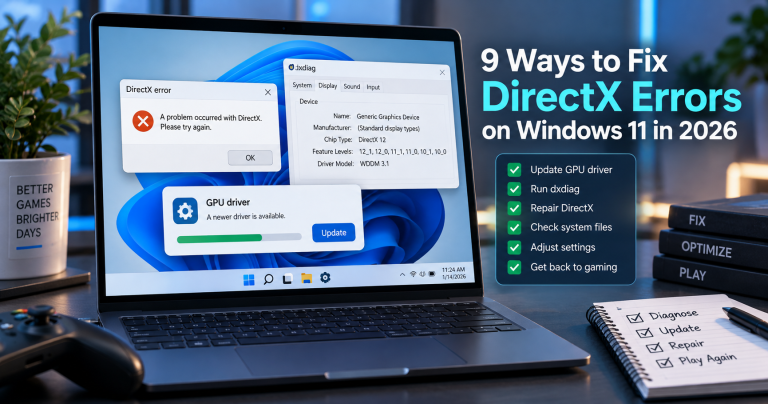
If a game reports a missing DirectX file, first identify the exact error and check the game’s system requirements. Run dxdiag to check the DirectX version Windows reports. Update Windows and your graphics driver from their official sources. If the error names a legacy component such as d3dx9_43.dll or XInput1_3.dll, use Microsoft’s DirectX End-User Runtime page; it adds optional legacy side-by-side libraries but does not upgrade or replace the DirectX runtime built into Windows.
What to Know First
- DirectX is part of Windows. A separate “DirectX 10.1 for Windows 10/11” installer is not the way to upgrade a modern system.
- The DirectX End-User Runtime is for older applications that depend on optional legacy SDK components. Microsoft says it does not modify the DirectX runtime installed with Windows.
- The DirectX version shown by Windows does not guarantee that a particular graphics card supports every feature a game needs. Check the game requirements and the GPU maker’s specifications too.
- Do not download individual DLL files from third-party sites. A DLL can be tampered with, mismatched, or placed in the wrong folder.
Check the DirectX Version in Windows
Use Microsoft’s DirectX Diagnostic Tool before installing anything:
- Press Windows key + R, type
dxdiag, then press Enter. You can also search for “dxdiag” from Start. - If Windows asks whether to check driver signatures, choose the option to continue.
- On the System tab, read the DirectX Version line. On the Display tab, note the graphics adapter and driver details.
- Compare those details with the specific game’s requirements. If the game lists a feature level or GPU requirement, confirm it with the graphics-card manufacturer; the DirectX version line alone is not a hardware compatibility test.
Microsoft’s DirectX support page explains how to check the installed version and directs users to Windows Update for current Windows releases.
Fix a Missing DirectX File Safely
1. Record the exact error
Write down the filename and the game that reports it. “DirectX error” is too broad to identify the fix. A missing legacy component is different from an unsupported GPU, a damaged game installation, or a graphics-driver problem.
2. Update Windows and the graphics driver
Install available Windows updates, restart, and get graphics drivers from Windows Update or the PC/GPU manufacturer. Avoid third-party driver bundles. Note that Windows 10 reached the end of standard support on October 14, 2025; check Microsoft’s current support guidance if this PC still runs Windows 10.
3. Install legacy components only when the error calls for them
For a game that specifically needs older DirectX SDK files, download the DirectX End-User Runtime Web Installer from Microsoft. Read the page’s notes, close the game, run the Microsoft installer, and restart if requested. This package supplies selected legacy components; it does not change the DirectX version built into Windows.
4. Repair the game before changing system files
Use the game launcher’s verify/repair option or reinstall the game from its official store if the error remains. Do not copy a DLL from another computer or place a downloaded DLL in Windows folders. If the game still fails, check its publisher’s support page for the exact error and supported operating systems.
What DirectX 10.1 Means Today
DirectX 10.1 belongs to an earlier generation of Windows graphics technology. It is relevant mainly when checking older hardware, games, or compatibility claims. It is not a standalone upgrade that adds newer graphics features to a current PC, and installing the legacy End-User Runtime cannot make an unsupported graphics card meet a game’s requirements.
If you are troubleshooting a current Windows game, continue with our DirectX error fixes for Windows 11 or the DirectX and Windows fixes hub. For older system-specific background, see our guides to DirectX on Windows 10/11 and DirectX 11 on Windows 7.
FAQ
Can I download DirectX 10.1 for Windows 11?
There is no separate DirectX 10.1 installer that upgrades Windows 11. Windows manages its DirectX runtime through the operating system. Use the legacy End-User Runtime only if an older game needs one of its optional components.
Does the DirectX End-User Runtime upgrade DirectX?
No. Microsoft states that the package installs selected legacy side-by-side libraries and does not modify the DirectX runtime installed with Windows.
Should I download a missing DirectX DLL by itself?
No. Use the game’s repair option and Microsoft’s official runtime package when appropriate. A standalone DLL from an unknown download site can be unsafe or incompatible.
Our Take
DirectX 10.1 is best treated as legacy compatibility context, not a download target for modern Windows. Start with the exact game error, check the system and graphics hardware, and install only the official legacy component that the error actually requires. Techmixer’s steps here are based on Microsoft documentation; we have not tested every game or hardware combination.
Last reviewed: 29 September 2026.

I want directx 10
I want directx 10 for game
HEY ALL U WANT Dx10 BUT I NEED IT OR AT LEAST SUMTHING HIGHER THAN Dx9c
I want directx 10 for game.
How can I download DirectX 10 Final – DirectX 10.1?
For Everyone,
if you want to download DirectX 10 on your computer, you can try install latest Windows Vista Services Pack 1 which bundles with DirectX 10.1
i think that it better for game
SPECIAL 4 STUPID PEOPLE HERE IS DirectX 10.1
http://rapidshare.com/files/32237608/d10_ZONA.WS.rar
relly this is enough ! i dont know how to install directx 10
I Need only Dx 10 Please I tried every day but i can not succeded
I want directx 10
How can I download DirectX 10 Final – DirectX 10.1?
I Need only Dx 10 Please I tried every day but i can not succeded
I Need only Dx 10 Please I tried every day but i can not succeded
Thanks a lot!!!
How can I download DirectX 10 Final – DirectX 10.1?
plz,i want directx10 for gaming…..plz help me……plz.plz
I WANT DIRECTX 10
Where can i find DirectX 10 for XP I see it is some release i don’t know now does somebody know about that?
I want directx10 for my PC, Thanks alot.
how can i download directX 10.1?coZ there’s nothing in here…
Hi. Hoq can i get DirectX-10 for my 32 bit vista ? can anybody e-mail me link where can i download directX10 ?i realy need this for my games.
where i can download directx-10 from vista??
I need directx 10 for vista PLEASE
PLEASE’I WANT DIRECT X FOR GAME’IMMEDIATLY
here is a link for DX10 cracked for XP
http://rs90.rapidshare.com/files/43588168/Direct_X_10_Cracked_for_windows_XP_ewares.org.rar
—
every body knows that DX10 is preinstalled in vista…
so no need to install dx10 in vista
get the vista SP1 for having latest updatest & Direct X
bye bye
i’m using vista and my directx 10 is corrupt, how can i download another one.
@Sarwarsy,
You can download DirectX 10.1 standalone software from Microsoft website or Via Windows Vista SP 1 Update
Here is the standalone DirectX 10 download:
Get all DirectX downloads
2. Download Latest DirectX updates
shut the hell up all you people who want dx10 for xp. there’s no such thing. theres a hack that makes xp think it’s running dx10 but its not true-the rendering doesn’t change. and if your computer can’t run dx10 compatible games, then get a better pc. dx10.1 is not being released for vista for a while yet, because there were some problems, including the fact that microsoft wanted to introduce a new series of video cards that only supported dx10.1. do all you guys wanna buy a new video card for dx10.1? i don’t. so quit whining
Is Direct x10 is for the genuie windows product ?
Use Google and search for Alky Project
how to download file d3dx10.dll???
Well, it isn’t for Win XP at all. It is only for Vista! So NO ONE can get it for Win XP.
thanks for directx10 play my pc games project igi.
how i can download file directx10
any1 got download link for dx10? or 10.1?
to robert mihalyi: mate you a twat! no dx10 for xp??!! welll well, im using “it” right now, and I can seee the improvements on my e8500, gtx280 xfx790i ultra beast. everything is far more detailed, filled in, etc etc….it may not be legit, but its damn close as to make no difference. so who’s the fool?
its not fair im trying to download this soft ware but its not working so please help me out
como baixooooo o direct 11
Hi it works on winXp sp3 PROF
common pls tell me where the heck can i download directx ten for windows xp to play assasins creed
http://rapidshare.com/files/92465458/DirectX-10.1-windows-XP.zip
I Need only Dx 10 Please I tried every day but i can not succeded
DirectX 10 language – en, ru:
http://www.redrival.com/~megabyte/dx10.rar
just install the pc game Crysis and then unistall it. it needs dx10 to run propley
eeeeeeeeeeee
i want to download directx 10.1 final
2 all u guys who n33d DX10 or DX10.1:
TH3R3 IS NO DX10.* 4 XP, NOR WILL TH3R3 B 1 IN FUTURE! AND TH3R3 IS NO R3ALLY WORKING DX10-WORKAROUND! D/L vista or win7 if you want 2 hav3 dx10! all D/Ls “dx10 4 xp” r fak3z and slow down your machin3, so DON’T DOWNLOAD THIS CRAP! xp doe3n´t know how 2 handl3 dx10, so forg3t it!
2 all vista us3rs with probs @ DX10:
D/L the SP1 again ….
2 all lam3rs who don´t g3t th3 point:
rot in h3av3n!
i need this for a game,BUT WHERE CA I DOWNLOAD IT I NEED THIS NOW TO PLAY A GAME NAME IT CALL OF DUTY 6
hi its cool i think
[…] Can I install DirectX 12 on Windows 7? A: No, DirectX 12 is exclusive to Windows 10 and above. Windows 7 supports DirectX 11 but cannot be upgraded to 12. Q: Do I need to manually […]