Related Techmixer hubs
Use these Techmixer hub pages to find updated guides, safer software notes, and related workflows.
2026 update: treat this as a legacy software note
Before using this older tool today, check whether it is still maintained, whether the download source is safe, and whether a newer built-in, cloud, or AI-assisted workflow solves the same problem better.
Related Techmixer guides: Software Guides, Best Tools, AI Tools.
- Use official or trusted download sources.
- Back up important data before system-level changes.
- Check whether the tool is still maintained.
- Prefer current alternatives when they are safer.
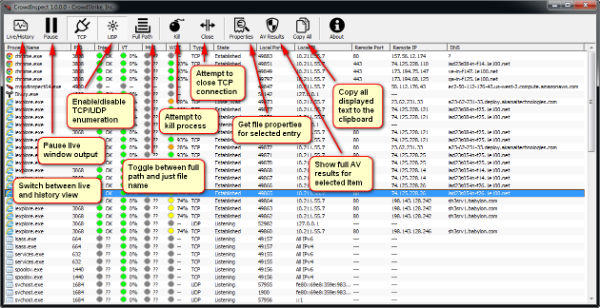 When Crowd inspect application turn on, it will displays a list of all running Windows processes similar like Windows task manager on your computer. Beside showing the standard information, Crowd inspect also showing the Windows processor local and remote port numbers and IP addresses, and reverse resolved DNS name, on-line security ratings, status icons if a Windows process has been scanned or not. All Windows processes are monitored and scanned in real-time in crowd inspect. The scanning process will be against with antivirus cloud engines of VirusTotal’s community library to determine security ratings of the Windows processes. The security rating is represented in colour codes:
 1. Grey colour icon – New or undetectable by VirusTotal database.
2. Red colour icon – Potential danger Windows processes.
3. Green colour icon – Safe and no issues with any antivirus vendors.
The security rating is starting from 0 to 1oo%. This mean 100 % means every antivirus vendor reported the Windows process as problematic (very bad!)Another good thing about Crowd Inspect is you can hover the mouse pointer over an item to view additional information or right-click it to perform actions such as killing the process, copying its information to the clipboard or cutting it off from the Internet (‘Close TCP’). Crowd Inspect runs as portable Windows process inspection tool on on both 32 bit and 64 bit versions of Windows operating systems from XP and above.