2026 update: recover data safely before trying risky fixes
Data recovery advice has changed since many older Windows utility posts were written. If a drive is clicking, not detected, encrypted, or physically damaged, stop using it and consider professional recovery before running repair tools. For normal deleted-file cases, recover to a different drive and avoid installing software onto the same disk you are trying to recover.
Related Techmixer guides: backup and online storage tools, file synchronization software, Windows backup software, and software guides.
- Recover files to another disk, not the damaged or deleted-file source.
- Do not run disk repair commands before copying important data.
- For boot problems, back up user files before rebuilding boot records or partitions.
- Keep one offline backup so ransomware or account problems cannot erase every copy.
Official references: Recuva, Clonezilla, and SystemRescue.
EASEUS Todo Backup, a free Windows data backup software that offers various data backup method to save your important data or system file to a safe storage device. The smart wizard driven interfaces is very simple which novices user can performs mirror image, clone disk, or backup your data into hard drive or CD/DVD task easily.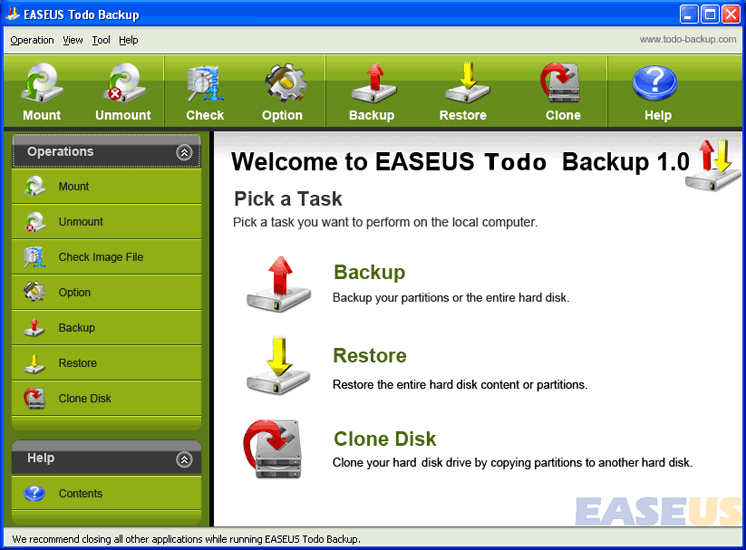 Meanwhile, the EASEUS Todo Backup mirror images features is best backup features because it can backup the full functional Windows systems. Once your system is crashed or need to reinstall, you may restore it from the image, and get a pure and full functional Windows system again.Furthermore, Easeus Todo backup tool not only useful in the event of system crash but also equally useful when you want to replace the older smaller hard disk by a newer larger hard disk without reinstalling the operating system and applications once again.
Easues Todo Backup Main Features:
- Backup system partition or entire hard disk into images archive to retain their state
- Creates a bootable CD/DVD to restore when there is a boot failure caused by virus or any other unexpected affairs.
- Clone the whole disk when you want to replace older smaller disk with a newer larger one without installing operating system.
- Mount the backed up image file as a read-only virtual physical partition to explore and copy. Unmount the partition to relive it.
- Backup option – Provides a serial of options for the users’needs: Priority, Compression Level, Image Splitting, etc.
- Smart Wizard Driven interface
Download Easeus TODO Backup – Free data backup software
Related Techmixer hubs
Use these Techmixer hub pages to find updated guides, safer software notes, and related workflows.