Related Techmixer hubs
Use these Techmixer hub pages to find updated guides, safer software notes, and related workflows.
- DirectX and Windows Fixes Hub
- Backup and Sync Software Hub
- Free Antivirus and Online Virus Scanner Hub
2026 update: check Windows version and safety first
Before changing system settings, confirm your Windows version, create a restore point, and back up important files. Many older utilities still solve narrow problems, but built-in Windows security, recovery, and update features should be checked first.
Related Techmixer guides: Fix Guides, Software Guides, backup tools.
- Use official or trusted download sources.
- Back up important data before system-level changes.
- Check whether the tool is still maintained.
- Prefer current alternatives when they are safer.
Free Windows RAM Booster Software to boost computer memory resources:
MZ Ram Booster – Free Windows Ram Optimizer Utility Tool
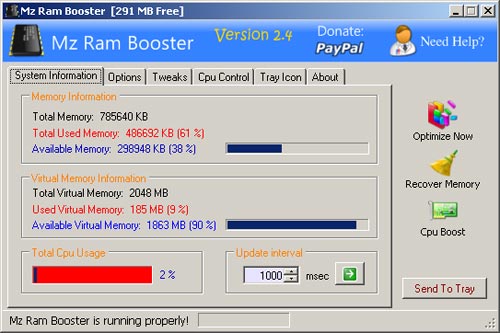 MZ Ram Booster, a Windows ram optimizer utility that increase or boost up computer ram performance by auto recovering RAM and fine tuning some Windows system settings. You can have memory performance without spending on hardware tweaks and expensive applications. Plus more, it will recovers computer memory from processes that are not in use, and unload DLLs that are not used.More Details: Download Mz RAM Booster
Ram Booster – Free Simple RAM Booster
 RAMBooster is a free RAM memory utility that optimizes how your computer uses its RAM, working to keep as much free as possible. On Version 2.0, the RAM Booster always minimizes to the tray instead of taskbar or tray. Plus more, it can supports RAM up to 9999 MB for RAM optimization and decreases the cpu usage which will again increase more speed in processing tasks.Download Ram Booster-Free Simple RAM Booster
Free Ram XP Pro – Free Windows RAM Booster Utility
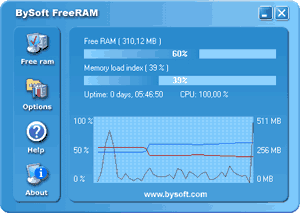 FreeRAM XP Pro is a free Memory RAM utility that tries to keep your memory from being consumed by a system full of hungry programs. This free RAM utility program wills optimizes how apps use memory, forcing them to use the minimum required and leaving as much as possible free for other programs. It seemed to be more intelligent than Windows in keeping memory free. In addition, the ability to free up large chunks of memory is useful if you are going to be running a program that needs it (a feature Free RAM XP Pro calls AutoFree).Download Free RAM XP Pro
RamRush – Free Memory Optimizer Tool
 a free memory optimizer tools that boost computer memory and free up physical memory when needed. A hot key button provided to boost computer RAM instantly whenever the hotkey is pressed. Beside that, this free windows memory optimizer also has an autoOptimize feature that cleans and optimizes your RAM and at a scheduled time.Beside optimize memory, this windows memory optimizer also act as protector to avoid system crashes, and avoid time consuming memory leaks that may cause huge and costly crashes and delays. Plus more, a warning message will pop out when low computer memory occur, prevent system crashes and make sure your computer system run in an efficient way.More details: RamRush – Free Memory Optimizer
Ram Boost Master – Boost Windows Memory Instantly
 RAM Boost master provides offers various RAM optimization settings which you can specify the free memory level that triggers automatic optimization, specify how much memory you want to free up and set your computer in general settings or page file settings.More details: Ram Boost MasterIf your computer is slow due to high usage of RAM fitted, try above free RAM booster software. Surely will improve your computer processing power. if you know other free boost memory ram software should includes on the list, let us know and share with our reader.