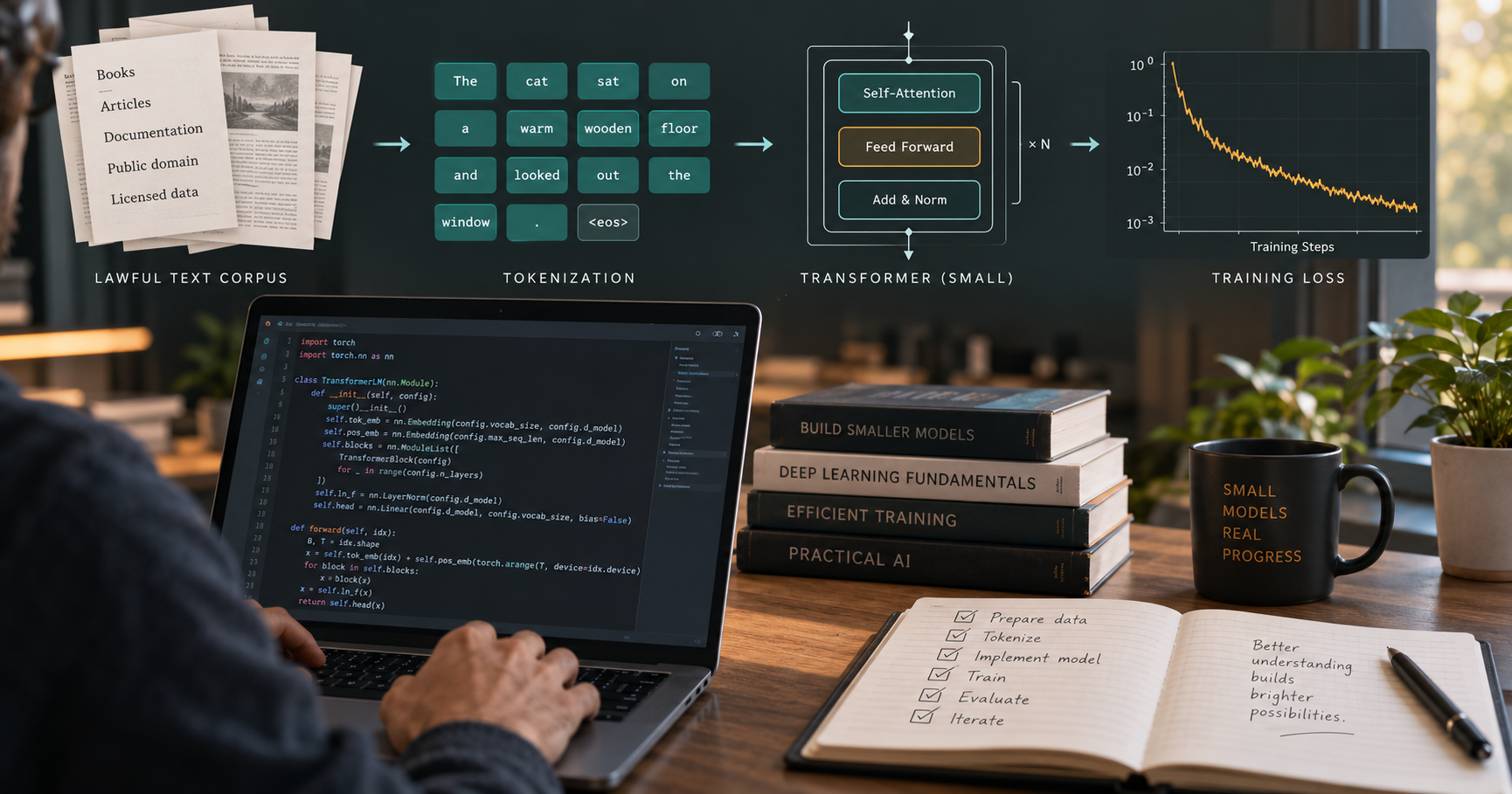
To train an LLM from scratch, you need more than a model script: you need a tokenizer, a rights-cleared text corpus, a GPU-capable PyTorch environment, a training configuration, checkpoints, and a held-out evaluation set. Fareed Khan’s open-source repository walks through those stages with a small Transformer, then demonstrates instruction tuning and preference/RL training. It is an educational project for learning how training works; its small model is not a practical replacement for a modern hosted assistant.
Quick Answer
Quick answer: Start with the repository’s 13-million-parameter configuration, not a billion-parameter target. Create a Python virtual environment, install the PyTorch build that matches your GPU, install the repository, prepare one training shard plus validation data, and run the legacy training script. Before using any corpus, verify its license and provenance, remove private or disallowed material, deduplicate it, and keep validation/test examples out of training.
What to Know First
- This means pretraining from random initialization. It is different from fine-tuning a pretrained model. From-scratch pretraining teaches next-token patterns from a corpus; it does not automatically produce a helpful chat assistant.
- Start small. The repository documents a 13M-parameter tutorial model and a 77M-parameter base-model example. Its README reports that 77M run on two L40 GPUs. Those examples are not performance guarantees for your machine.
- A GPU is recommended for training. The repository says a free T4 can handle its 13M example, but not its billion-parameter configurations. Free notebook runtimes can disconnect, so save checkpoints and expect to resume.
- “From scratch” does not mean “from any text you can find.” You are responsible for the rights, privacy, quality, and permitted use of the corpus and any post-training datasets.
- Expect a learning artifact, not a polished assistant. The project itself shows a 13M model producing incoherent sample text. Training loss going down does not prove factuality, safety, or useful instruction following.

What This Repository Teaches
train-llm-from-scratch is a PyTorch teaching project that implements a Transformer and walks from text preparation through next-token pretraining. Its README also documents supervised fine-tuning (SFT), reward-model training, DPO, PPO, and GRPO. The repository currently uses separate configuration paths for its legacy, simpler pretraining script and its newer base-model/post-training stages; follow the instructions for the exact script you run rather than mixing configs.
The useful first milestone is intentionally modest: tokenize a small, permitted dataset, train the 13M model, save a checkpoint, generate a short continuation, and compare it with a validation loss. Do not begin by trying to reproduce a frontier model. The data, compute, engineering, and evaluation requirements grow dramatically with model size.
Hardware and Software You Need
The project metadata requires Python 3.9 or later. Use a Python version supported by the current PyTorch release and your platform. Linux or Windows through WSL2 with a supported NVIDIA GPU is the least surprising path for the repository’s GPU examples. Other devices may work with PyTorch, but check the current project instructions and test compatibility rather than assuming every training stage supports them.
- A computer with enough disk space for the repository, downloaded source data, tokenized files, checkpoints, and logs.
- An NVIDIA GPU for practical training; the project lists a T4 as adequate for its 13M example. VRAM needs vary with model dimensions, sequence length, batch size, precision, and optimizer state.
- Git, Python, pip, and a virtual environment. Install PyTorch separately using the official selector so the CUDA/CPU build matches the machine.
- A way to monitor GPU memory, storage, training loss, validation loss, and checkpoints.
If you do not have a suitable GPU, you can still read the code and run tiny smoke tests on a CPU, but a full training run may be very slow. Do not rent a GPU until a small local or notebook smoke test has confirmed your install, data paths, and configuration.
Set Up the Repository
The commands below follow the repository’s editable-install instructions. The PyTorch install command is intentionally separate because the correct wheel depends on your operating system, CUDA version, and GPU.
- Install Git and a supported Python version. On Windows, open an Ubuntu/WSL2 terminal if you plan to use the documented NVIDIA CUDA training path.
- Install PyTorch from the official PyTorch Start Locally page. Select your platform and compute option; do not copy an old CUDA wheel command from an unrelated tutorial.
- Clone the official repository and enter its folder:
git clone https://github.com/FareedKhan-dev/train-llm-from-scratch.git cd train-llm-from-scratch - Create and activate an isolated environment. On Linux/WSL2:
python3 -m venv .venv
source .venv/bin/activate
python -m pip install --upgrade pip
On Windows PowerShell, activate with
.\.venv\Scripts\Activate.ps1after creating the environment withpy -m venv .venv. - Install the project and its optional dataset/logging tools:
pip install -e ".[train]"The repository lists
[train]for the Hugging Face datasets package and optional experiment logging. If pip reports a PyTorch mismatch, re-check the official PyTorch selector and the active virtual environment. - Confirm which PyTorch build is active:
python -c "import torch; print(torch.__version__); print(torch.cuda.is_available())"A
FalseCUDA result means PyTorch cannot see a compatible CUDA device in this environment. Fix that before attempting GPU training; do not assume installing the repository alone configures GPU drivers.
Prepare the Training Data
Data preparation is not a clerical step. It determines what the model can learn, what it may memorize, and whether your evaluation result means anything. The repository’s pretraining path downloads a slice of The Pile, tokenizes text with the r50k_base tokenizer, appends an end-of-text marker, and stores token IDs in HDF5 files. Its later stages use separate instruction, preference, and reinforcement-learning prompt datasets.
1. Decide what the model should learn
Write down the intended domain, language, audience, and use. A small corpus of clean public-domain documentation may be useful for a tokenization experiment; it will not make a general-purpose assistant. If the goal is to learn training mechanics, use the repository’s documented sample path first. If the goal is a domain model, assemble a separate corpus only after you can document every source and its terms.
2. Audit provenance, license, and privacy
Keep a manifest with each source name, source URL, collection date, license/terms, allowed uses, and any filtering applied. “Publicly accessible” does not automatically mean “licensed for model training.” Exclude material whose rights or terms you cannot establish. Remove personal data, credentials, access tokens, private customer conversations, confidential files, and content subject to deletion or retention restrictions unless you have a clear lawful basis and safeguards. Do not upload private datasets to third-party notebooks or logging services without authorization.
3. Clean and deduplicate carefully
Normalize encoding and whitespace, remove empty or corrupted records, detect boilerplate and near-duplicates, and apply language or quality filters that match the project. Preserve code formatting, tables, and meaningful punctuation when they carry information. Do not rewrite or “clean” text in ways that silently change technical meaning. Record what was discarded so the experiment can be reproduced.
4. Split before tokenizing
Create train and validation partitions before training. Keep related documents, duplicated pages, and chunks from the same source on one side of the split; otherwise the validation score can look artificially good because the model has already seen near-identical text. Keep a separate test set for final comparisons and do not repeatedly tune against it. Record dataset versions and random seeds.
5. Keep pretraining and post-training data distinct
Pretraining uses ordinary text for next-token prediction. SFT uses examples with a user prompt and a target assistant answer; the project builds a loss mask so it trains on assistant tokens rather than learning to reproduce the prompt. Preference tuning uses prompt/chosen/rejected pairs. Its RL prompt data has prompts and gold answers. These formats serve different objectives: do not concatenate them indiscriminately or treat a preference pair as ordinary pretraining prose.
For the repository’s sample data, the README documents these preparation commands:
python scripts/prepare_pretrain_data.py --split val --out data/pile_dev.h5
python scripts/prepare_pretrain_data.py --split train --num_shards 1 --out data/pile_train.h5
Those commands fetch and prepare the project’s documented data source; first review that source’s current terms and dataset composition. For later stages, the repository lists prepare_sft_data.py, prepare_preference_data.py, and prepare_rl_prompts.py. Use only the stage you intend to study, and keep a small held-out evaluation file untouched.
Train a Small Model First
For the basic learning path, the README uses scripts/train_transformer.py with config/config.py. It demonstrates a 13M parameter setup with vocabulary size 50,304, context length 128, embedding width 128, eight attention heads, and one Transformer block. Check the current file before editing because repository configs can change.
- Open
config/config.pyand confirm the small-model settings match the current README. - Check that the training and validation HDF5 files are where the selected config expects them.
- Start training:
python scripts/train_transformer.py - Watch training loss and validation loss together. If training loss falls while validation loss stalls or rises, investigate overfitting, split leakage, and data mismatch instead of simply training longer.
- Keep checkpoints outside temporary notebook storage. The repository documents periodic saves and resume options; confirm their current flags with
python scripts/train_transformer.py --help. - Generate a short sample from the checkpoint using the matching inference instructions. Review the raw continuation honestly: grammatical fragments are not evidence that the model understands the topic.
Once the basic run is repeatable, the repository’s newer scripts/pretrain_base.py path adds features such as distributed training, mixed precision, gradient accumulation, warmup, and periodic checkpoints. That is a second project stage, not a necessary first step.
How to Evaluate the Result
Use a fixed held-out set and report its source, size, and limitations. Track validation loss, token throughput, peak GPU memory, training steps, configuration, seed, and checkpoint. Compare generated samples from the same prompts at consistent decoding settings. Check whether outputs are coherent, whether the model memorizes long passages from training data, and whether it reproduces personal or licensed text.
A lower loss only means the model predicts the held-out token sequence better under that setup. It does not establish factual accuracy, safety, reasoning ability, or usefulness as a chatbot. If you want an instruction-following model, study the repository’s SFT stage after pretraining and build separate evaluation examples that were not used in training.
Common Mistakes and Risks
- Starting with a huge model: dimensions, sequence length, batch size, and optimizer state can exceed VRAM quickly. Begin with the supplied tiny configuration and measure.
- Using data without clear rights: a dataset can be downloadable yet have mixed sources and restrictions. Audit the underlying sources and terms, not just the download button.
- Leaking evaluation data: duplicates across train and validation make results misleading. Deduplicate across splits, not only within each split.
- Putting secrets into data or logs: API keys, credentials, private customer records, and notebook outputs can persist in datasets, checkpoints, or experiment trackers. Scan and restrict access.
- Assuming open-source code makes the model/data open: the repository’s MIT license covers its code. It does not grant rights to every dataset or training output; audit those separately.
- Reading GPU tables as guarantees: the README labels hardware sizes as rough guidance, and actual capacity varies with software versions and configuration.
Who Should Try This?
Try it if you know basic Python and want to inspect how tokenization, attention, loss, optimization, and post-training fit together. If your goal is to build an application quickly, training from random initialization is usually the wrong first move: evaluate an existing model, retrieval-augmented generation, or fine-tuning a suitable pretrained model before committing to a pretraining run.
For a broader learning path, see Techmixer’s AI Engineering from Scratch guide. Browse the AI Tools hub for practical model and workflow guides, free AI tools for work for lower-cost experiments, and Software Guides for development utilities. Readers interested in agentic video-generation projects can also review our OpenMontage setup guide.
Frequently Asked Questions
Can I train an LLM from scratch on a laptop?
You can run small CPU smoke tests and study the code on a laptop, but meaningful training is much more practical on a GPU. The repository says its 13M example can run on a T4-class GPU; a laptop’s speed and memory depend on its hardware and the selected settings.
Is this the same as fine-tuning ChatGPT or another existing model?
No. This repository’s pretraining path initializes a small Transformer and trains it on text. Fine-tuning starts from existing model weights and adapts them; it is usually a more practical route when you need a task-focused model.
What data format does the project use?
For pretraining, its scripts tokenize text into arrays of integer token IDs saved in HDF5. The documented later stages use packed instruction data, preference pairs, and prompt/gold-answer records.
How much data do I need?
There is no single useful number independent of model size, goal, and compute. For learning the mechanics, follow the repository’s small sample and focus on a clean train/validation split. A small corpus will not produce broad general knowledge.
Can I use scraped web pages or company documents?
Only after reviewing rights, terms, privacy, confidentiality, and retention obligations for each source. Do not include private or restricted material just because it is technically accessible.
Will the trained model be a chatbot?
Not automatically. Pretraining teaches text continuation. The repository separately demonstrates supervised fine-tuning and other post-training stages to teach response formats and preferences.
Related Techmixer Guides
- Learn AI engineering from scratch: a beginner learning path
- AI tools and workflow guides
- Free AI tools for work and experimentation
- Software guides for developer setup
- OpenMontage: install an open-source AI video workflow
Our Take
This repository is valuable as a code-reading and controlled-experiment project: it connects dataset preparation to a working Transformer and then shows why instruction and preference training are separate steps. Its small-scale examples are for education, not evidence that a one-GPU user can reproduce a useful commercial assistant. We reviewed the public README, project metadata, and setup/data instructions; Techmixer has not run this training job or independently audited the datasets. Check the current repository instructions and each dataset’s terms before running the pipeline.
Last reviewed: 2 October 2026.