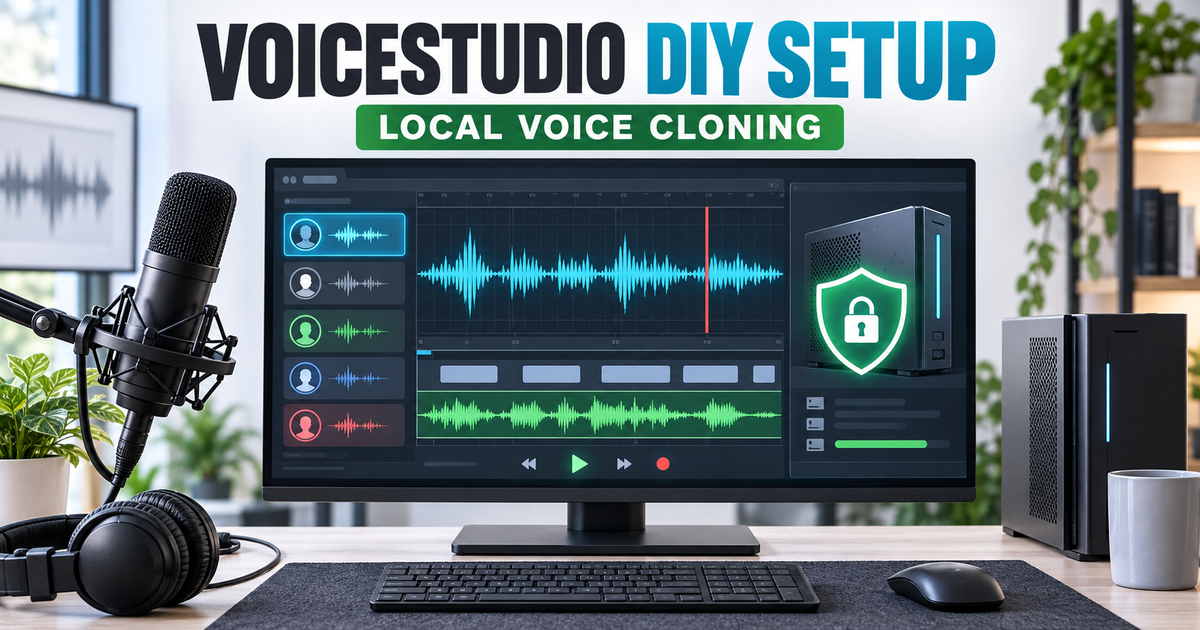
Voice Studio setup can turn a Windows, macOS or Linux computer into a local voice-cloning, text-to-speech, dubbing and transcription workstation. It can replace part of an ElevenLabs workflow when privacy, local control and an open API matter more than cloud convenience. It is not a guaranteed quality-for-quality replacement: the result depends on your hardware, chosen speech engine, reference recording and model license.
Quick answer
Voice Studio is a credible DIY ElevenLabs alternative for people willing to manage local models and hardware. Install the current Electron release, verify the installer and model licenses, choose a model pack that fits your RAM or VRAM, add a clean voice sample with permission, and run a short test before committing to an audiobook or dubbing job. Keep ElevenLabs if you need a managed cloud service, predictable support and minimal setup.
What to know first
- Use Electron: the project says Electron is the maintained desktop application; the older Tauri app stopped at version 0.5.3.
- Local does not mean lightweight: model downloads can consume many gigabytes, and CPU generation may be slow.
- Windows acceleration is limited: NVIDIA CUDA is supported; AMD and Intel GPUs operate through CPU fallback on Windows.
- App and model licenses differ: VoiceStudio is AGPL-3.0, while individual speech models keep their own terms.
- Installer warnings are possible: release notes say current Electron installers may be unsigned or ad-hoc signed.
- Voice consent is mandatory: clone only your own voice or a voice you have clear permission to use.
Can VoiceStudio replace ElevenLabs?
Voice Studio can replace ElevenLabs for a specific group: technically comfortable users who want local processing, control over models, a local API and no per-character cloud dependency. ElevenLabs remains the easier choice when you need a polished managed service, hosted models, professional cloning and commercial support without maintaining a local speech stack.
| Area | Voice Studio | ElevenLabs | Practical decision |
|---|---|---|---|
| Processing | Local by default; optional remote workers and integrations | Managed cloud service and API | Choose VoiceStudio for local control; choose ElevenLabs for low-maintenance access |
| Voice cloning | Multiple local engines with short-reference cloning | Instant and Professional Voice Cloning | Test the same clean sample before judging similarity |
| Dubbing | Local transcription, translation, synthesis, timing and export workflow | Hosted automatic dubbing across supported languages | VoiceStudio favors control; ElevenLabs favors speed of setup |
| Cost model | Application is open source; hardware, electricity, storage and optional services still cost money | Usage or plan limits apply to cloud features | Compare total workflow cost, not only subscription price |
| Performance | Depends on engine, device, RAM, VRAM and model warm-up | Compute is managed by the service | Local hardware is the deciding constraint |
| Licensing | AGPL application plus separate model licenses | Service terms govern usage | Commercial users must review the exact model and deployment terms |
| Integrations | Local API, OpenAI-compatible routes and MCP | Hosted API and ecosystem integrations | Both can automate; VoiceStudio requires local operations |
Best choice by use case
- Choose Voice Studio: private drafts, offline-capable workflows, local voice experiments, self-hosted automations, MCP integrations and users who control their hardware.
- Choose ElevenLabs: teams needing hosted reliability, less setup, professional voice-cloning workflows and vendor support.
- Use both: develop and batch-test locally, then compare final production output against a managed model before publishing.
- Choose neither: if you do not have consent to clone the voice or cannot confirm the output and model licensing for your use case.
Before you install Voice Studio
A reliable VoiceStudio setup starts with hardware, storage and rights checks. Skipping them can leave you with a large model download that runs slowly or cannot be used for the intended project.
| Check | Practical starting point | Why it matters |
|---|---|---|
| Operating system | Windows 10/11 x64, supported macOS build, or Linux x64 | Download the release matching the operating system and CPU architecture |
| Memory | 16 GB RAM is a practical baseline, not an official minimum | Speech, transcription and translation models can compete for memory |
| Storage | At least 10 GB free, with more for additional model packs and projects | The app, Python runtime, models and generated audio accumulate quickly |
| GPU | NVIDIA on Windows; Apple Silicon uses MPS/MLX where supported; Linux options depend on the engine | Acceleration can change generation time dramatically |
| Reference audio | 5-15 seconds of clean, single-speaker speech plus an accurate transcript | Noise, music, room echo and transcript mismatch reduce clone consistency |
| Rights | Written permission and a model license compatible with the intended use | The application license does not grant rights to a person’s voice or every model |
Voice Studio setup in 9 steps
1. Choose the stable release or source-build route
Most readers should use the latest stable Electron release. Building from source is for developers who want the current main branch, intend to modify the code or need to inspect the complete stack. Do not follow old Tauri installation commands: the project has retired that desktop shell.
2. Inspect your hardware before downloading models
Check the operating system, CPU architecture, RAM, free disk space and GPU. On Windows, open Task Manager and confirm whether the GPU is NVIDIA, AMD or Intel. Do not assume a GPU badge means VoiceStudio can use it. The app later reports the actual device as CUDA, MPS or CPU.
3. Download only from the official release page
Open the official VoiceStudio release and choose the Electron package for your platform. Release 0.5.6 provides Windows x64, macOS Apple Silicon, macOS Intel and Linux x64 packages. Check the included SHA256SUMS file when available. Stop if the hash does not match or the filename is from an unofficial mirror.
4. Install the Electron application
Close any older VoiceStudio or Tauri process before installing. Current release notes warn that installers may be unsigned or ad-hoc signed, so operating systems can show a trust warning. Verify the source and checksum before deciding whether to continue. Do not disable system security globally just to install one application.
5. Choose storage and privacy settings
On first launch, choose a data and model location with enough free space. A VoiceStudio setup intended for private recordings should keep analytics, network integrations and remote workers disabled until you understand what each option sends outside the computer. Windows users who want a movable installation can use Portable mode with a writable app folder.
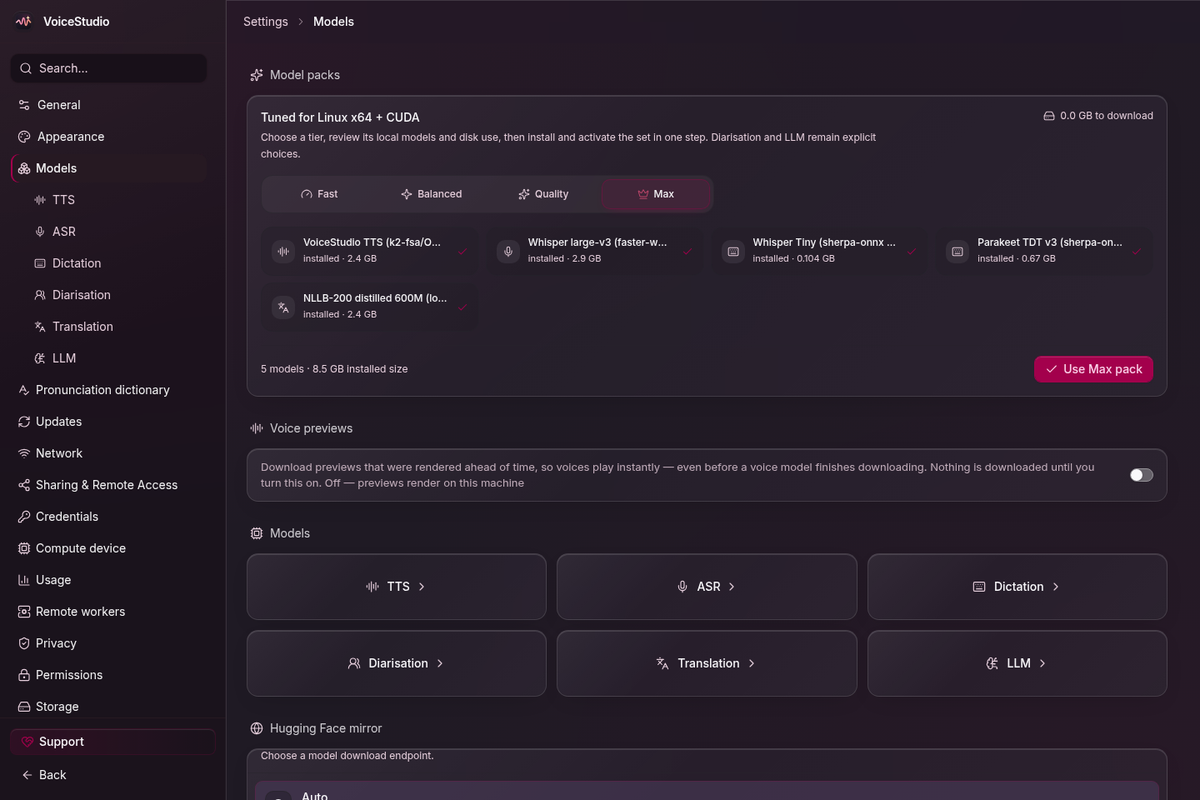
6. Select a model pack and verify the compute device
Open Settings, then Models and Performance or Compute Device. Start with the default VoiceStudio/OmniVoice engine or a smaller supported option. Review the model size and license before downloading. After installation, confirm that the app reports the expected device rather than silently using CPU.
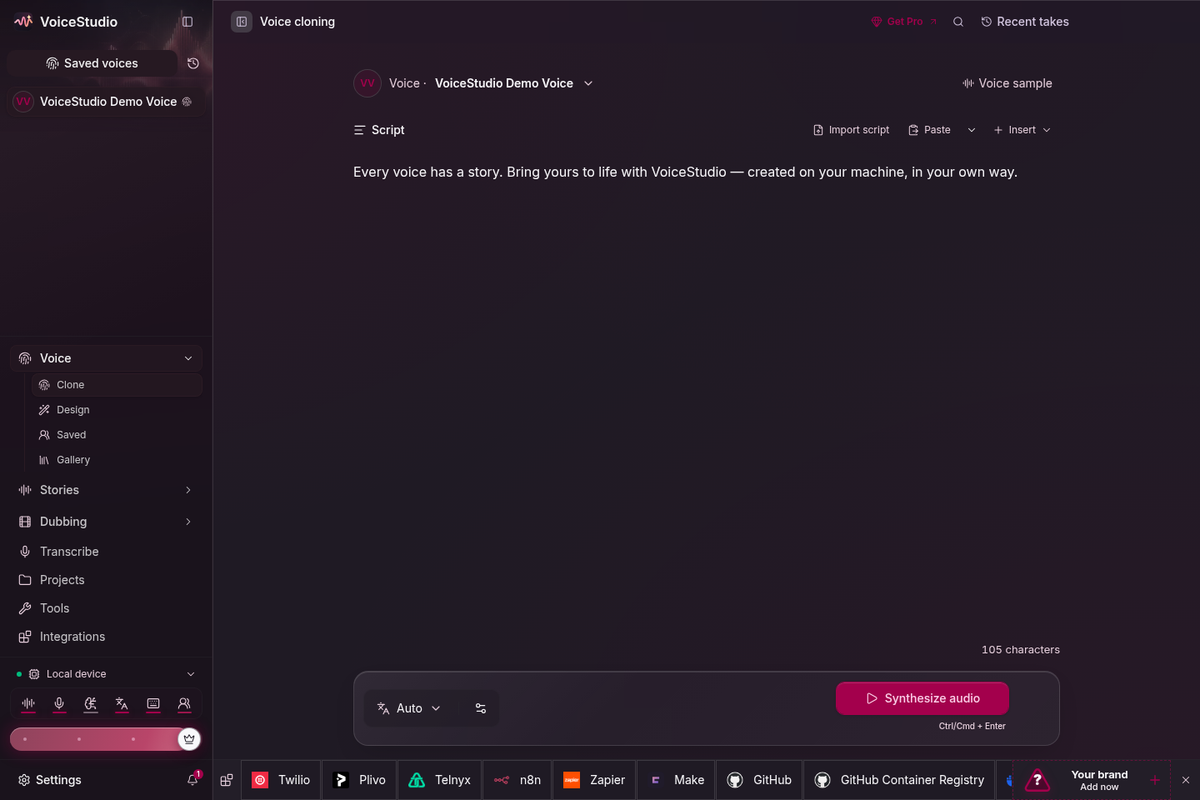
Record or import one clean speaker with no background music, echo or overlapping speech. The engine guide recommends 5-15 seconds for a first clone, even though the interface can accept longer references. Enter the exact transcript of the spoken sample when requested. Name the profile so its owner and permission scope are clear.
8. Generate a short test and review it
Use two or three sentences that include names, numbers, punctuation and a change in tone. Generate the clip, then check similarity, pronunciation, pacing, artifacts, silence and whether the model used the expected device. Judge performance after the second generation because model loading makes the first run slower.
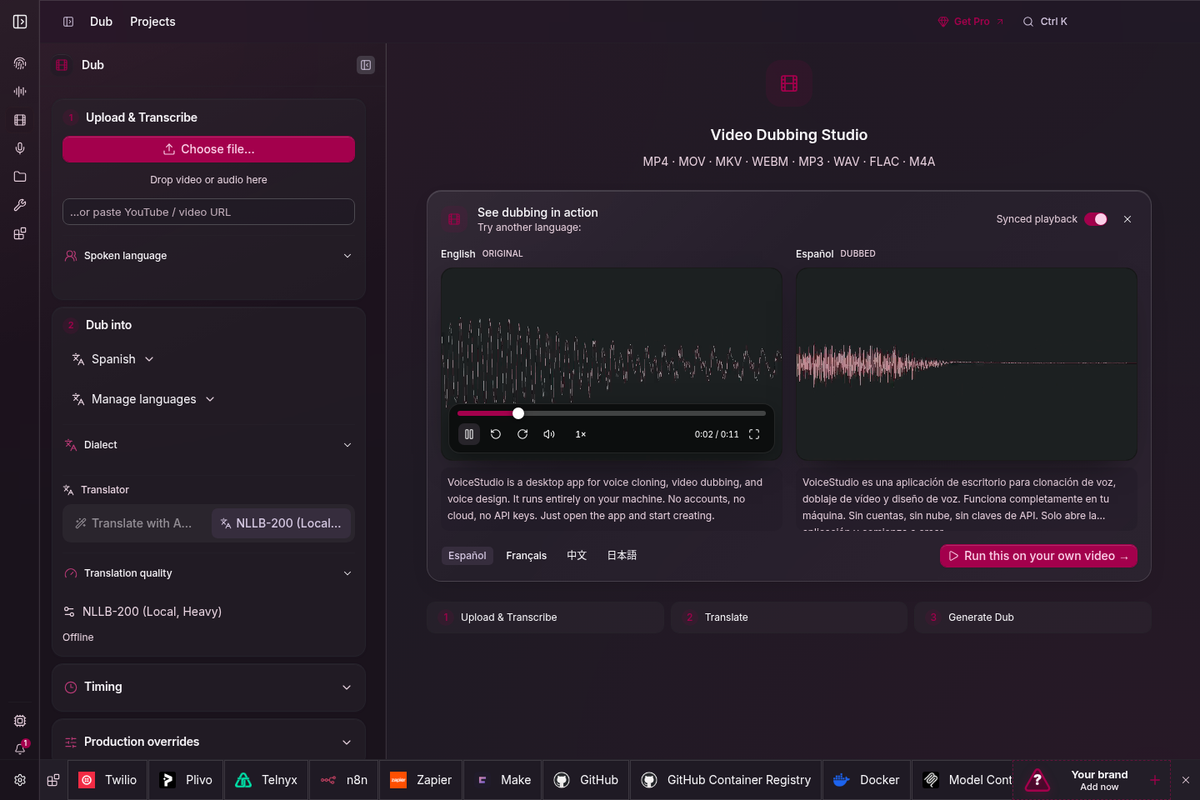
9. Add dubbing, API or MCP only after the base test works
Do not debug five systems at once. Once local synthesis works, try the Dubbing workspace with a short authorized clip, or connect the local API and MCP endpoint. The default backend address is http://localhost:3900; the agent installation guide uses /health and /openapi.json to verify the service.
DIY developer setup from source
Use this VoiceStudio setup path only if you need the current code or plan to modify VoiceStudio. The official source workflow requires Git, Node.js 22 or newer, Bun, Rust/Cargo, uv and platform build tools. From the repository root:
git clone https://github.com/debpalash/VoiceStudio.git
cd VoiceStudio
bun install
bun run setup:api
bun run dev
The Electron shell manages the local FastAPI backend. Do not start a second backend unless you intentionally configure a different port. For a production-like package, the repository also provides bun run smoke-test and bun run dist, but a successful build is not proof that a speech model is installed or that generated audio is usable.
A practical first test
- Use your own voice and record a clean 10-second reference sample.
- Write down the exact words spoken in the reference.
- Generate a 20-30 second script containing a name, a date and one difficult term.
- Run the generation twice and time the second run, not the initial model warm-up.
- Listen through headphones and a phone speaker.
- Record the engine, model license, device, generation time and obvious artifacts.
- Repeat the same script in ElevenLabs only if you already have authorized access, then compare rather than assuming either is superior.
Common problems and fixes
| Problem | Likely cause | What to try |
|---|---|---|
| Generation is extremely slow | CPU fallback or model warm-up | Check the reported compute device, run a second test and close memory-heavy applications |
| Clone sounds unlike the speaker | Noisy reference, wrong transcript or unsuitable engine | Use clean single-speaker audio, match the transcript and test another cloning engine |
| Backend cannot be reached | Runtime setup failed, port conflict or crashed process | Run the built-in self-check, inspect logs and verify localhost port 3900 |
| CUDA out-of-memory error | Model or torch.compile exceeds VRAM | Choose a smaller model or disable torch.compile in Performance settings |
| Commercial-use uncertainty | App license and model license are being confused | Read LICENSE-NOTICE and the selected model card before publishing or selling output |
| Dubbing quality is inconsistent | Transcription, translation or segment timing error | Correct the transcript and timing before regenerating individual segments |
When to stop troubleshooting
- Stop if you cannot prove you have permission to clone the voice.
- Stop if the installer checksum differs from the official release.
- Stop a generation if the system overheats, repeatedly runs out of memory or becomes unstable.
- Do not use a model commercially until its weight license clearly permits the intended use.
- Use a managed service instead when maintenance time costs more than the privacy or local-control benefit.
Official sources
- VoiceStudio GitHub repository
- Latest VoiceStudio release
- Official Windows installation notes
- VoiceStudio performance guide
- VoiceStudio engine catalogue
- VoiceStudio license notice
- ElevenLabs voice-cloning documentation
FAQ
Can VoiceStudio completely replace ElevenLabs?
VoiceStudio can replace ElevenLabs for some local voice cloning, text-to-speech, dubbing, transcription, audiobook and API workflows. It is not a universal replacement because output quality, speed, supported languages and setup effort vary by engine and hardware.
Is VoiceStudio free for commercial work?
The VoiceStudio application is AGPL-3.0 and its license notice allows commercial and internal use, but downloaded models have separate licenses. The default OmniVoice weights are identified as CC-BY-NC, so review the selected model license before commercial use.
Does VoiceStudio work without a GPU?
Yes, several engines support CPU operation, but generation can be much slower. On Windows, the project documentation says NVIDIA CUDA is the supported GPU acceleration path while AMD and Intel GPUs fall back to CPU.
How much voice audio is needed?
The engine guide recommends a clean 5-15 second reference clip for cloning, although the interface accepts longer clips and each engine handles them differently. A matching transcript improves the workflow.
Does VoiceStudio send recordings to the cloud?
The project says local workflows run on your hardware. Remote workers, cloud integrations and analytics are optional, so review those settings before importing private recordings.
Which VoiceStudio version should I install?
Use the latest stable Electron release unless you have a specific reason to build from source. Tauri 0.5.3 was the final Tauri release and is now retired.
Related Techmixer guides
- Explore the Techmixer AI Tools hub
- Browse Techmixer Software Guides
- OpenMontage Setup Guide for AI Video Production
- Vizard Agent AI Video Editing Guide
- Best No-Code AI Workflow Automation Tools
- Improve an OpenClaw Personal AI Assistant
Our take
VoiceStudio is a serious local toolkit, not a one-click free copy of ElevenLabs. A successful VoiceStudio setup gives you multiple engines, local files, local API access, MCP integration and the ability to inspect the stack. Its weakest case is operational burden: hardware compatibility, model downloads, licensing and output evaluation become your responsibility. Start with one authorized voice and one short script; only expand to dubbing or automation after the baseline test is reliable.
Evidence note: This guide is based on VoiceStudio 0.5.6 release notes, repository documentation, official interface captures and ElevenLabs documentation. Techmixer did not install the application or independently benchmark voice quality for this draft. Hardware behavior and model availability should be verified on the target computer before publication.
Last reviewed: 28 September 2026.