Choosing a CPU VPS or NVIDIA GPU for OpenClaw, Hermes Agent and Paperclip starts with where the model runs. A CPU VPS can host the agent when a hosted provider runs the model. A GPU becomes relevant when you run the model yourself and your workload needs hardware acceleration. Start by choosing where inference happens, then price the agent host and the model separately.
Can you get a free NVIDIA GPU VPS for this stack? Techmixer did not verify a permanently free, general-purpose NVIDIA GPU VPS for round-the-clock hosting. NVIDIA Brev documents metered GPU instances. Eligible credits can cover an experiment, but their availability, coverage and expiry depend on the offer. NVIDIA Brev billing.
When to choose a CPU VPS or NVIDIA GPU
| What you need | Where to run it | What to check first |
|---|---|---|
| One agent using a hosted model | CPU VPS for the agent, hosted API for inference | Agent memory, storage and the provider’s API costs and limits |
| A short experiment with your own model | Temporary GPU instance with the agent or a separate client | Model fit, response time and whether the credits cover the run |
| Continuous access to your own model | Local hardware or a GPU instance budgeted for steady use | Restart behavior, persistent storage, endpoint access and idle charges |
What OpenClaw, Hermes and Paperclip each run
OpenClaw runs the gateway and agent workflows. Its model provider can be a hosted API or a compatible endpoint you configure. With a hosted model, size the VPS for the gateway, active sessions and any tools running alongside it. OpenClaw model providers.
Hermes Agent runs the agent and its configured tools. Its model settings determine where inference runs. File processing or other work performed by a local tool still uses resources on the machine that executes it. Hermes configuration.
Paperclip coordinates tasks, approvals and agents. An adapter connects Paperclip to the selected runtime. Check which machine runs that adapter and which provider it uses before estimating the resources the deployment needs. Paperclip adapter documentation.
How to evaluate a GPU credit offer
- Check availability in your account. Confirm the GPU model, memory and region before you plan the experiment. Check whether the offer applies to the instance you can select.
- Read the expiry and billing rules. Check when credits expire, how storage is charged and what happens if your balance runs out during a job.
- Run one bounded test. Use a small sample and record setup time, peak memory use, response time and credits consumed. Include startup and idle time when the provider bills for it.
- Back up the result outside the instance. Keep the configuration, outputs and any files needed to repeat the run. Check which directories persist after stopping.
Brev charges for running instances based on the GPU type. For stoppable instances, compute charges end when the instance stops, while storage charges can continue. Restarting depends on available capacity. NVIDIA also says it may stop or delete resources when credits run out, depending on whether the resource can be stopped. Brev instance lifecycle and billing.
Start with one agent and one repeatable task
Suppose you want Hermes to turn a short set of public project notes into a weekly checklist. Run that task once using a hosted model on a CPU VPS. Save the output and verify that it keeps names and actions paired correctly. Restart the agent service and run the same task again to confirm the configuration and output location survived. Review the API usage for both runs.
If you later need a self-hosted model, rerun the same task against a private or authenticated inference endpoint. Compare output quality and response time, then record the GPU runtime and storage used. That gives you a baseline before adding more agents or committing to continuous GPU capacity.
Estimate what happens after credits expire
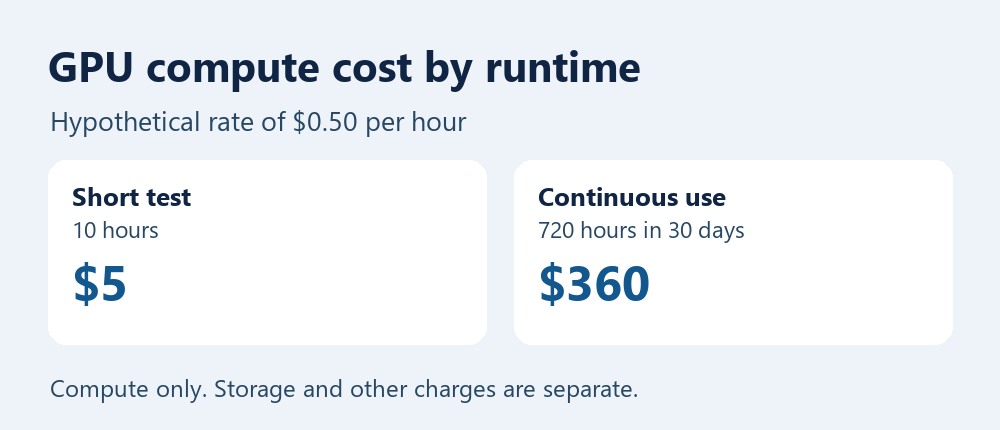
Start with the rate in your account. A machine priced at a hypothetical $0.50 per hour costs $5 in compute for a ten-hour test, or $360 if it runs continuously for a 30-day month. Add storage and any applicable fees. With a CPU VPS and hosted models, add the VPS and storage charges to the provider’s model usage charges. The example rate illustrates the calculation and does not represent a Brev quote.
Related Techmixer guides
- Compare VPS hosting options for AI agents
- Compare temporary cloud GPUs with local hardware
- Browse the AI tools guides
Our take
Use a CPU VPS for the first deployment if you already plan to call a hosted model. Spend GPU credits on a short experiment that answers a specific question, such as whether your chosen model fits in memory and responds quickly enough for the agent. Base any longer deployment on the observed workload and the price after credits.
Last reviewed November 13, 2026. Techmixer reviewed the official hosting, billing and configuration documentation. The deployment and cost examples illustrate a decision process.